

Forum Replies Created
-
AuthorPosts
-
Barry
MemberHi there – that’s certainly possible!
This thread covers the basics of doing this, albeit you would be targetting the purchase/receipt template rather than the ticket email received by customers.
Does that help?
MemberHi randomwalk,
The ticket and the attendee are effectively one and the same – that’s to say, each entry in the attendee screen has an order ID and a ticket ID: the ticket ID is the post ID of the attendee object.
Does that clarify things at all?
MemberHi Anthony,
Sorry you’re experiencing difficulties.
Can you confirm first of all that in addition to checking off the roles you wish to block you also checked the Block access to WordPress dashboard setting?
If that’s all good then – just for the avoidance of doubt, though I do realize you indicated having already tried our standard troubleshooting steps when you opened this topic – can you confirm you tested for and found this wasn’t resulting from a theme or plugin conflict?
Thanks!
MemberHi Clive,
Though it’s not an official Modern Tribe plugin a large number of users make use of this plugin to help with colour coding of events:
wordpress.org/plugins/the-events-calendar-category-colors
Perhaps that’s worth a try?
Second issue is I tried following the guide as to how to customise template files, but it didn’t work. In the docs there seems to be a couple of variations as to the correct file structure to achieve template overrides. Tried this which did not work for me: https://theeventscalendar.com/knowledgebase/themers-guide/
It should be up-to-date, but let me provide you with an example and perhaps that will clarify things. Say you want to modify the template used to display individual events. You can find this at the following location:
the-events-calendar/views/single-event.phpTo override this, you would make a copy and place it in your theme as follows:
your-theme/tribe-events/single-event.phpOf course, change your-theme to whatever your actual theme directory is 🙂
Lastly does anybody have a list of which templates are used in which part of the plugin? I want to tweak the hover-over tooltip on calendar month view and don’t fancy spending another hour digging around the templates.
Beyond what is in the Themer’s Guide, I’m afraid not. To modify the month view tooltips, though, you should look at:
month/single-event.php
month/tooltip.phpDoes that help?
MemberHi WP_1010,
Thanks for getting in touch 🙂
Yes, that’s definitely possible: the plugin is built up using WordPress’s own infrastructure wherever possible, so as long as you’re comfortable developing with WordPress this should be a fairly easy customization.
I hope that answers your question, but let me know if you need help with anything else.
Thanks!
MemberHi Terrence,
Sorry to hear you are hitting difficulties.
Those links actually rely on some Javascript to function as expected – and as I see at least one type error when I inspect your list view (which actually stems from your theme – “Quindo” – and its own Javascript) it’s possible the reason it isn’t working as expected is as simple as a theme conflict.
That said, I see you already indicated having run through our standard troubleshooting steps, which include switching to a default theme such as Twenty Fifteen. Did you experience something different when you ran through those steps, or are you able to confirm the issue lies with your theme/another plugin?
If so, it could be worth approaching your theme vendor for further assistance on this one. Here is the actual error I am seeing:
TypeError: skrollr.get(...) is undefined in http://fmpa.com/events/list/ in http://.../wp-content/themes/quindo/_/js/pro/global.js?1415742329(Edited so as not to expose your URL.)
MemberThanks!
I think the problem is that the file itself was not saved or created using UTF-8 encoding (which is simply one of a number of formats that can be used when characters from extended/international alphabets are needed).
While I could replicate the issue initially using your sample CSV file, once I converted the file to UTF-8 it imported perfectly. Could you give the same thing a try?
How you do this will vary according to your operating system and the tools you have at your disposal, but most popular and up-to-date text editors and spreadsheet applications will include options to save files using UTF-8 encoding 🙂
MemberHi there!
Also Barry, did you take a look at the Filter Bar issue. I assume this is not related to the Google issue.
I’d expect it isn’t directly related … and, with that in mind, could you create a fresh topic for this as we do try hard to stick to one issue per topic to avoid confusion and ensure fast service for everyone.
One observation I would make is that, best I can tell on looking at your test site, you do not actually have any upcoming events that have been assigned to either event categories or tags and so it could be worth applying a few different terms to your existing event or some new test events in the first instance.
I have tried what you suggested but the add4ress is still not found and doesn’t appear in the map view either.
So we should investigate a little further and try to figure out if there is a problem connecting to Google.
Can you try installing and activating this test plugin? Once active you should see a notice at the top of the plugin page (or any other admin screen), something like this:
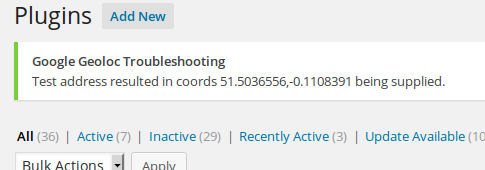
Can you give it a try and tell me what you see?
MemberHappy to hear it – and thanks for sticking with us 🙂
I’ll go ahead and close this topic out, but please don’t hesitate to post new questions if anything else crops up.
Thanks again!
MemberHi Matt,
Thanks for sharing those links 🙂
The address is showing up on the google map on the same page so it would be odd for the search to not pick it up.
Google can generate maps using either a street address or coordinates. You’ve got a complete street address in there and so our plugin is using that – in the absence of coordinates – which is why the map displays successfully.
When I inspect the page to see what data is available, though, I can see that coordinates are indeed absent (and these are required for things like location based searching and map view, a street address alone isn’t enough for these features to work).
Are you suggesting that to use these features I need some kind of account with google ? If so that was not made clear when I bought the plug-in.
Well, you don’t generally need a Google account, but this feature does rely heavily on being able to obtain information from a Google-provided service (their geolocation API). In some circumstances they can reasonably decline to provide that service … or, it may be that some kind of connectivity issues are preventing your site from communicating successfully with their own servers.
If I test out the address you shared and use it to create a new venue I find it works as expected and the coordinates are successfully retrieved and stored along with the venue. So, something is clearly preventing that in your case.
Here’s something we can quickly try: please enable map view then edit that venue and make a minor amendment to the address (this will prompt Events Calendar PRO to send a fresh query to Google). The amendment could be as simple as altering the street number. Once you’ve done that, save the change and test to see if the event appears within map view/if location search behaves as expected.
If that doesn’t work we can further investigate to see if the problem is an inability to communicate with Google.
Thanks!
MemberHi Matt,
When you reply privately only you and team members like myself can see what you post — you can bear this out if you open the topic URL in a private/incognito browser where you are not signed in.
Please note, though, that we prefer discussion to be open wherever possible. Certainly if you prefer to avoid disclosing your URL or other details such as addresses then you are welcome to use the private reply facility — but to ensure the topic can be easily read and understood by other users (whom it may help in the future) we do reserve the right to publicly quote from your private replies wherever this makes sense and, of course, where it doesn’t expose any information that you clearly wish to keep under wraps 🙂
(I’m also unsure if you mean that you tried to contact us to progress this issue by email – if so, I’d stress we do not typically deliver support via email and would prefer to keep things on the support forum.)
Thanks!
March 12, 2015 at 8:51 am in reply to: How do I activate and integrate The Event Calendar Pro with my purchased theme? #947899MemberHi Earl,
However, that’s where the problem starts. When I try to upload the theme I purchased from designcrumbs.com, WordPress rejects the .zip file for the theme.
So I’m not sure what the particular error message you’re seeing is, but perhaps your file permissions need to be adjusted? Ultimately, though, I’m not sure we can offer too much help with theme installation issues and it would be best to approach the theme vendor (Design Crumbs?) for assistance on that count.
The URL for my WordPress site is http://your-site.com/wordpress/.
(I’ve adapted the URL slightly since you posted it within a private reply) So I can access that and can access your events page at …/wordpress/?post_type=tribe_events, so it looks like The Events Calendar and Events Calendar PRO are set up correctly and are running as expected.
The URL for my website is https://your-site.com/_php/index.php, and for the events page on the site, it is https://your-site.com/_php/party.php.
So if I’m understanding you correctly, you don’t want people to visit …/wordpress/?post_type=tribe_events to see the calendar and instead you wish them to visit …/_php/party.php — is that accurate?
If so, that’s the sort of customization you would need to drive forward yourself. Is there some reason you can’t simply use the WordPress site itself instead of trying to pull things into a set of custom, non-WordPress templates?
If I am misunderstanding please just let me know, but it sounds like you have a fairly atypical setup here and that’s not really something we can support.
MemberHi Ed,
Would it be possible to see your CSV data? When I try to replicate this and insert apostrophes and other accents (such as é) within the fields I don’t encounter any problems.
Though you cannot upload files directly to the forum, if you are able to upload the file to your own WordPress site (or else a service such as Dropbox) you can share the link here, as a private reply if you prefer.
Thanks!
MemberGreat question!
It’s quite possible a number of tweaks would be needed to make things display really nicely in an RTL context – but since our core plugin is free, why not take it for a spin and let us know how things work out?
March 12, 2015 at 7:11 am in reply to: How do I activate and integrate The Event Calendar Pro with my purchased theme? #947874MemberHi Earl,
The Events Calendar and Events Calendar PRO will generally run on any supported version of WordPress without problems. When I look at the URL you shared when you opened this thread, though, I’m not sure you are actually running WordPress.
Can you confirm that URL is correct, or point me to your actual WordPress site?
-
AuthorPosts