

Forum Replies Created
-
AuthorPosts
-
June 6, 2016 at 7:18 am in reply to: Can the iCal Importer be set to only import Google Calendar Public events #1122959
Barry
MemberHi Mike,
Thanks for posting 🙂
The iCal standard doesn’t really have a notion of public and private – rather, everything in a given iCal feed is generally seen as being available for consumption (by our importer, in this case).
The answer to your question then probably lies in the way you have configured your events on Google Calendar and upon the actual iCal URL you are sharing.
However, as this is the pre-sales forum, it’s not the right place to go into technical detail. If you need further help can I ask that you login and post in our iCal Importer forum instead?
Thanks again!
MemberHi Nicole,
I’m sorry to hear you’ve experienced difficulties setting this up. We’ve tried hard to make it as simple as possible to setup common patterns of recurring events, but it’s hard to cover all cases.
Based on your description of the pattern you need to set up, I think all you really need here is to create a daily recurring event with a couple of exceptions, ie:
- All day event (or use specific times if you prefer)
- Starting 2016-08-08
- Recurring every day and will end on 2016-08-18
- Exception for the date of 2016-08-13 (Saturday)
- Exception for the date of 2016-08-14 (Sunday)
Here’s a screenshot of the above that might also help:
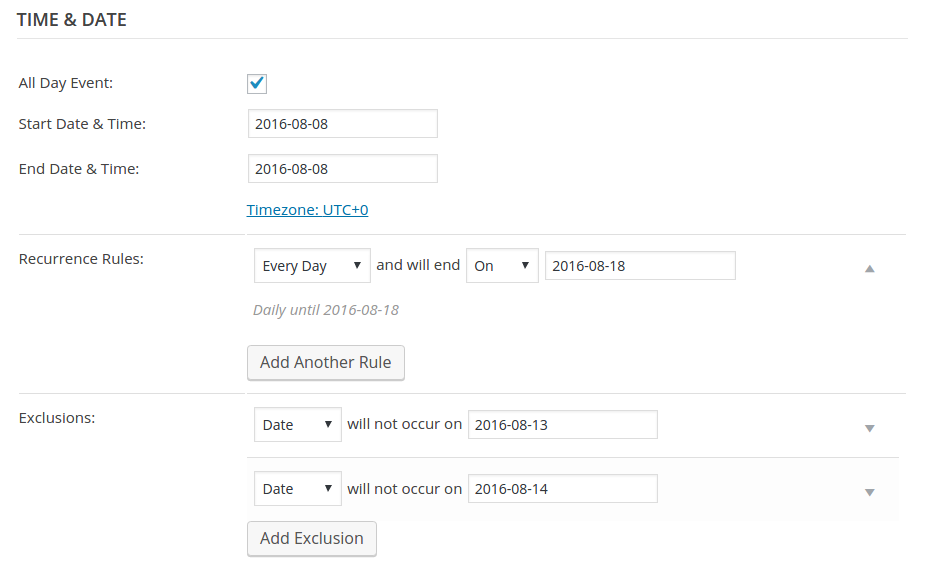
Does that get you any closer?
MemberGreat to see this is helping others in the community 🙂
At this point it seems like everyone is good so I’ll go ahead and close this topic. Of course, if any other issues or questions arise please do feel free to post new topics as needed.
Thanks again!
MemberThank you for sharing, @danfeeley – nicely done 🙂
David does that allow you to get started on your own implementation?
MemberGlad to hear it helped!
MemberHi David,
Interesting idea!
First and foremost, please do feel free to add this as a feature request – I can certainly see the utility of it and that will let others add their support, too.
To do this now would involve some custom development work and in outline the solution might look like this:
- Listen for the woocommerce_order_item_meta_end action firing
- This happens for both the receipt sent to customers as well as the ‘admin’ notification
- In the first case (customer copy) you can grab the meta fields from stored cookie data
- In the second case (staff/admin copy) you will need to query for the tickets linked to the order and work back from there
As you are probably already realizing, it’s a relatively advanced customization and so not one we can unfortunately go in to too much depth with here on the forum.
Some other notes if you do wish to explore this on your own as a custom dev task:
- Tribe__Tickets_Plus__Main::instance()->meta() provides you with access to the ‘meta manager’ object
- That object has both get_meta_fields_by_ticket() and get_meta_cookie_data() methods you can work with
- The relationship between ticket objects and order objects is maintained via the _tribe_wooticket_order meta field which is stored against the ticket object
I hope that helps – and perhaps in the meantime you could allow staff to access the attendee screens in question?
MemberAwesome!
I’ll go ahead and close this topic but of course please don’t hesitate to post new topics as needed if anything else crops up – one of the team will be only too happy to help 🙂
Member…As a sidenote, it looks like you have also removed the if ( ! empty( $event ) ) {} test. If there is any potential for you to sell a ‘mixed cart’ containing not only tickets but unrelated products, I’d advise restoring that 🙂
MemberSorry for the mixup and thanks for pointing that out, I have now updated the snippet 🙂
With regards to the email template you’re right, that won’t work there because $cart_item isn’t defined – that was just an example to get you started and was specific to the cart/cart.php template.
However, you should be able to follow effectively the same process – only this time you would obtain the product ID by using $_product->id (within the foreach loop you see there).
Does that help?
April 18, 2016 at 1:32 pm in reply to: Event tickets email hits spam filters due to frequency? #1103919MemberChecking those records out is definitely a good first step – let me know if that makes a difference here 🙂
There are definitely a number of email-related postings on the forums however I’m not aware of this specific issue – where major service providers like Gmail are consistently marking the 2nd email as spam – being a general problem across our userbase. That said, I’ll definitely check in with the team and double check that angle.
If you’re down to give something like Mail Gun a try (I believe they have a free tier of service so you can experiment at no charge) and see if that makes a difference then that may also be a useful test of whether or not there are configuration problems at work which are specific to your own setup.
Thanks!
April 18, 2016 at 12:14 pm in reply to: Event tickets email hits spam filters due to frequency? #1103884Member…One more thought: are you sure the anti-spam measures are not in fact taking place within your own hosting environment?
It’s not infrequent for shared hosting platforms to introduce constraints that block emails from being sent when there isn’t a sufficiently large time interval between them, simply to avoid their servers being used as a source of spam.
April 18, 2016 at 12:11 pm in reply to: Event tickets email hits spam filters due to frequency? #1103882MemberHi @gabba,
Thanks for posting!
It’s certainly possible to dispatch both emails near-simultaneously and this by itself shouldn’t present much of a problem.
If you’re positive the timing alone is the problem, though, I’d imagine it’s possible to rework things and introduce a delay for one of the emails – however that would be the sort of custom development task that we unfortunately cannot provide a great deal of help with here on the forums.
Before doing something quite so drastic though I would recommend looking into your current email setup: ensuring that SPF, DKIM and various other things are correctly configured is important in terms of increasing the perceived ‘trustworthiness’ of the source mailbox.
Email configuration is itself an advanced subject and I’d recommend speaking with your host if you are unsure about any of this.
Last but not least, you could consider making use of a dedicated services such as Mail Gun or SendGrid (there are many such providers) which may result in a higher success rate.
I hope that helps!
MemberHi Vivianne,
So within the cart template (and in the portion where $cart_item['product_id'] has been defined) you might do something like this:
$event = tribe_events_get_ticket_event( $cart_item['product_id'] );

if ( ! empty( $event ) ) {
    echo get_the_title( $event->ID );
    echo tribe_get_address( $event->ID );
}
Of course, you’d need to add formatting etc – but hopefully that gives you a better idea of the form your code might take?
MemberSounds good, Vivianne.
When we decided for the plugins we thought something like this is included as a standard.
The main tickets email should indeed provide this information to your customers – but we don’t feel that everyone would wish to add this to the cart, checkout and receipt.
That said, you are welcome to post feature requests detailing what you would like to see (and/or upvote or comment on existing feature requests like this one).
Thanks again!
MemberHi Vivianne,
Thanks for clarifying 🙂
So the essence of this is that in most of the views/emails you referred to you will be able to obtain the product ID. For example, within WooCommerce’s cart/cart.php template you can grab it using $cart_item['product_id'] – from there, you can use various template tags and helper functions we provide to obtain the data you are interested in.
- tribe_events_get_ticket_event() will accept the product ID and return the associated event object (if there is one)
- You can then obtain the event ID and make use of standard WordPress functions like get_the_title()
- To access specific pieces of event and venue data you can use various helpers we provide such as tribe_get_start_time(), tribe_get_address() and tribe_get_city()
In terms of injecting this data into the templates in question you could either use template overrides or suitable action hooks – but since it sounds like most of the areas you want to customize are on WooCommerce’s side I’d encourage you to familiarize yourself with their code and documentation before settling on an approach.
Does that help?
-
AuthorPosts