
Home › Forums › Calendar Products › Community Events › Organizer Name Already Exists / Venue Name Already Exists when it does not
- This topic has 42 replies, 6 voices, and was last updated 10 years, 7 months ago by
Support Droid.
-
AuthorPosts
-
October 14, 2015 at 10:51 am #1014604
Jim
ParticipantSimilar to https://theeventscalendar.com/support/forums/topic/organizer-name-already-exists-error/
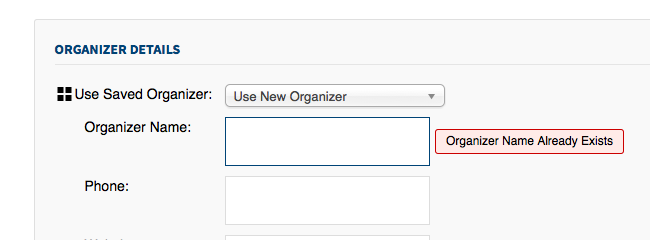
Community event form during data entry displays “Organizer Name Already Exists” and/or “Venue Name Already Exists”.
Prior to submitting the form.
May display this message before the field forms are filled in.
The venue/organizer does not exist.
Anonymous submissions enabled.This error did not occur in prior testing, e.g. pre 3.12.x
October 14, 2015 at 2:43 pm #1014674Nico
MemberHi Jim,
Thanks for reaching out to us and sorry to hear about this issue. Glad to help you out once again here 🙂
I see you marked that you tested this with default WordPress theme (TweentyFifteen for example) and with no other plugins active, right? Any other setting that I might need to configure to test this on my end?
When you mention this didn’t occur prior to 3.12.x, What product are you referring too: PRO, Core, both?
Thanks,
NicoOctober 14, 2015 at 6:29 pm #1014738ParticipantHi Nico,
Yes, I tested this with 2014 and no-plugins.
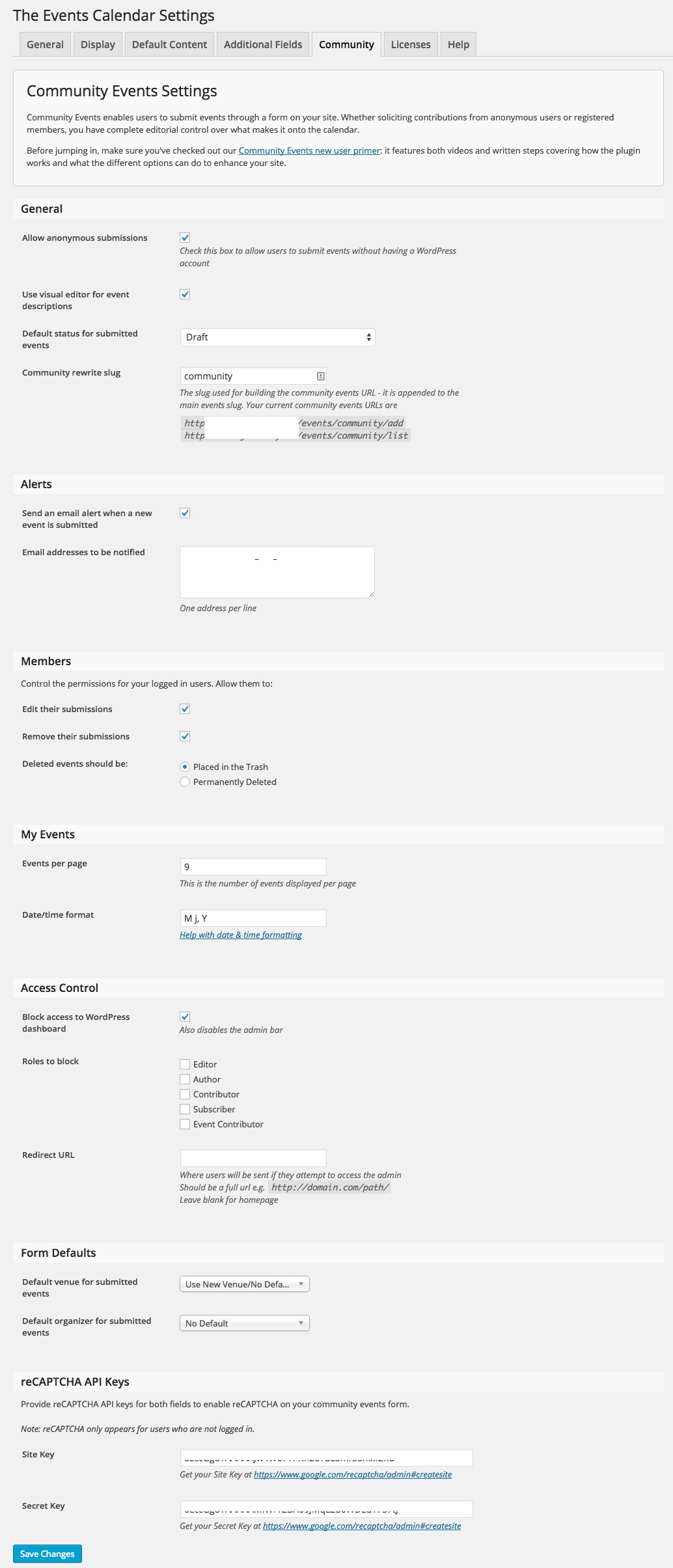
Settings? Here’s the community events settings page.
You should probably also know that I’m experiencing another problem with Community submissions:
Previously entered event name displayed in lists My Venue, My Organizer
October 15, 2015 at 9:14 pm #1015161MemberHey Jim,
Thanks for pointing that other thread out, I’ll try to coordinate efforts with George.
I’ve set Community Events on my local site following your settings (logged-in or as anon), but I’m not seeing any errors. So not really sure what’s happening here. Just out of curiosity, Do you have any values set for Venues or Organizers in the ‘Default Content’ tab?
As both issues cannot be reproduced by us -until now at least-, Can you please try to re-install our plugins? Check out this article describing how to do this manually: https://theeventscalendar.com/knowledgebase/manual-updates/ (the process for re-installing is the same as for upgrading).
Please let me know if re-installing solves the issue,
Best,
NicoOctober 20, 2015 at 11:12 am #1016315ParticipantHi Nico,
Reinstallation did not change the result.
The defaults for organizer and venue are both “No default”.The message does not appear immediately; floats to the right of the input field:
 October 21, 2015 at 1:04 pm #1016687Member
Hi Jim,
Sorry to hear re-installing the plugin had no effect on this 🙁 Unfortunately I’m still not able to reproduce this on my end.
Have you imported the Organizers/Venues from a CSV or other source? By any chance have you created an Organizer/Venue with empty name?
Can you share the site URL in a private reply? Is it possible to access the submit form anonymously? I would like to take a look to it, maybe some clue shows up.
Thanks for your patience on this,
Best,
NicoOctober 21, 2015 at 7:26 pm #1016770ParticipantHi Nico,
Nothing was imported, but testing for creating a venue or organizer without a name may have led to progress on another issue.The site is now live and accepting draft event submissions anonymously at http://www.jimtovey.ca/events/community/add
Please label any test submissions with obvious data; I’ll let the event coordinator know you’re testing.
I’ve found I can sometimes just wait for the “already exists” flag to appear spontaneously, sometimes I enter a few characters or fields and wait.
October 23, 2015 at 1:28 pm #1017435MemberHey Jim,
Thanks for sending over the URL! I’ve tested the on your site and I could narrow down this down to the a back-end issue (apparently). Everything looks good on the ajax call but the ‘check for existing venue/organizer’ function is always returning ‘0’ which means that there’s an existing venue/organizer with that name. The function runs a SQL to check on this, so I guess the error might be with the query itself, Can you check the server error logs for any clues on this?
Thanks again for your patience, hope we can get this right soon,
Have a great weekend,
NicoNovember 4, 2015 at 1:45 pm #1021886ParticipantCan you check the server error logs for any clues on this?
Apparently, with the client’s hosting package, server logs are only available after specific requests via their support staff. This has been requested and I expect to accumulate some data shortly. Sorry if this means you need to simulate some event tasks again.
November 5, 2015 at 4:22 am #1022082MemberJim,
Don’t worry at all. I’ll be waiting for that info!
Thanks for keeping me posted!
Best,
NicoPS: at this point I’m mostly sure your name is not Jim, it’s just your client name XD
November 7, 2015 at 1:49 pm #1022911ParticipantChecking up on the production of error logs, I have found that no server error logs can be provided. The client’s hosting package (GoDaddy Managed WP)
does notcannot provide hosting error logs other than from WP debug due to GoDaddy’s server setup and implementation. I find this hard to believe, but that is their claim.Using data I can provide: I’ve found an anomaly between the anonymous submission form displayed on the live site versus localhost where fields for organizer and venue are displayed very differently.
0. Both sites are configured identically in “Community Events Settings”:
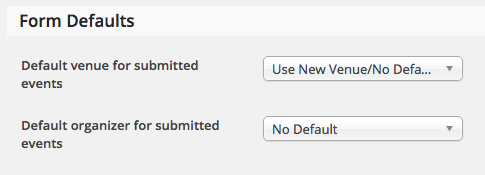
Which is the expected, correct scenario for logged-in users?
1. On localhost both organizer and venue accept creation of new entries:
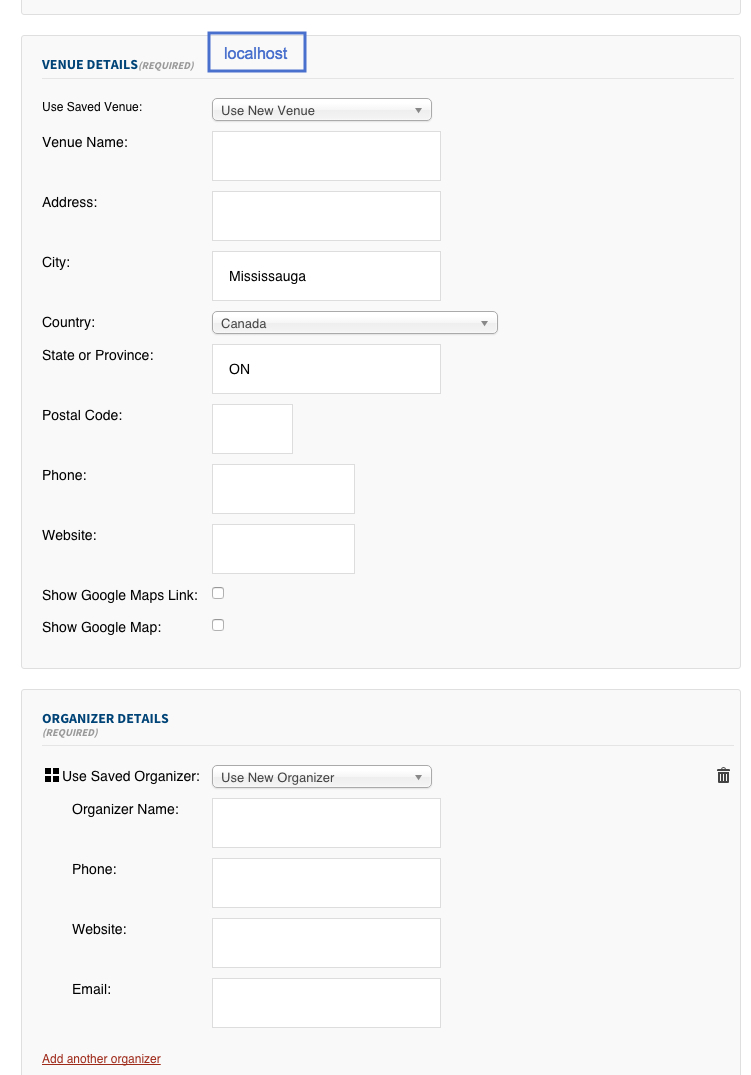
2. On live hosting both organizer and venue do not allow for creation of new entries:
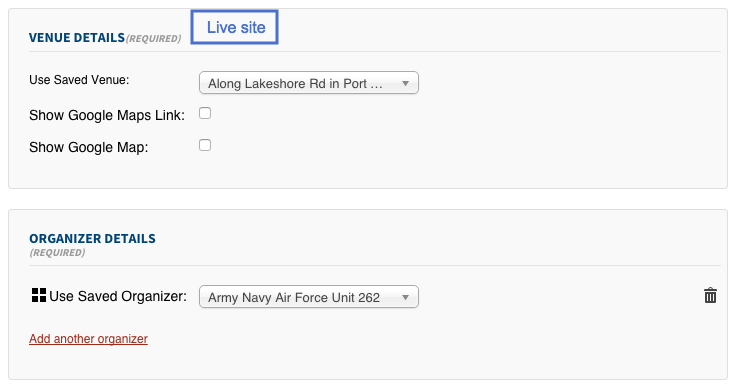 November 9, 2015 at 8:29 am #1023255Member
Hi there,
Thanks for following up! Oh didn’t know about that log policy, what a bummer!
From what you show me the local behaviour is the default behavior for sure. Do you have any configuration that might be messing up with user roles/capabilities? If you allow anonymous submissions in the live site, Does it allow new venue/organizer creation?
The code itself that outputs the Add New option is the following:
$venue_pto = get_post_type_object( self::VENUE_POST_TYPE );

if ( ! empty( $venue_pto->cap->create_posts ) && current_user_can( $venue_pto->cap->create_posts )) {

    echo '<option value="0">' . esc_html( sprintf( __( 'Use New %s', 'tribe-events-calendar' ), $this->singular_venue_label ) ) . '</option>';

}
So maybe there’s some configuration on user roles that is preventing this from printing out?
Best,
NicoNovember 11, 2015 at 6:56 am #1024178ParticipantHi Nico,
From what you show me the local behaviour is the default behavior for sure. Do you have any configuration that might be messing up with user roles/capabilities? If you allow anonymous submissions in the live site, Does it allow new venue/organizer creation?
I don’t know of any config that would come into play with user roles. Anonymous submissions are allowed on both sites, only the live site disallows creating new venues/organizers. The TEC Community Events > Access Control config is “Block access to WordPress dashboard”=selected, all other options are not set.
So maybe there’s some configuration on user roles that is preventing this from printing out?
Perhaps? Except that the unexpected behaviour is shown when the user is not logged-in, adding their events anonymously. It appear that the single (?) most significant difference is the delivering host server. I’ll provide the System Information for both installations in another, private post.
November 11, 2015 at 6:57 am #1024179ParticipantThis reply is private.
November 12, 2015 at 12:14 pm #1024874MemberHi there,
Thanks for following up! This is certainly a strange thing, I see everything is ok with the system info just different PHP versions but not sure is this is the cause. I’m suspecting it might related with this bug: http://theeventscalendar.com/support/forums/topic/anonymous-users-unable-to-add-new-venues-or-organizers/. A maintenance release for community events is coming out later today addressing this bug. Can you update and re-test after? If the issue is still present it’s probably a bug we might have to log and take look!
Thanks again for your patience on this,
Best,
Nico -
AuthorPosts
- The topic ‘Organizer Name Already Exists / Venue Name Already Exists when it does not’ is closed to new replies.