
Home › Forums › Calendar Products › Events Calendar PRO › Event time defaulting to am
- This topic has 17 replies, 4 voices, and was last updated 9 years, 4 months ago by
Colm McCarthy.
-
AuthorPosts
-
March 16, 2017 at 4:15 pm #1255573
Colm McCarthy
ParticipantWhen a user enters an event time , it defaults to am
eg:
Time entered 6pm, when saved it defaults to 6am
Time entered 18:00, when saved it defaults to 6amAnybody know how to fix this?
March 16, 2017 at 4:32 pm #1255582ParticipantPS: I am able to change this at the backend when I notice it but our registered users who can add events can’t
March 17, 2017 at 8:44 pm #1256204Hunter
ModeratorHi and welcome 🙂
Can you send screenshots of your WordPress Admin > Settings > General > Timezone and Events > Settings > Display > Date Format Settings screens?
It would also be helpful if you could send your System Information as a private reply.
Once I have that information I’ll have a better idea on how to proceed. Thanks and have a great weekend ahead!
March 18, 2017 at 4:13 am #1256254Hans-Gerd
ParticipantHi,
it’s a known bug in datepickers.php (community events), see here: https://theeventscalendar.com/support/forums/topic/24-hour-time-format-2/@hunter: It would be very helpful, if this will be documented on https://theeventscalendar.com/known-issues/
I have checked also the possible solution in
– but it doesn’t work at all.As long as this problem exists, unfortunately, we cannot update to TEC 4.4.x. This is really unpleasant.
Cheers,
Hans-GerdMarch 18, 2017 at 4:22 am #1256256ParticipantHi,
because I can’t edit the post before:
Sorry, but the issue I described is to see in connection to community events. The advice of hunter (“Timezone” and “Date format settings”) may be the solution.Cheers,
Hans-GerdMarch 19, 2017 at 6:07 am #1256446ParticipantThanks Hunter and Hans.
See screenshots attached
I can’t seem to send you a private reply with my system informationMarch 20, 2017 at 10:29 am #1256788ModeratorHi @Hans-Gerd, I reviewed the bug report related to the forum thread you linked to, but the bug seems to be affecting the Community Events‘ timepicker only allow am/pm times, not 24-hour times.
When replying here in the forums, you should see a “Set as private reply” checkbox. Follow the instructions to gather your System Information as a private reply, then paste the contents and check the “Set as a private reply” checkbox.
Keep me updated and have a good afternoon 🙂
March 21, 2017 at 7:10 am #1257237ParticipantThis reply is private.
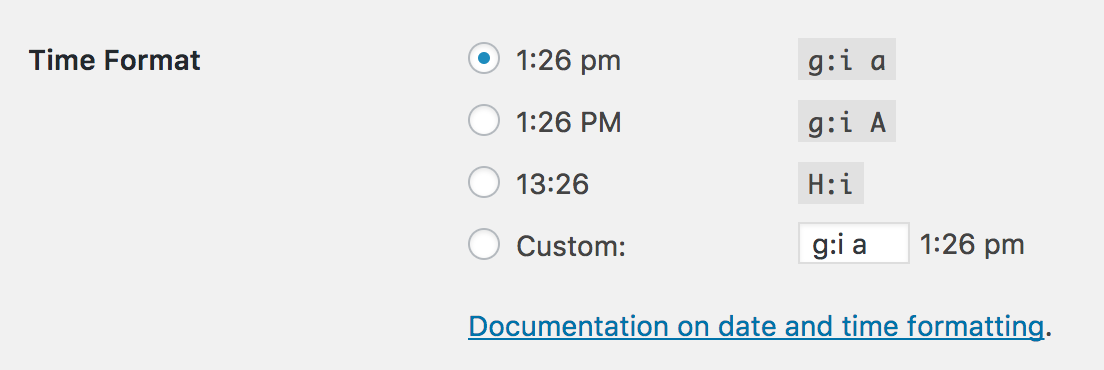
March 21, 2017 at 1:28 pm #1257551ModeratorWhat is your Time Format option set to under WordPress Admin Dashboard Settings > General? See screenshot below for example:
Let me know and we’ll go from there. Take care 🙂
March 22, 2017 at 6:46 am #1257974ParticipantThis reply is private.
March 22, 2017 at 9:06 pm #1258427ModeratorHey Colm,
Thank you for the response. I see in your System Information you have Community Events installed. We are aware of the issue you’re experiencing. I’ve added this forum thread to the ticket which helps expedite the process of getting a fix included in an upcoming release. I don’t have a precise date when it will be available, but please stay tuned to our Release Notes and the plugin changelogs for more information.
I am seeing a workaround though I’m unsure whether it works or not. Try adding it to the bottom of your theme’s functions.php file and see if it resolves the issue:
/*

 * Changes the formatting of the timepicker in The Events Calendar: Community Events submission form

 * Change format in line 17 based on https://codex.wordpress.org/Formatting_Date_and_Time

 *

 * Author: Barry Hughes

 */

function ce_timepicker_24hr_fix() {

    echo "

        <script type='text/javascript'>

            document.addEventListener( 'DOMContentLoaded', function() {

                if ( 'function' !== typeof jQuery ) {

                    return;

                }
setTimeout( function() {
jQuery( '.tribe-timepicker' ).timepicker( { 'timeFormat': 'H:i' } );
}, 500 );
}, false );
</script>
";
}add_action( 'tribe_events_community_form_after_template', 'ce_timepicker_24hr_fix' );
Your other option in this instance is to downgrade to the version that best works for you.
Thanks again (to you too, Hans-Gerd) and let me know if you’ve got any additional questions or comments. Cheers!
March 22, 2017 at 10:54 pm #1258467ParticipantHi Hunter,
hurray – it works 🙂
It seem to be very important to add the function at the bottom of the functions.php (I have tried it some time before without success).I will check it at next days and if there are still issues will back here.
Thanks a lot
Cheers,
Hans-GerdMarch 23, 2017 at 12:17 pm #1258971ModeratorHi Hans-Gerd,
I’m happy to hear the code is working on your site! Let’s hope Colm (the original poster) has the same luck. Thank you for the update and have a great weekend ahead!
May 5, 2017 at 8:24 am #1279230Nico
MemberHi there,
Just wanted to share with you that a new maintenance release (for the Week of 1st May 2017) is out, including a fix for this issue ?
Now the Community Events submission form should work with 24hrs format and 12hrs AM/PM format.
Find out more about the release → https://theeventscalendar.com/maintenance-release-week-1st-may-2017/
Please update the plugins and let us know if the fix works for your site,
Best,
NicoMay 5, 2017 at 8:52 am #1279244ParticipantHi,
unfortunately the fix for datepicker doesn’t work – see here:Cheers,
Hans-Gerd -
AuthorPosts
- The topic ‘Event time defaulting to am’ is closed to new replies.