

Forum Replies Created
-
AuthorPosts
-
December 7, 2015 at 1:45 pm in reply to: Organizer Name Already Exists / Venue Name Already Exists when it does not #1037151
Jim
ParticipantSuccess?! Tested Temporary Fix 39179 with TEC, Pro and Community each at 4.0 on live and local installs: can anonymously add venues and organizers.
Optimistic about 4.0.1
December 2, 2015 at 7:23 pm in reply to: Organizer Name Already Exists / Venue Name Already Exists when it does not #1034272ParticipantThese page views weren’t logged in the past.
No, I have not seen this on the test site, but it doesn’t get any traffic either.November 23, 2015 at 11:55 pm in reply to: Organizer Name Already Exists / Venue Name Already Exists when it does not #1029928ParticipantReturned live site to using TEC 3.12.3.
This killed adding community events; 404 for the add-event page.
Re-saved permalinks. No change.
Re-updated to 3.12.6An unexpected side-effect: every time the CE add page is first loaded (from different devices or browsers, or cookies deleted) Jetpack records a page view for “WP Router Placeholder Page”, with the url “http://www.jimtovey.ca/WP_Router/wp-router-placeholder-page/” (when used, this url returns the front page). The WP-Router plugin is NOT installed on this site, but I understand it to be integrated with the community events plugin and causing problems in the past. Since Jetpack did not change, I suspect this is TEC.
November 19, 2015 at 1:52 pm in reply to: Organizer Name Already Exists / Venue Name Already Exists when it does not #1028247Participanttesting it with 2015 and no other plugins active?
Yes, 2015, no other plugins.
Reverting to 3.12.3 allows venue and organizer to be added anonymously as tested locally, expect to redo live site tonight.November 17, 2015 at 12:20 am in reply to: Organizer Name Already Exists / Venue Name Already Exists when it does not #1026725ParticipantRestored functions.php; installed and activated plugin, but found no change in result.
I can add an event anonymously with a new venue but not a new organizer.
November 15, 2015 at 6:25 am in reply to: Organizer Name Already Exists / Venue Name Already Exists when it does not #1026031ParticipantI applied Temporary Fix 41497 in functions.php.
I can add an event anonymously with a new venue but not a new organizer.
November 13, 2015 at 9:44 am in reply to: Organizer Name Already Exists / Venue Name Already Exists when it does not #1025390ParticipantInstalled the recommended update to 3.12.6 revealed in this post.
Removed the now non-functioning code for required fields.
Can confirm what Roy has also found: can anonymously add new venue but not new organizer. Kinda kills the Community Events add-on.
November 11, 2015 at 6:57 am in reply to: Organizer Name Already Exists / Venue Name Already Exists when it does not #1024179ParticipantThis reply is private.
November 11, 2015 at 6:56 am in reply to: Organizer Name Already Exists / Venue Name Already Exists when it does not #1024178ParticipantHi Nico,
From what you show me the local behaviour is the default behavior for sure. Do you have any configuration that might be messing up with user roles/capabilities? If you allow anonymous submissions in the live site, Does it allow new venue/organizer creation?
I don’t know of any config that would come into play with user roles. Anonymous submissions are allowed on both sites, only the live site disallows creating new venues/organizers. The TEC Community Events > Access Control config is “Block access to WordPress dashboard”=selected, all other options are not set.
So maybe there’s some configuration on user roles that is preventing this from printing out?
Perhaps? Except that the unexpected behaviour is shown when the user is not logged-in, adding their events anonymously. It appear that the single (?) most significant difference is the delivering host server. I’ll provide the System Information for both installations in another, private post.
November 11, 2015 at 6:33 am in reply to: Previously entered event name displayed in lists My Venue, My Organizer #1024166ParticipantThanks for the update, George. How can I track these updates, or provide a reference to someone, allowing them to follow up?
November 7, 2015 at 1:49 pm in reply to: Organizer Name Already Exists / Venue Name Already Exists when it does not #1022911ParticipantChecking up on the production of error logs, I have found that no server error logs can be provided. The client’s hosting package (GoDaddy Managed WP)
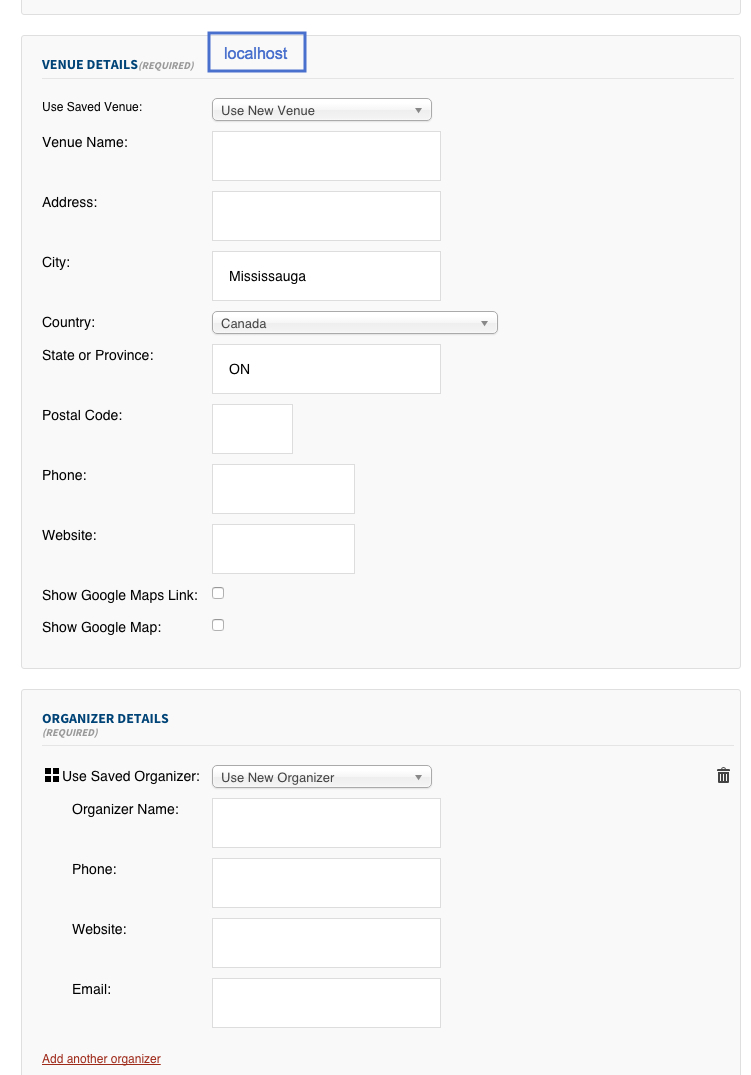
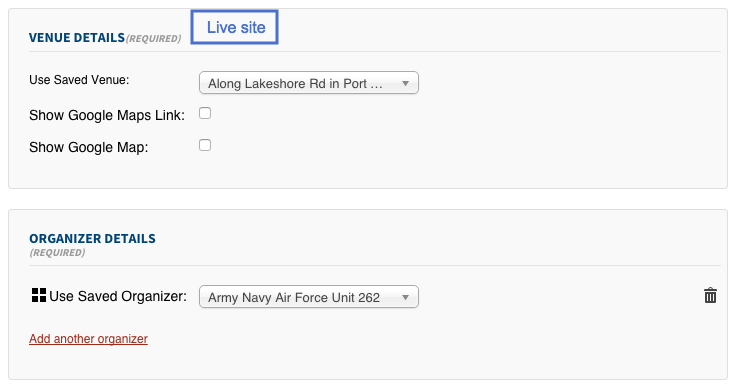
does notcannot provide hosting error logs other than from WP debug due to GoDaddy’s server setup and implementation. I find this hard to believe, but that is their claim.Using data I can provide: I’ve found an anomaly between the anonymous submission form displayed on the live site versus localhost where fields for organizer and venue are displayed very differently.
0. Both sites are configured identically in “Community Events Settings”:
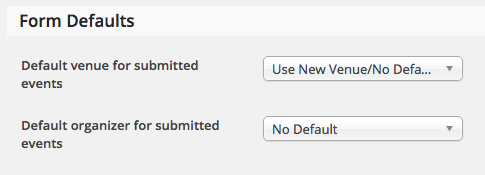
Which is the expected, correct scenario for logged-in users?
1. On localhost both organizer and venue accept creation of new entries:
2. On live hosting both organizer and venue do not allow for creation of new entries:
 November 7, 2015 at 12:43 pm in reply to: Previously entered event name displayed in lists My Venue, My Organizer #1022902Participant
No apologies required 🙂
We’re getting somewhere with required fields using the snippet from the last link provided!Except …
The snippet segment provided for organizer name does not work; copied verbatim:
if ( empty( $_POST['organizer']['Email'] ) )
        $fields[] = 'Organizer Email';

    return $fields;
The submission proceeds as normal when the Organizer email field is blank.
Edit: updates applied
The Events Calendar – version 3.12.3 installed. Update to 3.12.5
The Events Calendar: Community Events – version 3.12 installed. Update to 3.12.1
The Events Calendar PRO – version 3.12.4 installed. Update to 3.12.6-
This reply was modified 10 years, 11 months ago by
November 4, 2015 at 1:45 pm in reply to: Organizer Name Already Exists / Venue Name Already Exists when it does not #1021886ParticipantCan you check the server error logs for any clues on this?
Apparently, with the client’s hosting package, server logs are only available after specific requests via their support staff. This has been requested and I expect to accumulate some data shortly. Sorry if this means you need to simulate some event tasks again.
November 4, 2015 at 6:44 am in reply to: Previously entered event name displayed in lists My Venue, My Organizer #1021679ParticipantWhat I described here is still your issue, right?
Actually, this is specifically not the issue. I’ll restate the problem:
A venue or organizer data entity may be created without a name: if the name field is left empty the name “Unnamed Organizer” or “Unnamed Venue” is assigned by the plugin. Any number of “Unnamed Organizer” or “Unnamed Venue” entities may be created, each with the same programatically assigned, generic and identical, meaningless name. Any of these organizers/venues may be identical to another. Any number of events may each have a unique org/venue that can not be distinguished by name.
Scenario – In a list of venues or organizers the entities cannot be differentiated:
When adding a new community event a user may be presented with dropdown selectors containing unlimited lists of identically named venues/organizers without a method of distinguishing one from another. At best *yet another* organizer/venue is created, further orphaning events, organizers and venues from each other.This situation may be repeated at will using the current versions of the plugin and add-ons.
The appropriate correction would be to disallow the creation of an organizer or venue without the entry of a unique name for the organizer or venue.
October 21, 2015 at 7:26 pm in reply to: Organizer Name Already Exists / Venue Name Already Exists when it does not #1016770ParticipantHi Nico,
Nothing was imported, but testing for creating a venue or organizer without a name may have led to progress on another issue.The site is now live and accepting draft event submissions anonymously at http://www.jimtovey.ca/events/community/add
Please label any test submissions with obvious data; I’ll let the event coordinator know you’re testing.
I’ve found I can sometimes just wait for the “already exists” flag to appear spontaneously, sometimes I enter a few characters or fields and wait.
-
This reply was modified 10 years, 11 months ago by
-
AuthorPosts