
Home › Forums › Ticket Products › Community Tickets › Multiple Ticket Types
- This topic has 23 replies, 2 voices, and was last updated 8 years, 4 months ago by
photoeventsnw.
-
AuthorPosts
-
April 2, 2018 at 12:09 pm #1494607
photoeventsnw
ParticipantDoes Events Tickets Plus and more importantly, Community Tickets, support multiple ticket types? For example:
- General Public – $65
- Member – $45
- Student – $25
Thanks!
Tom
April 2, 2018 at 12:47 pm #1494633Courtney
MemberHi Tom
With Event Tickets Plus, you can create multiple tickets per event. (This would require our free plugins The Events Calendar and Event Tickets) plus an e-commerce plugin. We currently support WooCommerce or Easy Digital Downloads.Read more about each option’s features and payment gateways.
Community Tickets builds upon the earlier mentioned plugins along with requiring Community Events.
That said, Community Tickets at this time limits submissions to 1 ticket per event. If you would like to add additional tickets to the event as an administrator, you still very much can.
If you think that is something you would like as a feature I encourage you to visit our User Voice Page and either upvote an existing request or make a new request there.
You can suggest it at https://tribe.uservoice.com/forums/195723-feature-ideas?category_id=145179.
Is there anything else I can help you with?
Thanks
Courtney 🙂April 5, 2018 at 5:11 pm #1498163ParticipantHi Courtney,
This is unfortunate. I purchased the Ultimate Bundle, and my entire project is based on the Community Events module. If this functionality does not exist, I will need to get a refund. I requested one a couple of weeks ago and never received a response or a refund.
Tom
April 5, 2018 at 5:21 pm #1498169ParticipantI put in a second refund request. Order #1471691. Thank you.
April 6, 2018 at 1:00 pm #1499107MemberHi Tom
I misspoke, and must apologize for that.
https://cloudup.com/cpiNmByFlEP is how multiple tickets can be created with Community Tickets.
You’ll be notified of your refund request soon.
Thanks
Courtney 🙂April 9, 2018 at 12:32 pm #1500848ParticipantHi Courtney,
Thank you for getting back to me. I don’t understand. The link you sent me appears to be a picture of a ticket creation form. Cloudup seems to be a file sharing service like dropbox. Can you please send me specific instructions on how to create multiple ticket types? If I can accomplish that one task for now, my project can move forward. Thanks!
Tom
April 10, 2018 at 4:54 pm #1503669MemberHi Tom
Yes – CloudUp is a tool we use to quickly share screenshots. I took a picture of what the front end of Community Tickets would look like for you.
Install/activate Event Tickets, Event Tickets Plus Community Events along with an e-commerce plugin, and Community Tickets.
Then view the “Submit an Event” page. This will appear for you as an administrator in the top WordPress bar in your browser under “Events”. By default, it would be at yoursite.com/events/community/add. Then at the bottom will appear the ability to add multiple ticket types as shown in my screenshot.
https://theeventscalendar.com/knowledgebase/new-user-primer-community-tickets/ can walk you through setup as well.
Thanks
Courtney 🙂April 13, 2018 at 2:00 pm #1507067ParticipantHi Courtney,
I have gone through the primer again and see nothing that I have missed in regard to Community Tickets setup. But, for some reason when I go to the Submit An Event Page, I do not see what you are seeing. What am I doing wrong?
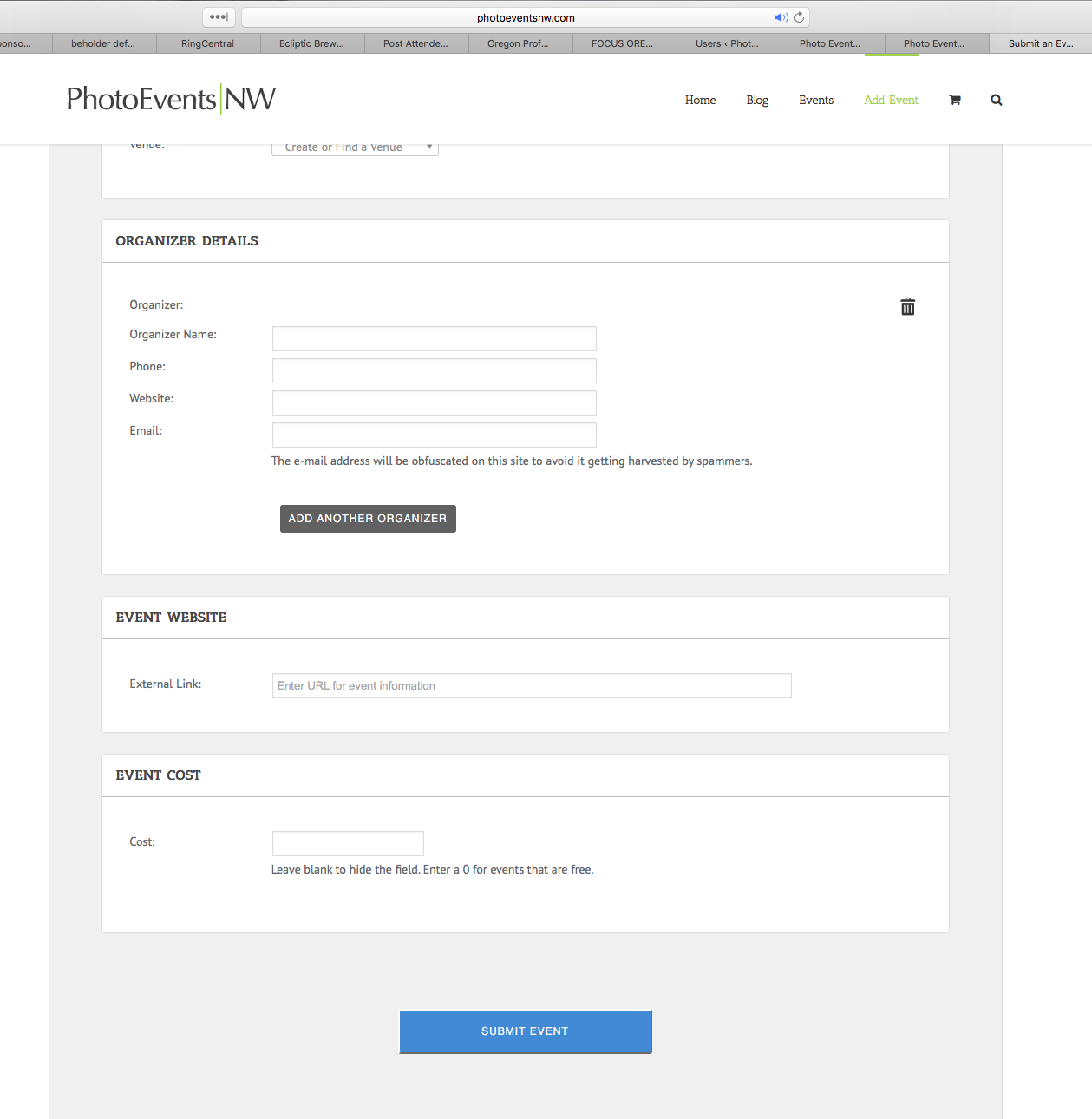
April 13, 2018 at 2:05 pm #1507071ParticipantHere is a screen shot:
http://photoeventsnw.com/images/Screen_Shot_2018_04_13_%20at%201.49.41_PM.png
I am only presented with an “event cost” field.
April 16, 2018 at 11:50 am #1508426MemberCan you send in your System Info https://theeventscalendar.com/knowledgebase/sharing-sys-info/ for us to review? Do you have a working version of your site available for us to view the link?
Thanks
Courtney 🙂April 17, 2018 at 6:02 pm #1509771ParticipantThis reply is private.
April 23, 2018 at 12:21 pm #1514040MemberHey Tom
When you go to Events » Settings » Community » Community Tickets, do you have Enable Community Tickets & Allow any user to create tickets enabled? By default, they should be.
Thanks
Courtney 🙂May 11, 2018 at 2:48 pm #1528719ParticipantHi Courtney,
Yes, both of those options are checked. Other thoughts?
Thanks!
Tom
May 15, 2018 at 4:08 am #1530489MemberThis reply is private.
May 15, 2018 at 4:59 pm #1531302ParticipantHi Courtney,
I sent you login credentials. Let me know if you need more access. Thanks!
Tom
-
AuthorPosts
- The topic ‘Multiple Ticket Types’ is closed to new replies.