

Forum Replies Created
-
AuthorPosts
-
January 13, 2017 at 5:30 am in reply to: Order(s) are auto completed before pay, if tickets are added directly to basket. #1218006
Shadi Habbal
ParticipantHello again,
so..
Does the autocomplete plugin work properly (with the snippet in place) if you buy a ticket through the normal event page process ?
Nope. Still “Processing”.
ParticipantAlright, thanks for the heads up.
Will be looking forward to seeing the fix hopefully soon.
January 13, 2017 at 3:52 am in reply to: Order(s) are auto completed before pay, if tickets are added directly to basket. #1217979ParticipantGood morning Geoff,
Thanks for the follow up.
First I would like to correct my latest statement, because I noticed the autocomplete plugin was disabled when I ran the last test (DUH!) so I ran it again:
Unfortunately the order (despite the 0$ cost), was set to “Processing”.
The order was “Completed” by the autocomplete plugin, without the snippet code.
Now to answer your new questions:
Does the autocomplete plugin work properly for other products that are added to cart directly (not tickets) ?
Yes, it works for the other virtual products (we sell Moodle courses).
Any virtual non-excluded course is autocompleted after payment.
Any virtual excluded course is kept under “Processing” for further handling.Is that also true when you are using a 100% discount code ?
Yes. Regardless of the coupon value. I have used a 100% discount coupon in my test above so that I don’t have to enter card details or use the Testing mode in my WorldPay payment gateway.
Any (course) product that is paid for, using coupons or not, is handled as expected and autocompleted after full successful payment.Now that you mentioned it, I continued the tests with a real credit card transaction, and despite the successful payment…
Does the autocomplete plugin work properly (without the snippet in place) if you buy a ticket through the normal event page process ?
Nope. Still “Processing”.
Does the autocomplete plugin work properly (with the snippet in place) if you buy a ticket through the normal event page process ?
Looks like I hit the daily limit on this card :)) I will get back to you with an answer to this question as soon as I get a hold on another card.
Did any of this work properly with a previous version of our plugin ?
This was the first time we have chosen to do it this way (adding it directly into the shopping basket).
Regards
ParticipantHi Dirk,
I confirm that the “Attendees” page seem to give correct stats.
The cancelled orders are definitely negatively affecting the stats of the “Orders” page, as kinda being subtracted from the total sales. Weird *not really in programming*
Looking forward to a solution.
Cheers
January 12, 2017 at 1:36 am in reply to: Order(s) are auto completed before pay, if tickets are added directly to basket. #1217241ParticipantGood morning Geoff,
I have added your snippet to my functions.php file on the staging subdomain;
then created a 100% discount coupon,
then added a ticket to the shopping basket, by placing it directly (eg. http://staging.propharmace.com/mock-exam-preparation/?add-to-cart=2287),
then proceeded with the order to the end.Unfortunately the order (despite the 0$ cost), was set to “Processing”.
ParticipantHello,
I have duplicated our website into a staging subdomain.
Changed the theme back to Twenty Sixteen.
Disabled all plugins except for the ones shown in the following snapshot (this is taken from the actual staging website):
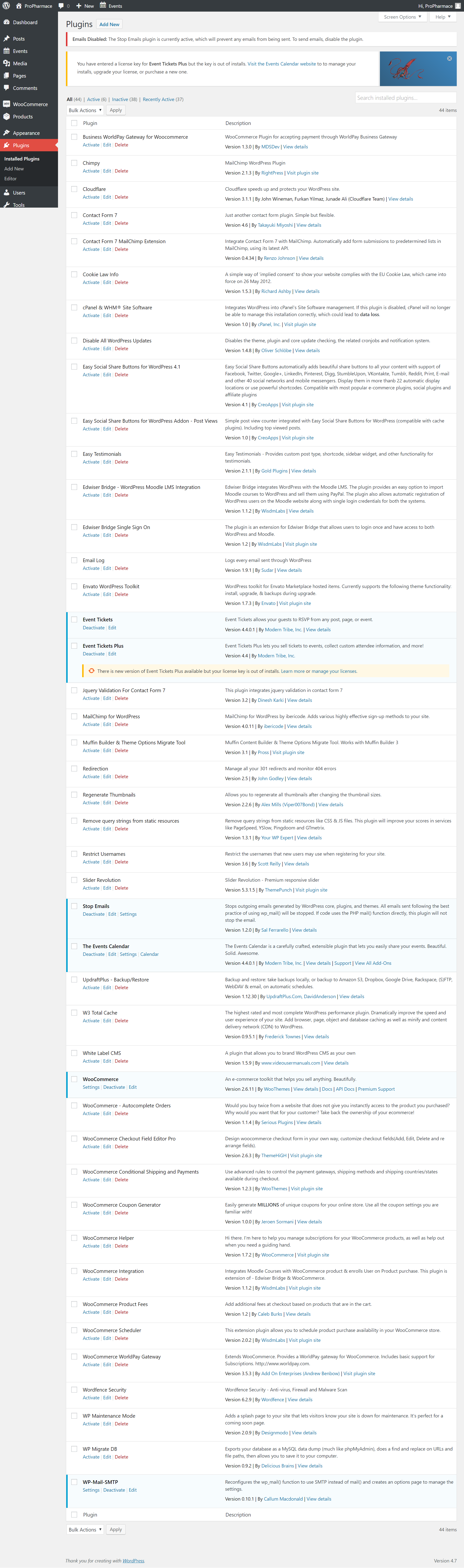
and now let’s see how the events orders views are acting weird:
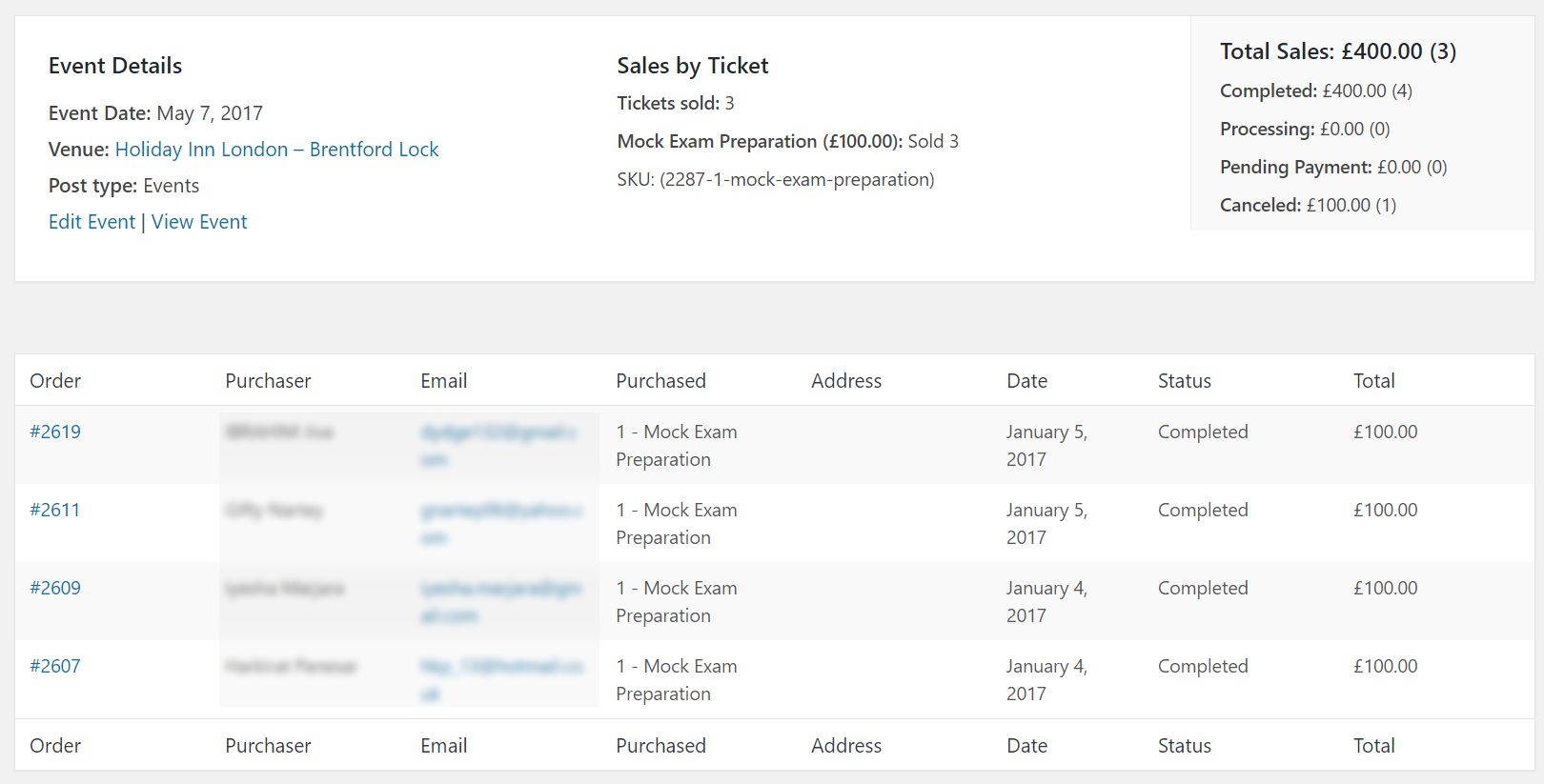
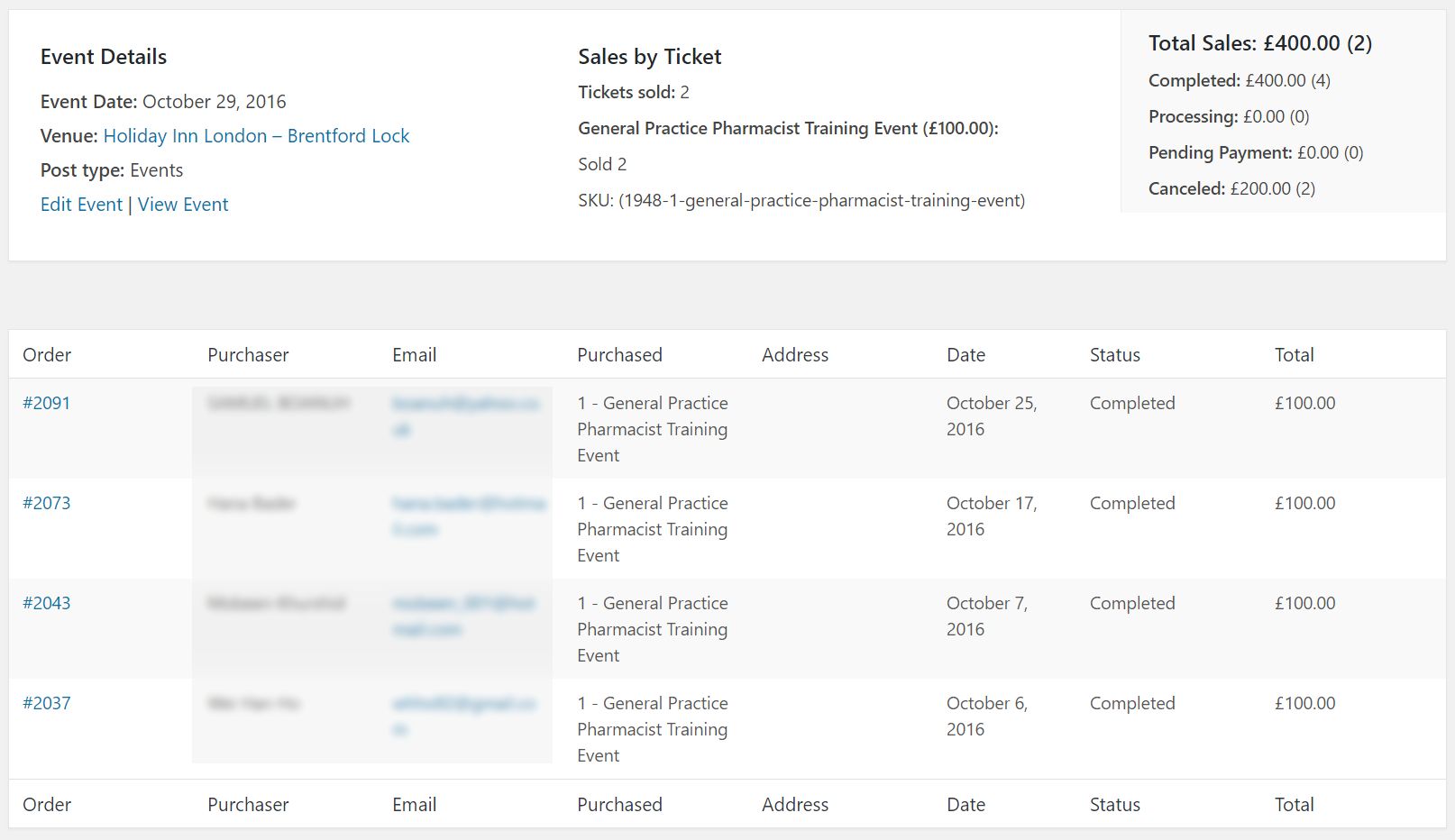
and the only correct one is this:
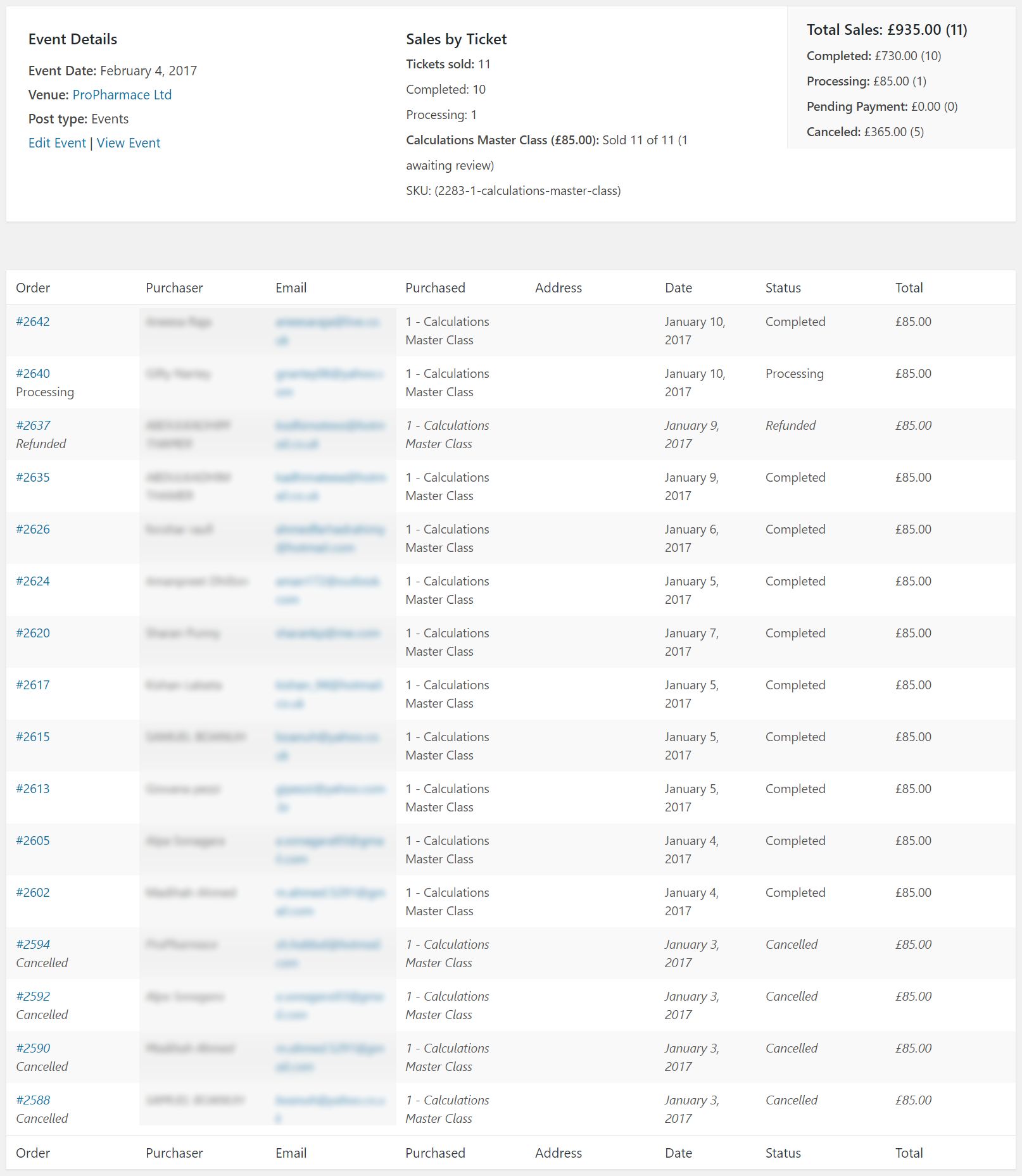
In the last event, I think that no orders were (auto cancelled due to timeout OR timed out but not auto cancelled until I did manually); whereas in the first two events, there were orders that timed out and either:
– were cancelled by WooCommerce after 5 minutes (that’s what I chose for stock hold in WC settings), or
– sat frozen there for days although they should have been cancelled by WC automatically; and I had to cancel them manually.I hope it helps now finding the real problem.
January 11, 2017 at 12:27 am in reply to: Order(s) are auto completed before pay, if tickets are added directly to basket. #1216402ParticipantThis reply is private.
January 8, 2017 at 11:02 pm in reply to: Order(s) are auto completed before pay, if tickets are added directly to basket. #1214966ParticipantHello,
Here is an interesting finding,
all the tickets that are added directly to the shopping basket (as I explained earlier), don’t trigger the “woocommerce_payment_complete_order_status” event, and there is no way for the autocomplete plugin that I am using to “know” that there has been an order in the first place; despite the fact that I have disabled autocompletion by Events Tickets Plus.
PS: my personal changes on the autocomplete plugin has nothing to do with this behaviour, as there has been no change whatsoever on the actions/listeners.
Comments?
January 8, 2017 at 2:07 am in reply to: Orders Auto Completed by Default. Needs to be "Pending Payment" #1214826ParticipantHello,
You might have faced the same problem that happened to us last week, check out my thread: https://theeventscalendar.com/support/forums/topic/orders-are-auto-completed-before-pay-if-tickets-are-added-directly-to-basket/
For the time being, I suggest you go into the Events > Settings > Tickets and “disable” the option (Try to set the status of new ticket orders to “complete” automatically) if it’s been activated.
Hope this helps.
ParticipantHi,
Here is another interesting case with another event.
Here, it says, 8 orders (7 completed + 1 pending)

But, actually there are (8 completed + 1 pending) orders.
The pending order is made by someone who have already bought a ticket (so kind of a duplicate unpaid order)Now, after I have manually cancelled this duplicated order, this is how the orders view look now

For some reason, there is 1 missing completed order.
ParticipantHi,
Just confirming that this behaviour is not limited to a single event, as it happened again today with a different recent event.
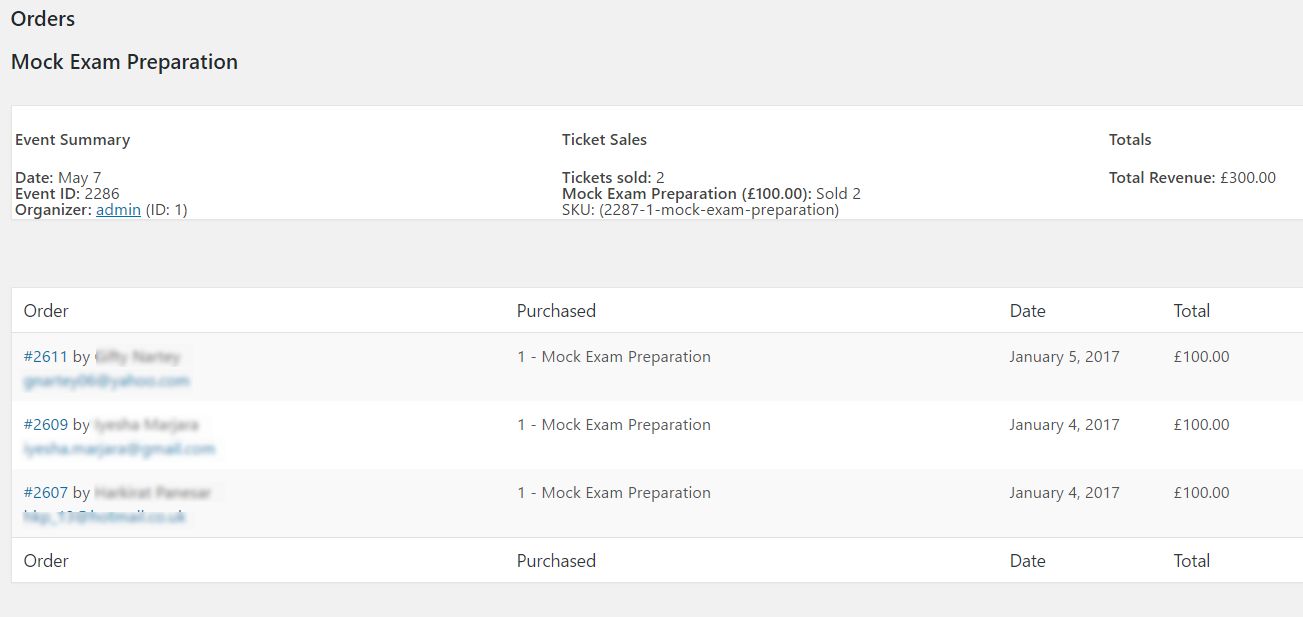
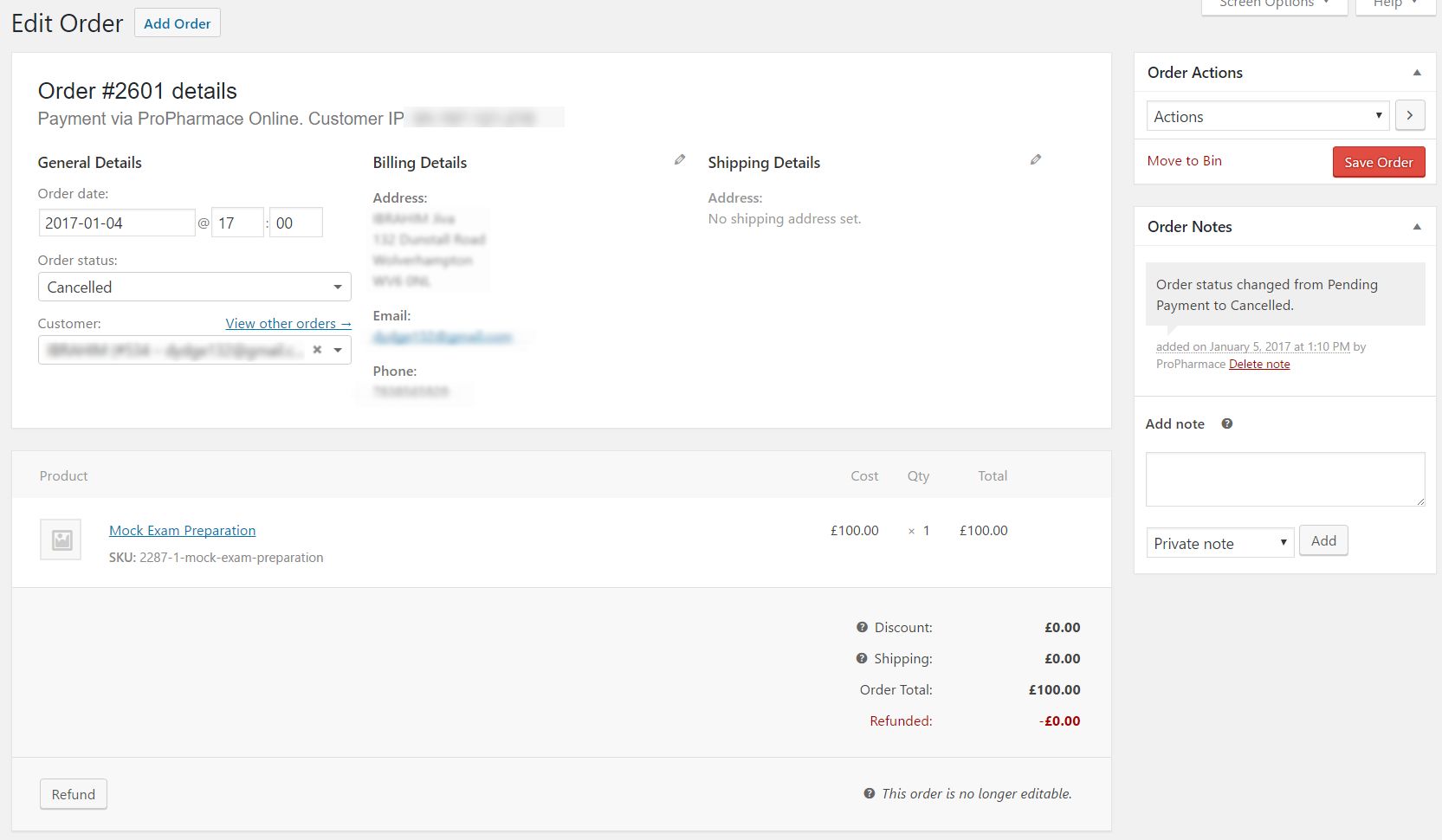
Unfortunately, I didn’t notice the number of sold tickets before I manually cancelled the long pending order, otherwise we could have told if the number went haywire because of the cancelled order or not.
January 5, 2017 at 4:10 am in reply to: Order(s) are auto completed before pay, if tickets are added directly to basket. #1213678ParticipantGood day Geoff,
The plugin that I use for orders autocomplete, already includes the snippet you shared, and more.
It takes care of different scenarios, including the one scenario that I need (auto completion of paid + virtual orders), because we’re planning on selling non-virtual products soon (Certificates), hence I don’t want to complete “all” kinds of orders.
But, it’s worth noting that I’m using a patched/private version of the WooCommerce Autocomplete Orders plugin, in which we added a certain behaviour, and although this added feature is working flawlessly with other products (courses, also “paid + virtual”), I might just double check that it’s not some unforseen glitch in our patch.
So, I will add some logging to the process, and wait for couple more new orders to see how things are working, and get back to you.
For the time being, thank you for stepping in for help.
Regards.
ParticipantHello,
I’m using WooCommerce own stock hold time feature (WooCommerce Settings > Products > Inventory > Hold Stock (minutes)).
I can’t actually revert to default theme and/or disable plugins, because we’re in production.
I will try replicating this behaviour on a fresh install, and/or clone our production into a staging domain, and then test your suggestion.
If only I had 48 hours a day 🙂
Will appreciate leaving this ticket open pending further investigation.
Regards
ParticipantHello,
Thanks for the headsup.
I will close my ticket for the time being, looking forward to seeing this feature added in near upcoming releases hopefully.
Best wishes
May 25, 2016 at 5:12 pm in reply to: Settings to opt out of frontend attendee list is NOT hidden if attendee list is #1118929ParticipantLooking forward to the new update.
Regards.
-
AuthorPosts