

Forum Replies Created
-
AuthorPosts
-
Alan
ParticipantI have the theme on google drive. I just need your email to share it with you.
ParticipantI’ve read up on the breakpoint. I don’t know where to put the code suggested in my functions.php file. Can it go anywhere? I’m not a programmer, so I need specific baby steps.
I was able to find /wp-content/plugins/the-events-calendar/common/src/functions/template-tags/general.php (around lines 654 and 1569) and make the change from 768 to 600. I was also able to edit the tribe-events.js file located here: /wp-content/plugins/the-events-calendar/src/resources/js/tribe-events.js (from lines 1091 to 1200)
But the site is still displaying the mobile version of the month view.
ParticipantBrook,
Yes I am on a windows server running IIS and plesk panel.
What is the fix?
Alan
-
This reply was modified 10 years, 3 months ago by
ParticipantIt looks like it self corrected later in the day. However, I noticed there was another update today (4.1.2) and when I tried it I got another error. Here’s the error message. (Events Calendar updates, but not pro)
Updating Plugin The Events Calendar PRO (1/1)
Downloading update from https://theeventscalendar.com?pu_request_plugin=events-calendar-pro&version=4.1.2&pu_get_download=1&pue_active_version=4.1&pu_install_key=4e6c36b4041d1ee7b2f8c20bf37181808a0f30fc…
Unpacking the update…
An error occurred while updating The Events Calendar PRO: Could not copy file. events-calendar-pro/src/deprecated/Tribe_Events_Pro_Single_Organizer_Template.phpParticipantHere’s some snippits from the wpdebug that mentions the events calendar (Does this help?)
“tribe-recurrence-cron\”;a:1:{s:32:\”40cd750bba9870f18aada2478b24840a\”;a:3:{s:8:\”schedule\”;s:5:\”daily\”;s:4:\”args\”;a:0:{}s:8:\”interval\”;i:86400;}}}i:1455831849;a:1:{s:41:\”tribe_events_pro_process_recurring_events\”;a:1:
WordPress database error: [MySQL server has gone away]
SELECT option_value FROM wp_options WHERE option_name = ‘tribe_settings_errors’ LIMIT 1WordPress database error: [MySQL server has gone away]
SELECT option_value FROM wp_options WHERE option_name = ‘tribe_settings_major_error’ LIMIT 1WordPress database error: [MySQL server has gone away]
SELECT option_value FROM wp_options WHERE option_name = ‘tribe_settings_sent_data’ LIMIT 1WordPress database error: [MySQL server has gone away]
SELECT option_value FROM wp_options WHERE option_name = ‘tribe_events_calendar_network_options’ LIMIT 1ParticipantThat error is now fixed, but it was on the front end and had nothing to do with the events calendar pro.
Were you able to find the javascript error?
javascript error: “Uncaught ReferenceError: tribe_datepicker_opts is not defined” In the file: http://glendalechristian.org/wp-content/plugins/events-calendar-pro/src/resources/js/events-recurrence.js?ver=4.0.5 on line 116
ParticipantOk I did follow the testing procedures but it didn’t reveal any problems. The issue with the drop down menu and date picker appears to be due to this javascript error: “Uncaught ReferenceError: tribe_datepicker_opts is not defined” In the file: http://glendalechristian.org/wp-content/plugins/events-calendar-pro/src/resources/js/events-recurrence.js?ver=4.0.5 on line 116
Any idea what that is error is?
ParticipantI’m not having any luck poking around in the debug area. I could create a login if you wanted to look, but otherwise I don’t know what else to do.
Participant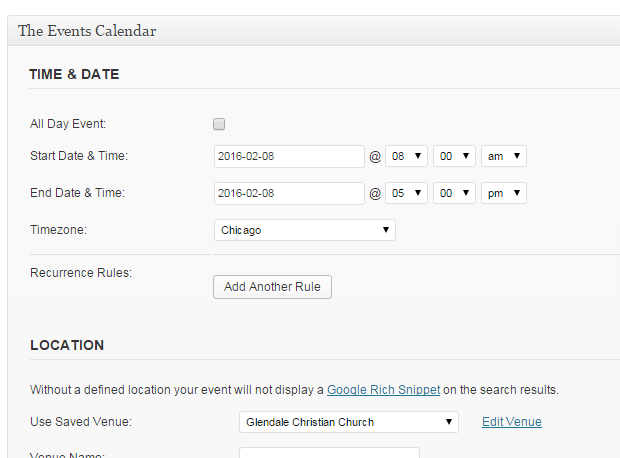 Participant
No. The pull down menu is missing. Can I show you a screen shot?
October 8, 2014 at 2:34 pm in reply to: Events Calendar is not up-to-date w/ event cal addon + no reocurring event optn #797270ParticipantI have this same problem with slightly different versions. EventsCalendar is 3.1, and Pro is 3.61 but when I click “update” I get a message saying “the plugin is at the latest version.”
Please advise.
ParticipantI found the file. Added the events directory in my theme folder and uploaded the events.css file into that folder with the added code.
http://www.glendalechristian.org/events
It seems to not be working or loading the calendar at all now?ParticipantSomeone suggested that we setup our theme as a child theme and add this code. I’m not sure how to do all that….is there another way to fix?
(here’s the code they gave me)
.tribe-events-prev-month {
margin-right:5px;
float: left;
}#tribe-events-events-month {
float: left;
margin: 0 10px;
}#tribe-events-events-year {
float: left;
margin: 0 10px;
}select#tribe-events-events-month {
width: 120px;
}select#tribe-events-events-year {
width: 120px;
}#content.tribe-events-event.widecolumn {
padding: 20px 10px 0 10px;
}h2.tribe-events-cal-title {
padding-top: 20px;
}#tribe-events-event-meta dd {
padding: 0;
margin-left: 80px;
margin-bottom: 2px;
}#tribe-events-event-meta .column {
width: 47%;
padding: 0 2% 0 0;
}ParticipantThis is what ours looks like….
http://glendalechristian.org/events/This is what I want it to look like:
-
This reply was modified 10 years, 3 months ago by
-
AuthorPosts