
Home › Forums › Calendar Products › Events Calendar PRO › Remaining Tickets incorrect from front and back end views
- This topic has 0 replies, 2 voices, and was last updated 8 years, 5 months ago by
Brett.
-
AuthorPosts
-
March 12, 2018 at 4:24 am #1476284
Brett
ParticipantHi all,
I am STILL having an issue and haven’t been able to resolve it, and am getting a lot of unhappy customers affected by this. I’m so unsure what I need to do here as I’m hitting a wall.
The front end is giving a different ‘ticket’s left’ total to the actual amount of tickets on the event… Sometimes the List View shows ‘fully booked’ on courses that have spaces left, or in the example I’m sharing below, 2 tickets rather than 7!?
I have been told to go through the processes of disabling all plugins, and also by disabling all custom edits on my child theme and it’s still giving me the exact same error no matter what I am doing. I’m clearing the cache often, and that isn’t doing a thing, either.
I use the DIVI builder on my site, overall and am unable to switch the theme to Twenty Seventeen and back as it doesn’t return my site to it’s former glory unless I do a full site backup/restore but I have read that there are no conflicts with the DIVI builder and The Events Calendar…
Please, if anyone can give any insight or suggestion, I’d be so grateful. 🙂
March 13, 2018 at 6:39 am #1477442Jaime Marchwinski
KeymasterHi Brett,
I’m sorry to hear that you are still experiencing this issue!
Can you try configuring the Health Check plugin, which can essentially mimic a bare WordPress install without having to switch themes and deactivate plugins?
Also can you please enable WP_DEBUG and WP_DEBUG_LOG and share any debug messages you see?
Let me know how that goes!
Thanks,
Jaime
March 13, 2018 at 9:09 am #1477668ParticipantThis reply is private.
March 13, 2018 at 11:31 am #1478006KeymasterHi Brett,
Thanks for all of that information.
It looks like there may be a conflict with your Divi child theme. Can you confirm that you’ve tried switching to a default WordPress theme, or the Health Check equivalent?
Just to clarify, are you seeing difference when you have only The Events Calendar and Event Tickets active, as opposed to Event Tickets Plus and Events Calendar PRO?
Let me know!
Thanks,
Jaime
March 14, 2018 at 2:12 am #1478647ParticipantHi Jaime,
Thanks. I can confirm that the Divi theme is disabled, and Twenty Seventeen becomes the default theme when using the Health Checker plugin.
So I had enabled only ‘The Events Calendar’ and ‘Event Tickets’ and was receiving the error, and in order to enable only ‘Event Tickets Plus’ and ‘Events Calendar PRO’ I have to have ‘Event Tickets’ enabled, which causes the error…
I have also renamed my child theme’s root file to disable it and any custom changes I may have made to the ‘Event Tickets’ plugin and the problem still exists.
What are the chances that I have made a change to ‘Event Ticket’s root file, which hasn’t been positively affected by an update? I don’t know why I would have done that, but I may have by mistake… I will have to try and re-install this plugin – Will I lose anything whatsoever by doing this? I don’t want to lose the courses, bookings, tickets or functionality behind it!
March 14, 2018 at 2:31 am #1478659ParticipantThis reply is private.
March 14, 2018 at 4:56 am #1478753KeymasterHi Brett,
If you have accidentally made a change to Event Tickets, that may definitely cause an issue. I’d recommend backing up your site and then deleting the Event Tickets plugin and re-downloading it.
Do you know what file you may have edited? If you have any more information about this, we could compare the code in the original plugin files with the files that you have.
There is also an update for Event Tickets and Event Tickets Plus available. Can you try updating and see if that helps as well?
Let me know how all of that goes!
Thanks,
Jaime
March 14, 2018 at 6:31 am #1478827ParticipantHi Jaime,
No, the update didn’t resolve it unfortunately… 🙁
I can see that these updates have affected and updated ALL of the files to the plugins, so there’s not even a chance a folder with custom code wouldn’t have been replaced with the new files, right?
It probably doesn’t help, but I’ve noticed the error has gone down a slightly different path now.
Please see the attached image
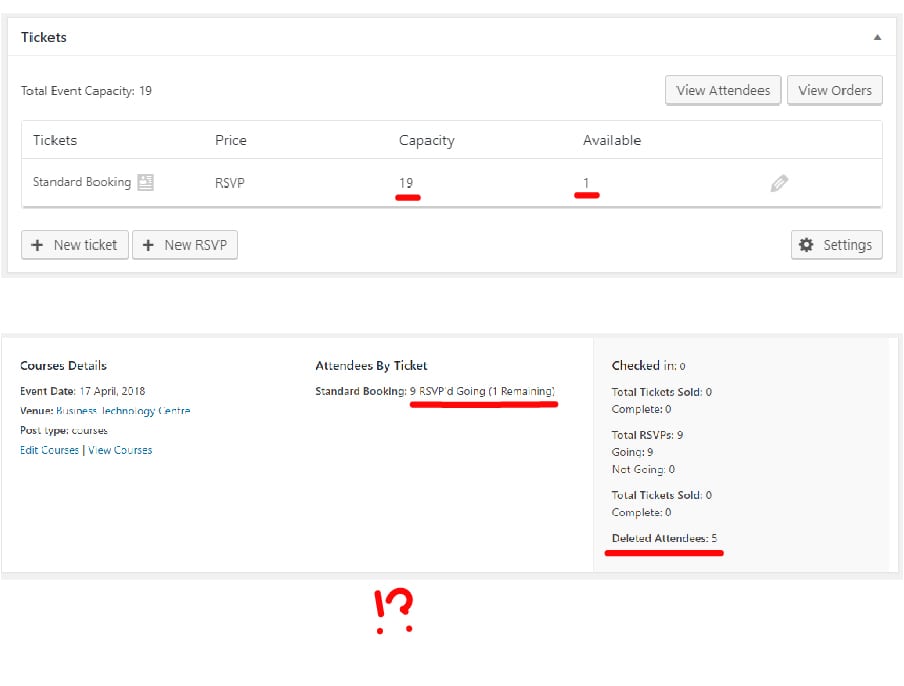
There are supposed to be 12 tickets in total but it’s saying 0 remaining.
There are 9 RSVP’s, and 5 deleted so SHOULD say 3 remaining (We know this as the original problem).
If the error was to say 14 in total, that would make a bit of sense, and putting the ticket total up to 15 to get 1 remaining would again, make sense. However, putting it up to 19 says 1 remaining instead.-
This reply was modified 8 years, 7 months ago by
March 14, 2018 at 8:49 am #1478981KeymasterHi Brett,
One thing you can do is to alter the total_sales custom field on the WooCommerce Product page that is associated with the ticket that you are trying to edit. You can change that number to reflect the actual number of attendees that you have, which will then change what you see in your Attendees tab.
You can also alter the ticket stock on the Edit Event page, where you edit your ticket.
Let me know if doing this helps to adjust the ticket stock to its proper function.
If not, can you try to create a fresh WordPress install with your current licenses and see if the same issue occurs there?
Let me know how that goes!
Thanks,
Jaime
March 14, 2018 at 9:24 am #1479058ParticipantHi Jaime,
Unfortunately I am not able to edit the custom fields on these, as they are RSVP and not under the WooCommerce Products listing…
March 14, 2018 at 9:52 am #1479207KeymasterHi Brett,
That’s right, sorry about that.
We are currently working on a bug that involves a customer changing their RSVP from Not Going to Going, as that can exceed the original capacity of the RSVP.
Does this sounds like what may be occurring with you? Can you check your RSVPs to see if that may be happening, which affects the numbers that you are seeing?
Let me know!
Thanks,
Jaime
March 15, 2018 at 1:50 am #1479762ParticipantHi Jaime,
No worries.
I haven’t allowed people to mark themselves as ‘not going’ on an event, as we need to go through our own process hence the ‘deleting’ of each cancellation we receive…
I wonder if I would still have this problem if admin were able to control someones ‘going’ and ‘not going’ status?
March 15, 2018 at 11:25 am #1480393KeymasterHi Brett,
Yes, this may affect the RSVP numbers. Here is some more information in managing your attendees:
https://theeventscalendar.com/knowledgebase/managing-your-orders-and-attendees/#dl_attendee-list
One thing you can do is to set up a test event and change the status from going to not going from the backend, as you usually do. You can then see if that affects the way that the numbers appear.
Let me know how that goes and if you have any other questions along the way!
Thanks,
Jaime
April 5, 2018 at 8:27 am #1497448ParticipantHi Jaime,
Sorry for not replying sooner, thought I already had!
So the issue is, with the attendees that have said they are going, there is literally no way to change that to say ‘not going’ on the backend, and users don’t have log ins so can’t do it themselves either.
Definitely does seem to be when an attendee is ‘deleted’… 🙁
April 6, 2018 at 4:50 am #1498440KeymasterHi Brett,
Okay, thanks for getting back to this.
To start back up, could you please provide us with your complete updated system information in a private reply using the instructions found in the following link?
https://theeventscalendar.com/knowledgebase/sharing-sys-info/
Let me know if you have any other questions in the meantime!
Thanks,
Jaime
-
This reply was modified 8 years, 7 months ago by
-
AuthorPosts
- The topic ‘Remaining Tickets incorrect from front and back end views’ is closed to new replies.