
Home › Forums › Calendar Products › Events Calendar PRO › Recurring events added non-desired dates
- This topic has 23 replies, 5 voices, and was last updated 7 years, 6 months ago by
Jennifer.
-
AuthorPosts
-
August 31, 2018 at 6:54 am #1610588
Ron
ParticipantWhen I create a recurring event, I clearly state the start/end dates. However some 4 events are created randomly. Please see the attached image: Event starts on 9/14 and there are 4 instances on the same day.
This error has been previously reported in other threads:
And
I already tested with a simple theme/debug. I cannot disable plugins. I just updated the Calendar Pro plugin this week.
Please advise.
September 3, 2018 at 4:06 pm #1612588KeymasterHi Ron,
I’m sorry that you’re running into this issue, but I’ll be happy to help you out!
Just to clarify here, are the “Once” rules in the screenshot you sent rules that you created, or were these created on their own? If they were generated randomly, can you please send me a screenshot of the rules that you started out with so that I can test it out on my end? Also, is this happening with just this one recurring series or with all of your recurring events?
I definitely understand not wanting to deactivate things on your live site – if you don’t have a staging site set up already, then you can use the free Duplicator or WP Staging plugin to create one. When you run through the conflicts testing, please make sure to have WP_DEBUG enabled and copy/paste any errors that you see into your reply.
Thanks,
Jennifer
September 3, 2018 at 5:41 pm #1612634Mathew
ParticipantRon,
You are not alone with this one. I too have seen it and have easily reproduced the same issue with TECPro 4.4.31
Until someone acknowledges the issue, the only workaround is to roll back to version 4.4.30.1 or below of TECPro.
Hope this helps.
September 4, 2018 at 10:25 am #1613309ParticipantHi Jennifer,
The “once” dates on the left were added by us. But if you look to the ones on the right, on Sep. 14th there are four instances, at 12pm, 6pm, and two at 6:30 pm. Only one of the 6:30pm is correct. The other (12pm, 6pm, and the extra 6:30pm) were created automatically.September 4, 2018 at 10:26 am #1613310ParticipantMatthew,
Thanks for your response.
RonSeptember 4, 2018 at 1:16 pm #1613523ParticipantUPDATE: I disabled all the plugin and the error keeps happening.
September 5, 2018 at 3:33 pm #1614689KeymasterMathew,
Thanks for chiming in here!
Ron, this has been logged for our developers to take a look at – I’ve linked this thread to our internal ticket for this, so as soon as we have an update, we’ll let you know here.
I apologize for the inconvenience that this is causing, and thank you for your patience as we work on getting this resolved! Please let me know if you have any questions in the meantime.
September 6, 2018 at 5:58 am #1615030ParticipantThank you for finally taking care of this big problem. I just want to add to I started a blank WordPress installation with the Theme 2017 and still got the same error.
I opened a new ticket with this information (and the ne server configuration) at:September 6, 2018 at 12:09 pm #1615551KeymasterThanks for doing that testing Ron! The good news here is that our developers are actively working on this, so we should have an update for you shortly (although I don’t have an ETA that I can give you yet). I apologize for the delay, we’ve had some much busier than usual forums these past couple of weeks!
Please let me know if there is anything else that I can help you with in the meantime.
September 10, 2018 at 5:48 am #1617453ParticipantAny news about the fix?
September 10, 2018 at 11:43 am #1617832Victor Levy
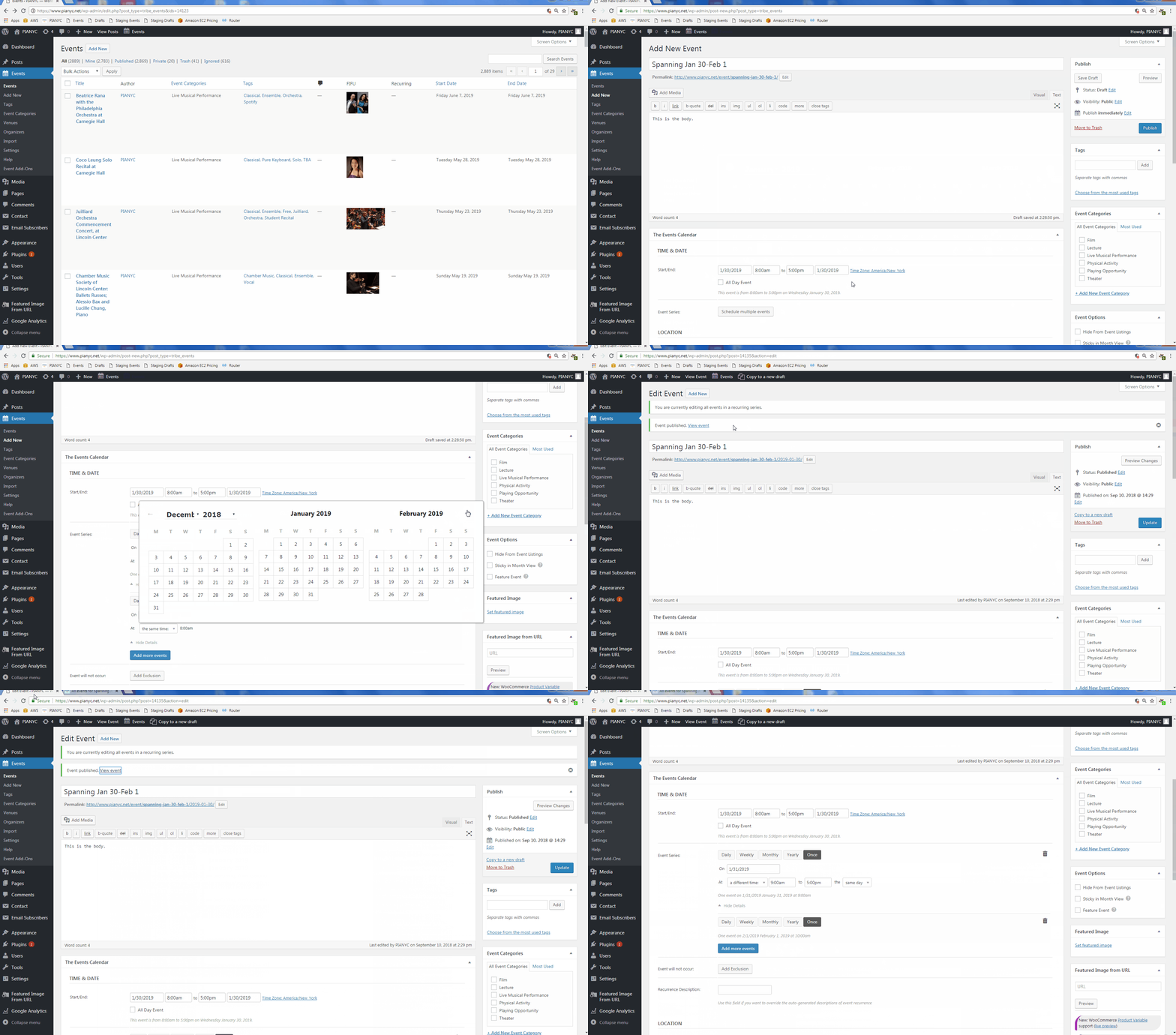
ParticipantI have a similar problem with recurring events, and it seems to be related to covering multiple months. If I create an event on January 30 2019 starting at 8 am with ‘once’-recurring events on January 31 at 9 am and February 1 at 10 am, I end up with four events, including an extra event on January 30 at 10 am. Then, in the editing page, I cannot edit the details of my final ‘once’-recurring event. You can see the whole sequence at in the GIF at this link:
September 10, 2018 at 12:11 pm #1617872ParticipantHello Victor,
This seems to be a verified issue in the plugin. If you are following my thread, it looks like they finally started taking care of it.
I recommend you to open a ticket as well and let them know about your problem so they can get the cure faster. Please link to my thread for them as a reference.September 10, 2018 at 4:00 pm #1618056KeymasterHi Ron,
I just checked on our internal ticket for this, and unfortunately I don’t have an ETA that I can give you yet. As soon as we do have some news, you’ll be notified automatically here. I’m sorry I don’t have a solution for you on this yet, but please let me know if there is anything else that I can help you with in the meantime!
September 10, 2018 at 4:03 pm #1618061KeymasterVictor,
I’m sorry that you are running into this same issue! If you subscribe to this thread, you’ll be notified when the fix is released, or you can also open up a new thread as Ron mentioned, and we will notify you there when we have an update.
Thanks,
Jennifer
September 12, 2018 at 10:55 am #1619857ParticipantI just want to add that today’s update of the plugins did not solve the issue explained in this post. We are still getting duplicate events.
-
AuthorPosts
- The topic ‘Recurring events added non-desired dates’ is closed to new replies.