
Home › Forums › Calendar Products › Events Calendar PRO › Fresh Install Drop Down Menu Doesn't Show "Add Event" + Other options
- This topic has 17 replies, 4 voices, and was last updated 11 years, 3 months ago by
Support Droid.
-
AuthorPosts
-
July 5, 2014 at 1:50 pm #287379
zedbailey
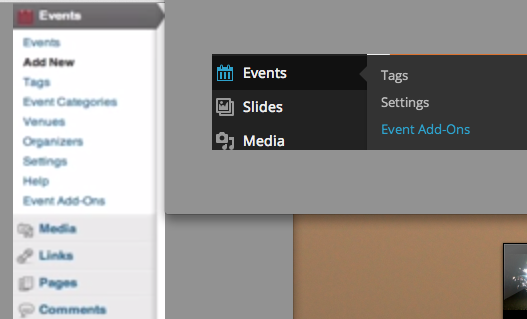
ParticipantI have installed the Events Calendar Pro and when I click on events, it only offers the options:
Tags, Settings & Event Add-Ons.I do not see the options listed on the tutorial.
July 7, 2014 at 8:08 am #300056matthewdenton
MemberHi:
Events Calendar Pro is an extension of our free The Events Calendar plugin. To have all functionality you need to install and activate The Events Calendar plugin on your website. You can download the plugin from WordPress.org at : http://wordpress.org/plugins/the-events-calendar/
Please let me know if this resolves your issue.
Thank you,
– Matthew
July 7, 2014 at 10:59 am #301107ParticipantI understand, this does not solve my problem.
I have both plugins installed and am only given the options as mentioned. I have disabled all plugins except the plugins The Events Calendar/Events Calendar Pro, changed themes, but still am limited to the options listed in the linked gyazo image.
July 8, 2014 at 7:37 am #309875MemberHi:
I took another look at the linked image and am slightly confused (due to image showing all options on left than another overlay of only 3 options). Can you please confirm my understanding of the issue?
You are currently using version 3.6.1 of The Events Calendar and Events Calendar PRO. These are the only plugins activated and you only see under Events the following options : Tags, Settings, Event Add-Ons.
Is this correct? If so can you let me know what version of WordPress you are using and Theme?
Also can you confirm that with only The Events Calendar activated you see the same menu options?
Thanks for your patience while we try to replicate this issue.
– Matthew
July 8, 2014 at 9:37 am #310784Participant–“Can you please confirm my understanding of the issue?”
Yes.
–“You are currently using version 3.6.1 of The Events Calendar and Events Calendar PRO. These are the only plugins activated and you only see under Events the following options : Tags, Settings, Event Add-Ons. Is this correct?”
Correct.
–“If so can you let me know what version of WordPress you are using and Theme?”
WordPress 3.9.1 running BuddyBoss 3.2.0 theme. I have also tried switching to the Twenty Thirteen theme w/ the Events Calendar activated and the same problem exists.
–“Also can you confirm that with only The Events Calendar activated you see the same menu options?”
I can confirm that with only The Events Calendar activated I see the same menu options.July 8, 2014 at 9:38 am #310804ParticipantI have also tried to re-install both plug-ins and the same problem of only having access to “Tags, Settings, Event Add-Ons” exists.
July 8, 2014 at 9:43 am #310853Participantanother screenshot: http://i.imgur.com/krcYu7t.png
July 8, 2014 at 12:53 pm #312211MemberHi:
Thanks for the additional screenshot. However can you send me a screenshot where you are using the Twenty Thirteen plugin and all other plugins are deactivated? I see in the screenshot a menu option for slider and Social WordPress that aren’t present by default and I really want to rule out that this isn’t a plugin conflict.
Also can you confirm your user has full admin permissions?
Thank you,
– Matthew
July 8, 2014 at 1:44 pm #312496Participant> However can you send me a screenshot where you are using the Twenty Thirteen plugin and all other plugins are deactivated?
I told you I already attempted that procedure, with the same result. No screenshot is necessary, the problem still exists.
Let’s try a new angle on this problem because I have disabled all the plugins except the Events Calendar Version 3.6.1 and have enabled Twenty Thirteen on WordPress 3.9.1 – & the problem still exists. (& yes, I am the admin of the account.)
So perhaps if the problem was approached with new methods:
* Has this problem ever occurred before?
* Do some of your colleagues who program have an idea of why something like this would occur?
* What other resources besides disable everything are there for remedying plugin problems?
* Why would it display only those 3 options – “Tags, Settings & Event Add-Ons”?If you could consult with the rest of your Support Team, perhaps someone will have a solution beyond the scope of what myself or yourself has suggested.
best,
-ZedJuly 8, 2014 at 1:48 pm #312513Participant*I meant twenty fourteen.
I enabled Twenty Fourteen.July 8, 2014 at 1:50 pm #312527ParticipantJuly 8, 2014 at 2:07 pm #312604ParticipantJuly 8, 2014 at 2:23 pm #312701MemberHi Zed!
Thanks for your patience as we look into this. I have been discussing this issue with several of my co-workers and our issue is that we can’t replicate this behavior in our local environments. To diagnose the problem we first need to identify where the conflict is occurring. I’m going to install the theme you mentioned earlier and try a few more scenarios.
Thanks again for your patience and I hope to have an update for you soon.
– Matthew
July 8, 2014 at 2:23 pm #312703ParticipantI figured it out.
I had utilized a plugin to change the name of Administrator to something else and your plugin is hard-coded to only function the full menu settings with the title “Administrator”.
I suppose I can mark this as resolved, but I definitely have a follow up question – can you change the name of the “Administrator” role and still use your plug-in?
This touches on the functionality:
https://theeventscalendar.com/using-subscriber-roles-and-permissions/July 8, 2014 at 2:24 pm #312708ParticipantI am marking this as resolved. 🙂 z.
-
AuthorPosts

- The topic ‘Fresh Install Drop Down Menu Doesn't Show "Add Event" + Other options’ is closed to new replies.