
Home › Forums › Ticket Products › Event Tickets Plus › Cant add multiple saved fieldsets to the same ticket
- This topic has 9 replies, 4 voices, and was last updated 9 years, 11 months ago by
Valerie.
-
AuthorPosts
-
August 27, 2016 at 4:23 pm #1156755
Valerie
ParticipantIf my ticket has no fieldsets at all, the dropdown appears giving me the option to choose a saved fieldset. If I choose one, then that dropdown box goes away and I cannot access any other fieldsets for that ticket. My only choice is to create it again using the tools to the left.
It is very inconvenient not to be able to access the saved fieldsets, some of which are somewhat complicated and I don’t want to recreate them for the each of 9 tickets I have for this event.
August 29, 2016 at 3:05 pm #1157294Hunter
ModeratorHey Valerie,
Sorry to her about the frustrating issue! I’d be happy to try and reproduce the behavior, but before doing so, would you mind reviewing our Testing for conflicts guide to see if the fieldsets still won’t work properly?
Let me know how it goes and we’ll continue investigating from there. Thanks for being so patient while we got to your thread and have a great evening. Cheers!
August 29, 2016 at 5:00 pm #1157354ParticipantOk, so I didn’t know that it’s not working properly. Can you post a screencap of what it looks like when it is? That part of the page isn’t on your tutorial docs, so I couldn’t tell. If I can see what it’s like when it’s working right, then that’ll help w/ troubleshooting on my end.
Thanks!
August 30, 2016 at 5:38 pm #1157895ModeratorSure! Let me know if this screenshot helps. You can see the saved Fieldsets in the dropdown:
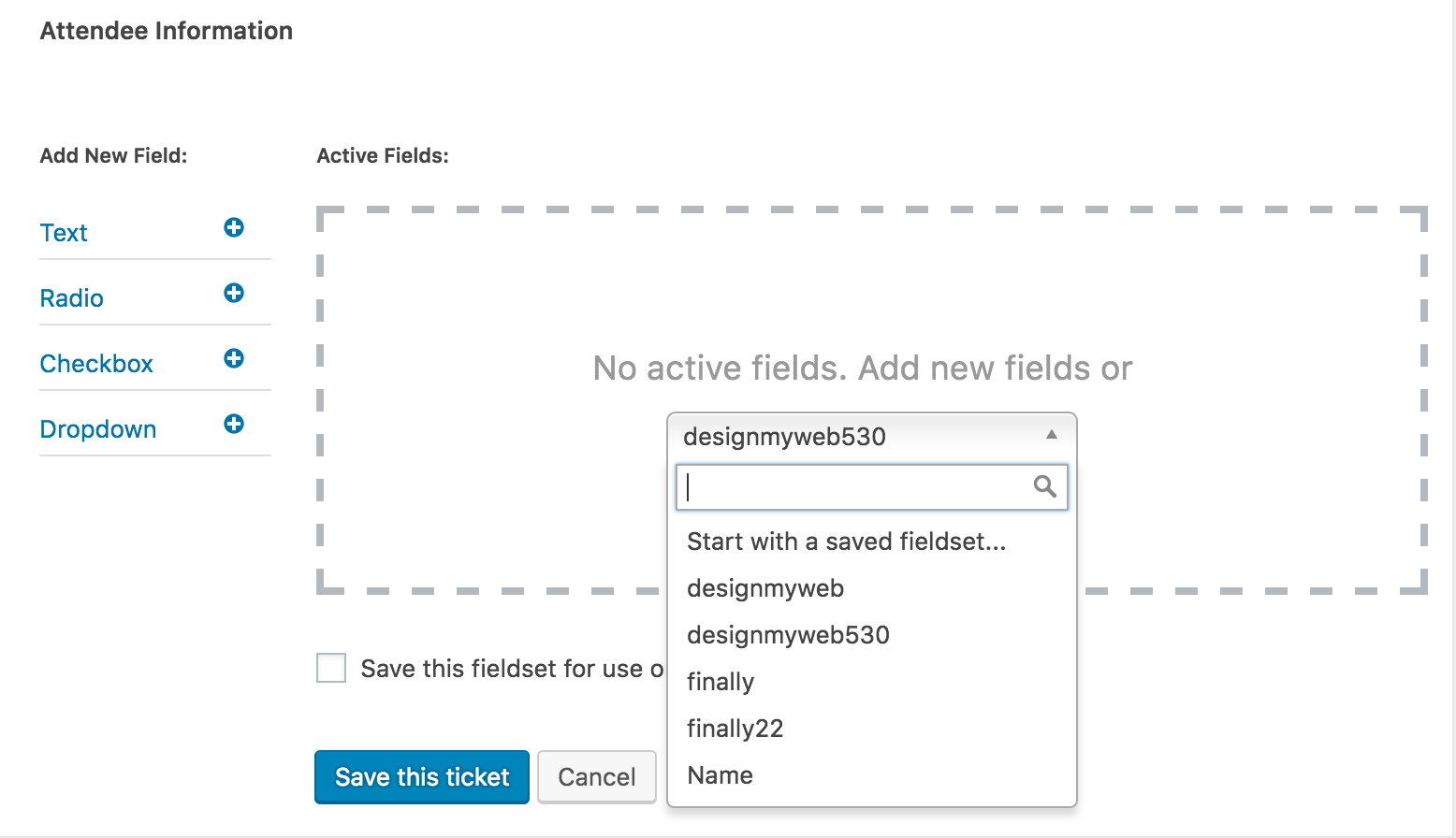
Keep me posted on the status of your issue and have a great evening. Cheers 🙂
August 30, 2016 at 7:57 pm #1157928ParticipantHi Thanks, but that doesn’t really help. I’m asking if I can see that dropdown when there’s already a fieldset added?
In your screencap, there are none. On my admin, when there are none, you can see the dropdown. But if I have 4 fieldsets I want to add, when I put the first one in, then the dropdown is not visible and I can’t add the other 3 saved fieldsets and the only option is to create them all from scratch.
Does that make sense?
BTW, I did the troubleshooting w/ plugins and themes, with no change in my admin so I’m wondering if you just have the capability to use one saved fieldset at a time?
August 31, 2016 at 11:35 am #1158390ModeratorHey Valerie,
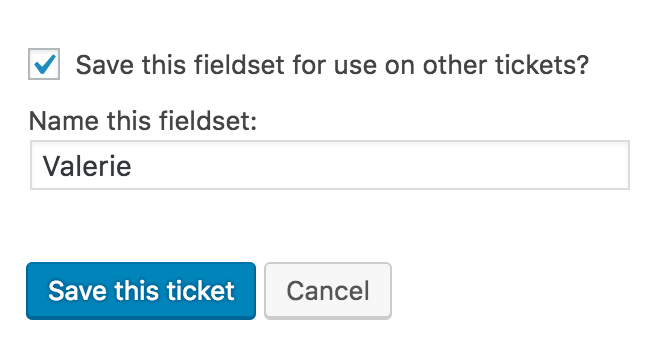
My apologies for the confusion in my first response. I now clearly understand what you’re attempting to do. I can confirm that at this time, the plugin unfortunately doesn’t allow multiple fieldsets to be added to tickets. Forgive me if you’ve already tried this or it’s irrelevant at this point, but are you able to get the desired behavior by building a fieldset on one event and checking the ‘Save this fieldset for use on other tickets?‘ box, then applying that fieldset to the relative events? (see screenshot below)
If that doesn’t suffice, let me know and I’ll create a report for our developers to review and hopefully get the functionality added into an upcoming maintenance or feature release.
August 31, 2016 at 1:16 pm #1158449ParticipantYes and save it like in your screencap. There is no prob with my install. I can use one fieldset.
But if there’s anything in that saved fieldset I want to add or change, then it’s not so helpful. I can go into edit saved fieldsets, but that doesn’t update the ones already attached to tickets.
I have about 8 or 9 different items to add to 9 different tickets. So this would be really cool if:
1. you could use more than one saved fieldset at a time (since you can’t, then I have to add all 8 items to one fieldset)
2. you could change the saved fieldset and have those changes update anywhere that fieldset is used.
3. If you could delete all items in a saved fieldset with one click (right now, if I have to change anything in a fieldset with 8 items in it that’s already attached to a ticket, then I have to click 8 times to delete them all so I can see the dropdown and choose my updated fieldset and add it again = really annoying when you have 9 tickets. That’s 72 clicks.
4. If you could reorder the 8 items in the saved fieldset. Right now, you can’t reorder at all. If you want to change the order of any of those 8 items, you’re back to #3 where you have to edit or make the fieldset w/ the updated order, then go into each of the 9 tickets, delete all 8 items in the attached fieldset so you can see the dropdown with the list of saved fieldsets and click to add your reordered one. Rinse Repeat Cry.
So I was initially excited about this functionality but it’s really so undeveloped that it’s only useful for only the simplest of tasks (that you won’t ever want to update later).
I gave you my feedback not so much to complain, though I am disappointed, but in the hopes that you’ll flesh this functionality out so that it can be a more mature implementation. It could be super useful.
September 1, 2016 at 12:17 am #1158616ModeratorHey Valerie,
First off, thank you so much for the constructive criticism. I really do see the validity in every single point you’ve made. If you wouldn’t mind, please visit our UserVoice Feature Ideas and submit your ideas there. More information on how important user feedback is to us can be found here.
I wish I had solutions for you in the mean time and if it comes down to it, we have a list of customizers that can hopefully get more functionality out of our plugins until we can include them in upcoming feature releases.
Again, thank you for the input and thorough details regarding your experience as we will most definitely review it while adding/updating features included in our plugins. Have a great upcoming weekend and please feel free to reply back with any more questions or comments you might have. Cheers!
September 23, 2016 at 9:35 am #1167967Support Droid
KeymasterHey there! This thread has been pretty quiet for the last three weeks, so we’re going to go ahead and close it to avoid confusion with other topics. If you’re still looking for help with this, please do open a new thread, reference this one and we’d be more than happy to continue the conversation over there.
Thanks so much!
The Events Calendar Support Team -
AuthorPosts
- The topic ‘Cant add multiple saved fieldsets to the same ticket’ is closed to new replies.