
Home › Forums › Calendar Products › Events Calendar PRO › Blank widgets screen
- This topic has 31 replies, 3 voices, and was last updated 9 years, 9 months ago by
Cliff.
-
AuthorPosts
-
December 24, 2016 at 2:56 am #1210239
Emily Tarrant
ParticipantHi Cliff
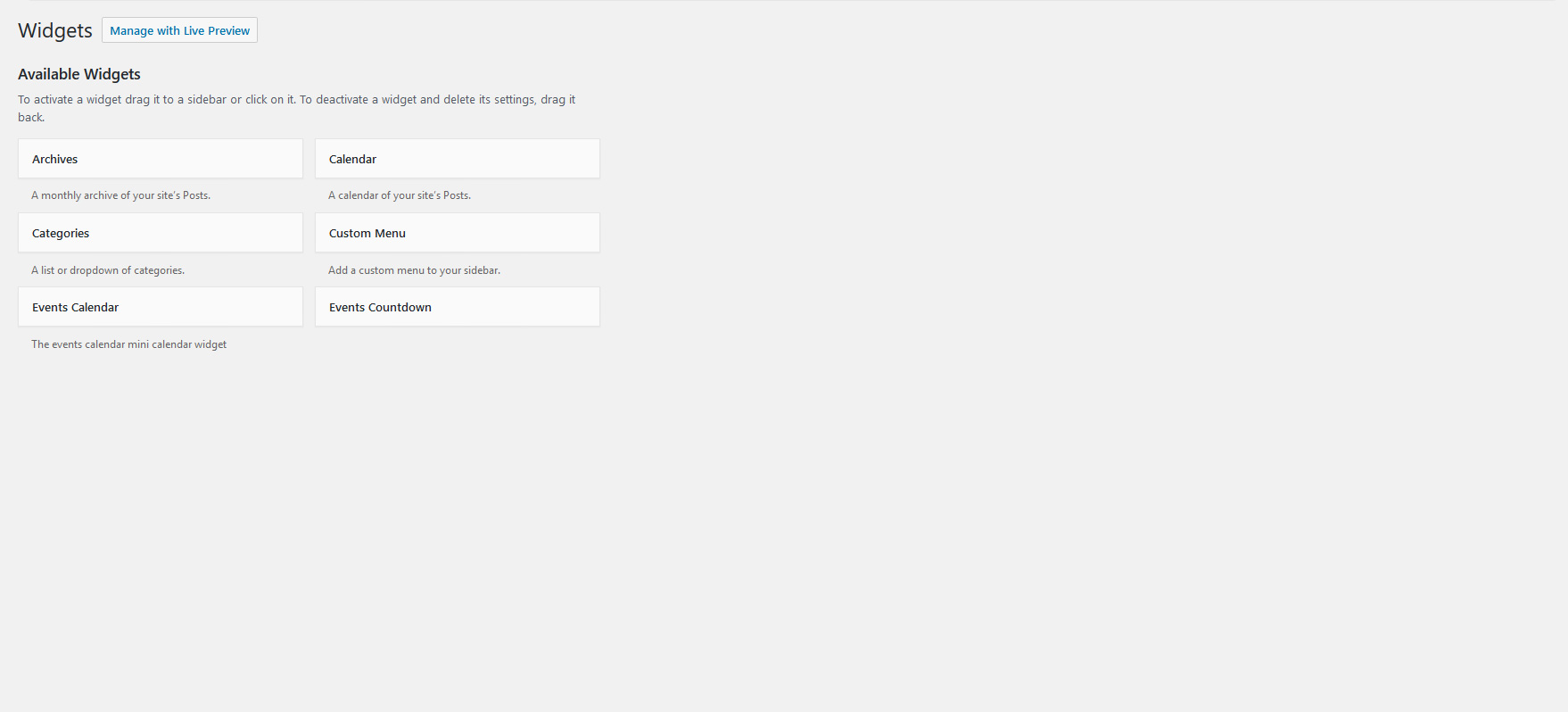
Apologies if I’ve confused you. What I hadn’t realised was that the sytem changes my file names when uploading jpgs, so pointing you at the file name for the screenshot understandably hasn’t worked. This is the screenshot that shows what happens with the events plugins enabled:
https://theeventscalendar.com/content/uploads/2016/12/f5f6f825c16ca414.jpg
To be absolutely clear, I’m not using the Events Countdown widget – the issue is that with the events plugins enabled (and specifically The Events Calendar Pro) the widgets page stops loading once it’s gets to the Events Countdown widget on the left hand side of the page. This is with ONLY Tribe Events plugins enabled, not WooCommerce or any of the other plugins that are installed.
Cheers, Emily
December 29, 2016 at 10:01 am #1211460MemberGotcha. Thanks for clarifying.
There’s obviously something wrong when the Available Widgets appears but the Widget Areas do not.
I’d suggest deleting your debug.log file, then load your Widgets screen only once. Then see what WP_DEBUG messages are in the fresh debug.log file that should get auto-created (as I suspect there will be WP_DEBUG messages). Then do a search-and-replace in the debug.log file to remove all instances of this text:
/home/sites/wfdevelopment.co.uk/public_html/lymelrm/lrm(this step will make it easier to read)
Then work toward resolving all those WP_DEBUG messages, whether that means reporting them to your web developer, your other plugin or theme authors (if the debug messages relate to their product), or even your web host if you think they’ll be able to help.
I hope these detailed instructions help you get to the bottom of this!
January 5, 2017 at 5:40 am #1213695ParticipantHi Cliff. Happy New Year! Thanks for your advice. I will do what you say and see what the debug says. I’ll let you know what I find out.
Cheers, EmilyJanuary 5, 2017 at 8:27 am #1213777MemberThanks, Emily.
Please note that threads get Closed automatically after a couple weeks of inactivity. If it does get Closed, please open a new thread, adding your current problem description and also linking back to this thread.
January 6, 2017 at 6:20 am #1214283ParticipantHi Cliff
I’ve tried resetting the debug file and this is what I’m finding:
Theme: Twenty Sixteen
Plugins Activated: The Events Calendar and The Events Calendar PRO – all other plugins deactivatedWhen I go to the widgets page I get the following error in the log:
[06-Jan-2017 14:12:47 UTC] PHP Fatal error: Out of memory (allocated 182452224) (tried to allocate 32 bytes) in [REMOVED]/wp-includes/wp-db.php on line 2416I only get this memory error if these two plugins are enabled. If I disable them and enable everything else it’s fine.
Cheers, Emily
January 6, 2017 at 3:42 pm #1214552MemberInteresting. Could you please make sure all your Modern Tribe plugins (and WordPress core) are at their latest versions?
It’s hard to tell if this is your issue or not, but, once you verify you’re on the latest versions, please do strongly consider trying the fix for runaway recurring events (a bug introduced in version 4.2.2 and fixed within a few days via version 4.2.2.1).
You can download our Recurring Event Cleanup Tool extension plugin to fix it.
Please let me know how it goes for you.
January 7, 2017 at 6:36 am #1214667ParticipantHi Cliff
I’ve made sure that the site is completely up-to-date – WordPress core and all plugins.
I’ve also had a look at the Recurring Event Cleanup Tool but I’m not using any recurring events – all events are entered individually as one-offs.
So, unfortunately that’s not my issue. Can you suggest anything else for me to look at?
Cheers, Emily
January 9, 2017 at 1:17 pm #1215304MemberTo be clear, A) you installed and activated the Recurring Event Cleanup Tool but it didn’t display any recurring events, or B) you did NOT try it out?
If you haven’t tried it out, please do, just in case something might have happened by accident or via a bug.
Thank you.
January 10, 2017 at 5:36 am #1215741ParticipantHi Cliff
I can confirm that I have installed and activated the cleanup tool and it didn’t display any recurring events.
So, from what I can see there is nothing for me to clean up using the tool. I’ve attached a screenshot of the tools so that you can check I’ve understood this correctly.
Many thanks, Emily
January 10, 2017 at 8:18 am #1215816MemberThank you for confirming.
I checked with one of our developers and they asked if you could try out this code snippet:
function reduce_countdown_widget_limit() { return 40; }
add_filter( 'tribe_events_pro_countdown_widget_limit', 'reduce_countdown_widget_limit' );
You could simply add it to the end of your active theme’s / active child theme’s functions.php file to test it out.
Let me know how it goes for you.
January 11, 2017 at 2:37 am #1216430ParticipantHi Cliff
That’s worked! What a relief!!
Is there anything that I should be aware of with using this fix?
Cheers, Emily
January 11, 2017 at 7:52 pm #1217141MemberAwesome!
Thanks so much for confirming.
FYI: The default limit is 250 so that code is overriding it with 40 instead.
250 may be more than your server resources can handle, but then I’d suggest asking your web host about your server limitations.
Please let me know if you have any follow-up questions on this topic.
January 12, 2017 at 1:36 am #1217242ParticipantThanks Cliff, is there a particular server limitation that I should enquire about?
January 12, 2017 at 3:02 pm #1217727MemberI’ll point you to https://wordpress.org/about/requirements/
Please let me know if you have any follow-up questions on this topic.
January 13, 2017 at 4:25 am #1217987ParticipantThanks Cliff, much appreciated.
-
AuthorPosts
- The topic ‘Blank widgets screen’ is closed to new replies.