
Change the Labels for “Events”, “Organizers”, or “Venues”
The Events Calendar is designed to create and manage events in a calendar format. However, sometimes a label like “Events” or “Venues” does not perfectly describe your calendar’s contents. Perhaps you want to change:
- “Events” to “Classes”.
- “Venues” to “Locations”.
- Or, “Organizers” to “Instructors”.
This extension for The Events Calendar will help you relabel them. It adds a new subtab to the WP Admin > Events > Settings > Display area called “Labels”.
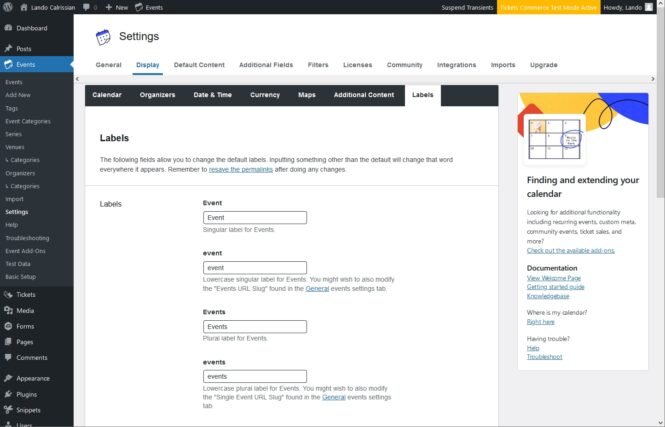
After installing the extension, go to the new settings area. You will find three different labels that can be altered, Events, Venues, and Organizers. For each label, there are four variations. Due to the broad number of languages supported by The Events Calendar, each of these variations is a separate field and can be edited individually. Typically when changing one of the labels you will want to edit all four variations of it:
- Singular (i.e. “Event”)
- Lowercase singular (i.e. “event”)
- Plural (i.e. “Events”)
- Lowercase plural (i.e. “events”)
Once you have made the desired changes, hit “Save Changes” at the bottom of the page. It is also recommended to resave the permalinks under WordPress > Settings > Permalinks. And you’re done! The changes will now be reflected across your site.
Changelog
- Version 1.2.0
- 2024-10-09
- Fix – Make sure the settings are visible and work with the new TEC admin interface. [TECEXT-334]
- Tweak – Move settings to their separate sub-tab under Events > Settings > Display > Labels.
- Version 1.1.0
- May 1, 2020
- Tweak – The extension has been reworked for better compatibility.
- Version 1.0.1
- Fix – The extension now conditionally requires the Settings_Helper.php file to prevent the Cannot declare class Tribe__Extension__Settings_Helper because the name is already in use error.
- Extension URL updated.
- Version 1.0.0
- Initial release.