
Default Attendee Fields
If you regularly create ticketed events and use the same attendee fieldset each time, you know how repetitive it can be to manually apply it to every ticket. This ticket extension takes care of this for you.
Once activated – and you already have some Ticket Fieldsets saved -, head over to Tickets → Settings → Attendee Registration tab → Default Attendee Fields for Collecting Attendee Registration Information. This is where you can set which fieldset should be used for RSVPs, or tickets. The extension supports all providers: Tickets Commerce, WooCommerce and Easy Digital Downloads.
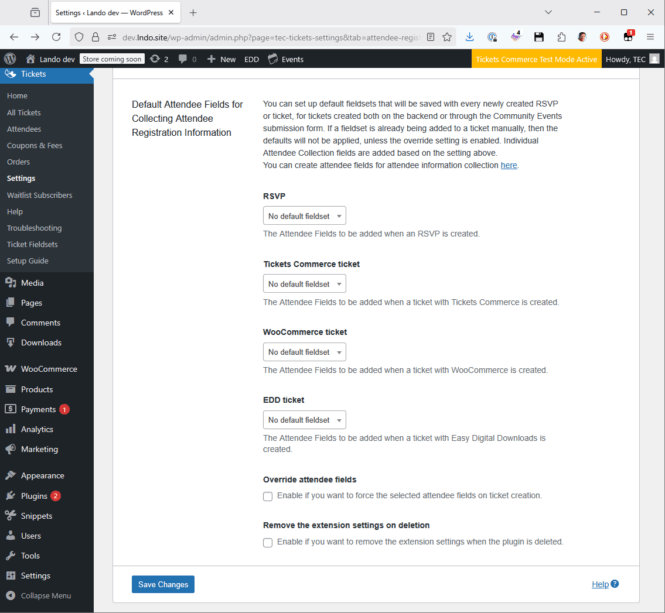
The selected fieldset will be automatically added to an RSVP or a ticket when it is created. Note however, that it will not be added on modification.
The Override attendee fields setting can be useful, if you want to use the same fieldset on all of the tickets, so if someone wants to add different fields, those will be overwritten.
Changelog
- version 1.2.0
- September 1, 2025
- Feature – Add support for the block editor.
- Feature – Add an option to remove the settings on plugin deletion.
- Tweak – Adjust the settings to match the new settings UI.
- version 1.1.0
- September 24, 2024
- Feature – Add support for Tickets Commerce tickets.
- Fix – Ensure the Settings link is added to the plugin actions the correct way and points to the right page.
- Fix – Correct the URL pointing to the Attendee Fields admin page.
- Tweak – Make sure the settings show up under Tickets → Settings → Attendee Registration.
- version 1.0.1
- June 24, 2023
- Fix – Update to use the new Service_Provider contract in Common.
- version 1.0.0
- November 3, 2021
- Initial release