Forum Replies Created
-
AuthorPosts
-
David
ParticipantUpgrade performed – saving does not work and does not save the order into the order that I drag them into
Worse – existing functions – based on your sample code for showing the Abstract post types no longer work at all
So I now have them not being saved, still in the wrong order and now not being shown – it’s a disaster of a fix to be honest
ParticipantI am still seeing the same issue – the linked page does not list it as being fixed either
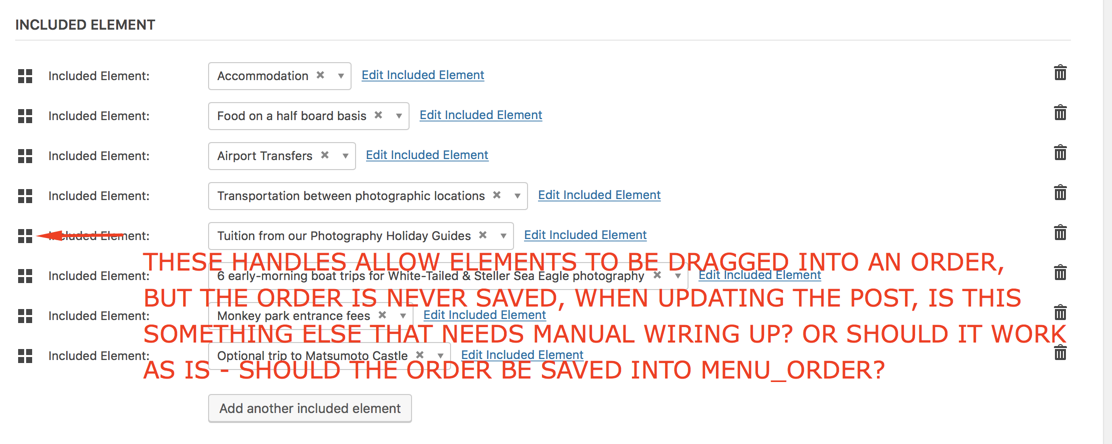
ParticipantCompare https://theeventscalendar.com/content/uploads/2018/03/f9d91a17c3d9db78.png – the edit order – with the output order as shown in the attached – the output order IS always alphabetical
ParticipantSorry you are correct – I am calling tribe_get_linked_posts_by_post_type – this always returns the associated linked posts in alphabetical order as opposed to the sort order on the edit screen – as per my screen shot – it doesn’t matter the entered order – they are always alphabetical
PS I am away as of tomorrow for two weeks – please do not close this ticket down in my absence
ParticipantOk – this is going the same way as my previous question – can you first up answer – should those drag handles do anything – they do not on my install – drag into a new order, hit update – order is not saved
I fully understand that the function outputs the linked post types – below is the code – bastardised from your functions that outputs them – please answer the basic question first – do the drag handles support reordering of the linked post types?
`function get_a_custom_field_key_from_label( $label, $post_type_key, $prepend_underscore = true ) {
$post_type_key = ‘included-element’;
$label = preg_replace( ‘/[-\s]/’, ‘_’, $label );
        $label = sprintf( '%s_%s', $post_type_key, $label );

        if ( ! empty( $prepend_underscore ) ) {
            $label = sprintf( '_%s', $label );
        }

        $label = sanitize_key( $label );

        return $label;
    }
function get_custom_field_labels() {
        $field_labels = array(
            'Phone',
            'Website',
            'Email Address',
        );

        $field_labels = array_map( 'esc_html', $field_labels );

        return $field_labels;
    }
function get_event_single_custom_fields_output( $post_type_key, $post_id = 0 ) {
        $post_id = absint( $post_id );

        $output = '';

        if ( empty( $post_id ) ) {
            return $output;
        }

        foreach ( get_custom_field_labels() as $custom_field_label ) {
            $custom_field_key = get_a_custom_field_key_from_label( $custom_field_label, $post_type_key );

            $value = get_post_meta( $post_id, $custom_field_key, true );

            if (
                false === $value
                || '' === $value
            ) {
                continue;
            }

            // Build the HTML markup applicable to each field.
            // By default use esc_html(), but we can't do that for all uses of $value because we already have our desired HTML (with escaped values).
            if ( 'Website' == $custom_field_label ) {
                $value = esc_url( $value );

                if ( empty( $value ) ) {
                    continue;
                }

                $value = sprintf( '<a href="%1$s">%1$s</a>', $value );
            } elseif ( 'Email Address' == $custom_field_label ) {
                $value = antispambot( $value );

                if ( empty( $value ) ) {
                    continue;
                }

                $email_link = sprintf( 'mailto:%s', $value );

                $value = sprintf( '<a href="%s">%s</a>', esc_url( $email_link, array( 'mailto' ) ), esc_html( $value ) );
            } else {
                $value = esc_html( $value );
            }

            $output .= sprintf(
                '<dt>%s:</dt><dd class="%s-%s">%s</dd>',
                esc_html( $custom_field_label ),
                esc_attr($post_type_key),
                esc_attr( strtolower( $custom_field_label ) ),
                $value
            );
        }

        return $output;
    }
function get_post_type_label( $post_type_key ) {
$label = ‘name’;
$post_type_object = get_post_type_object($post_type_key);
        $result = $post_type_object->labels->$label;

        return $result;
    }
function get_linked_posts($id, $post_type_key, $output_type) {
$output = ”;
//$output_type = “post-title-only”;
//$output_type = “post-title-content”;
//$output_type = “content-post-title”;
//$output_type = “content-only”;
// IS USED
// echo ‘Called get_linked_posts
‘;//echo “Requested ID: ” . $id;
//$post_type_key = ‘included-element’;
$linked_posts = tribe_get_linked_posts_by_post_type($id, $post_type_key);// echo ‘
';
// print_r($linked_posts);
// echo '
‘;
if ( ! empty( $linked_posts ) ) {
$output .= sprintf(
‘<!–%s
–>
- ‘,
-
%5$s
%6$s - %3$s
-
%3$s
%4$s -
%4$s
%3$s - %3$s
$post_type_key,
get_post_type_label($post_type_key),
$post_type_key
);switch ($output_type) {
case “custom-fields”:
//OUTPUT POST WITH CUSTOM FIELDS AND LINKEDforeach ( $linked_posts as $post ) {
$post_id = $post->ID;$output .= sprintf(
‘‘,
$post_type_key,
esc_attr( $post_id ),
esc_url( get_permalink( $post_id ) ),
esc_attr( get_the_title( $post_id ) ),
esc_html( get_the_title( $post_id ) ),
get_event_single_custom_fields_output( $post_type_key, $post_id )
);
}
break;
case “post-title-only”:
foreach ( $linked_posts as $post ) {
$post_id = $post->ID;$output .= sprintf(
‘‘,
$post_type_key,
esc_attr( $post_id ),
esc_html( get_the_title( $post_id ) )
);
}
break;
case “post-title-content”:
foreach ( $linked_posts as $post ) {
$post_id = $post->ID;$output .= sprintf(
‘‘,
$post_type_key,
esc_attr( $post_id ),
esc_html( get_the_title( $post_id ) ),
esc_html( get_post_field(‘post_content’, $post_id) )
);
}
break;
case “content-post-title”:
foreach ( $linked_posts as $post ) {
$post_id = $post->ID;$output .= sprintf(
‘‘,
$post_type_key,
esc_attr( $post_id ),
esc_html( get_the_title( $post_id ) ),
esc_html( get_post_field(‘post_content’, $post_id) )
);
}
break;
case “content-only”:
foreach ( $linked_posts as $post ) {
$post_id = $post->ID;$output .= sprintf(
‘‘,
$post_type_key,
esc_attr( $post_id ),
esc_html( get_post_field(‘post_content’, $post_id) )
);
}
break;
}$output .= ‘
‘;
}return $output; }function tec_linked_posts_shortcode($atts = [])
{
// IS USED
// normalize attribute keys, lowercase
$atts = array_change_key_case((array)$atts, CASE_LOWER);// override default attributes with user attributes $passed_atts = shortcode_atts([ 'id' => get_the_ID(), 'post_type_key' => 'included-element', 'output_type' => 'post-title-only', ], $atts, $tag); return get_linked_posts($passed_atts['id'], $passed_atts['post_type_key'], $passed_atts['output_type']);}
add_shortcode(‘tec_get_linked_posts’, ‘tec_linked_posts_shortcode’);
`ParticipantDoes the backend sort save? I cannot seem to sabe the order as defined by the drag handles
ParticipantThe back end provides sorting – via the drag handles – I expected it to come out in the order as defined by how I drag the items into order – else the back-end sorting is not worth having
January 16, 2018 at 12:32 pm in reply to: Abstract Post Types – 70% there – but last hurdle to cross #1427932ParticipantI couldn’t get your example to work as is – which was odd – but no matter, I pulled it apart and now have shortcodes for listing Abstract Post Types – which is awesome
But I still have two issues – one is new – the linked Abstract Posts show in the correct order in the back-end – but when displayed using tribe_get_linked_post_types they are coming out in alphabetical order – which is not what I want – how do I change this please?
And I still cannot create a new linked post type within the edit event screen – it never does save – I must have missed something major – it is a very simple type, that just has a post title
February 20, 2017 at 9:55 pm in reply to: Dequeue CSS Styles and JavaScript Files Extension #1242690ParticipantThis reply is private.
January 11, 2017 at 3:05 pm in reply to: Three questions about getting info out to use in short codes #1216975ParticipantHey George – how about you search these forums – eventually I found the answer, someone asked it before – and one of your guys answered it before – and shockingly, he was a lot more helpful than you have been on any of my requests, no he didn’t write code, he suggested a way of doing it, posted some functions that might be helpful – and there was enough information there for the original poster to work out a solution – and even though I didn’t need the same thing – I could work out the solution I needed too – and wow, colour me sarcastic here, but the previous support ticket was helpful – instead of saying, ‘Here is a link to a customisation service’!
When two of the three questions have now been answered – and most of the information was either a) a blatant attempt to get me to go to a consulting service or b) completely wrong in most of the pages that you pointed me to – I would say that you personally were of little use on this thread – and two weeks between replies, pretty poor as well
I refer you to the outstanding question – and the useless link you posted – and I ask again, can you show me the area of that page that you referred me to that you believe does achieve this aim?
There is no aspect in the linked page of https://theeventscalendar.com/knowledgebase/using-tribe_get_events/ – that shows anything to do with venues
December 28, 2016 at 1:31 pm in reply to: Three questions about getting info out to use in short codes #1211212ParticipantI’m not asking you to provide code – or a custom solution – just a simple ‘where is the function to provide x information’ – I can happily code it myself, I have done so for a host of other short codes already – that is why your answers are so infuriating. Your own page about customisers states ‘If you’ve read our forum guidelines, you’ll know there are some customizations that are just outside the scope of what we can help with’ – but I don’t want you to customise, I am happy to do that, seemingly simple questions are too tough to answer like ‘How do I get the total number of tickets ever on sale for an event’, tell me and I can take it from there!
December 28, 2016 at 1:21 pm in reply to: Three questions about getting info out to use in short codes #1211208ParticipantI’ve already used the knowledgebase for the first query – the link you provided is of no help at all – a peruse through the source files showed me the function I needed, but I doubt that I have found the most efficient way for getting the data out
The second query – I have already checked https://theeventscalendar.com/?s=ticket&submit=Search&post_type%5B%5D=wp-parser-function&post_type%5B%5D=wp-parser-hook – hence me knowing that there are functions – apparently listed – to return the number of tickets remaining – but no function for tickets sold or tickets in total – can you show me the function that you believe does achieve this aim?
There is no aspect in the linked page of https://theeventscalendar.com/knowledgebase/using-tribe_get_events/ – that shows anything to do with venues – can you show me the area of that page that you believe does achieve this aim?
Every question I have posted thus far is met with, we don’t support that, but can point you to paid people who can help you – pretty poor support in my opinion – and lo and behold, in some cases, I dig around and find that what I want to obtain, can be reached, but you prefer to say that it can’t
ParticipantThis reply is private.
December 8, 2016 at 11:55 pm in reply to: One event shows tickets – one doesn't – both appear to be set up the same #1203714ParticipantThis reply is private.
-
-
AuthorPosts