

Forum Replies Created
-
AuthorPosts
-
Daniel
ParticipantThanks! Just needed to be pointed to the right place. Deleted the code, and now the image upload is gone from the community page.
ParticipantIt seems making one-and-done events “sticky” solves the problem. Not a perfect solution, but at least a start. Not sure I can get my community posters to follow the rule perfectly–may be something I have to police. Would be nice if there was some functionality to filter recurring events to the bottom of a list, or auto-order events per day based on custom fields.
September 2, 2015 at 7:44 pm in reply to: No image options, sign in issues, and pending review #1001523ParticipantWell George, it seems like maybe the problem is a lack of understanding on my part. For some reason, on the admin bar that subscribers get, the “events” dropdown has the option to just “add event.” That takes the user to the post-like screen without any image options.
But if they choose “community events: add event” they get the right screen. The issue is making sure all of our front-end users are adding community events.
Out of curiosity, is there a way to completely remove that “add event” option from the events dropdown menu on the admin bar? I don’t have to block them if they choose the right things!
September 1, 2015 at 1:48 pm in reply to: No image options, sign in issues, and pending review #1001019ParticipantThanks for taking the time here George.
What is your goal here? Do you want anyone to be able to submit from the front-end? Or do you only want people who have accounts on your site to be able to post there?
We only want users who are registered as either subscribers or contributors to post events (since those roles can’t access other dashboard functions).If you log in as your full-on Administrator account, and go to “Add a New Event” in the admin back-end of your site, do you then see the Media buttons and “Featured Image” box and such?
When I log in with an admin user account through my artsbham.com/wp-admin page, I can add an event and include pictures with the “add media” button above my text editor. When I log in with my “test” subscriber user account, I have no “add media” button (nor featured image, nor upload image).What I’m confused about is this:
Using my “test” subscriber/contributor (doesn’t matter which role) account…
I’ll log into artsbham.com/events/community/add, and there’s the “upload image” button as in the first pic above.
Then I’ll log out, and the URL in the nav bar shows “http://www.artsbham.com/wp-login.php?loggedout=true.” If I log back in, or even leave the page to check the weather and navigate back to it, I’m at a page that looks like the second pic above, with no options for images anymore.This is, I believe, where our community folks are getting into a problem. Upon navigating back to the site, they’re greeted with a completely different event posting format (the 2nd pic), which has no media posting ability (unless they’re schooled in html).
Clear as mud, I think?
Thanks!
DanAugust 28, 2015 at 1:29 pm in reply to: No image options, sign in issues, and pending review #1000093ParticipantOk, so I logged out my test account, and something tells me that to get back to the normal event submission pages, I have to use the community URL (artsbham.com/events/community/add) and I get this:
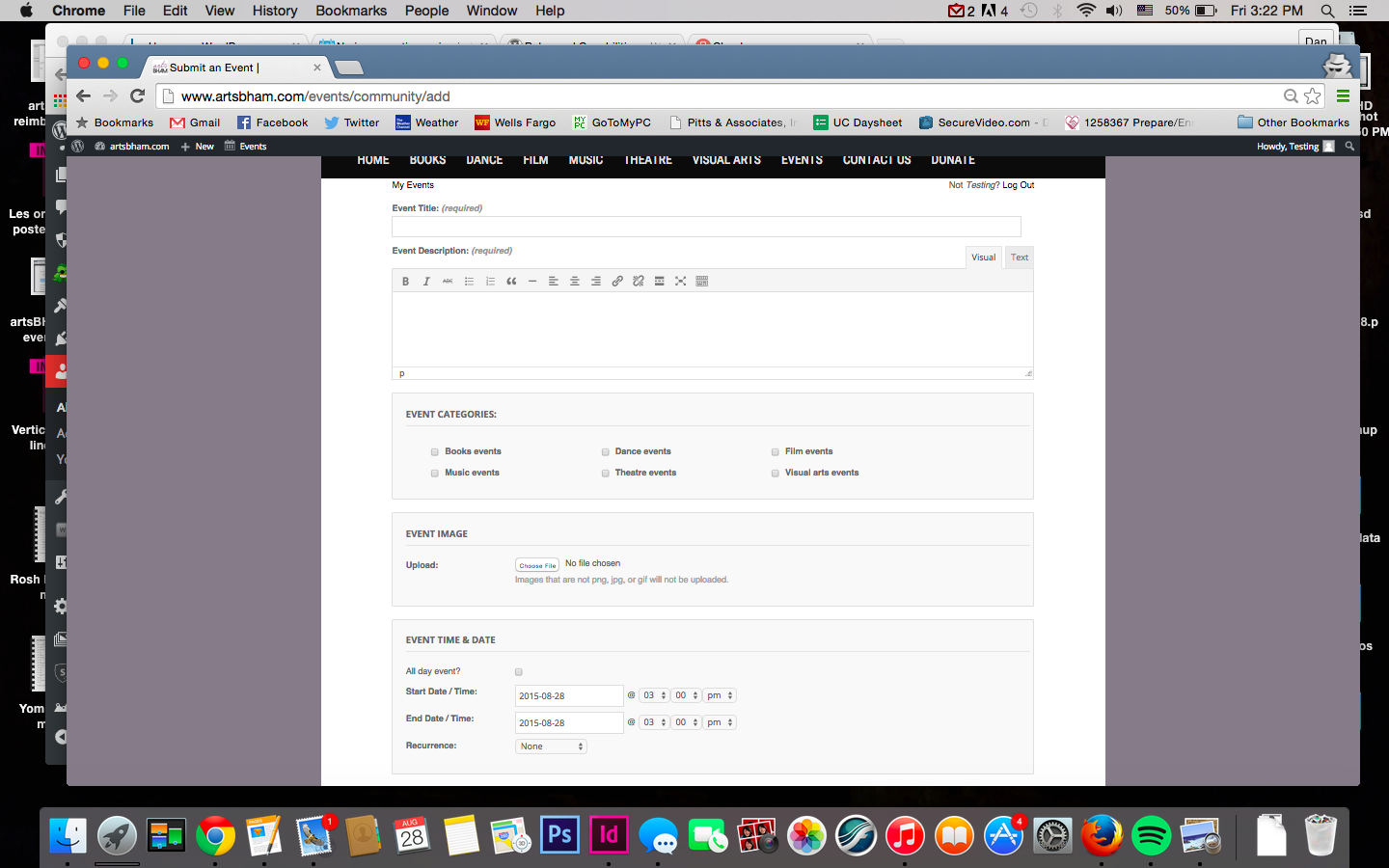
If I just try and log back in immediately, it’s into the overall site (artsbham/wp-login) and I get this:
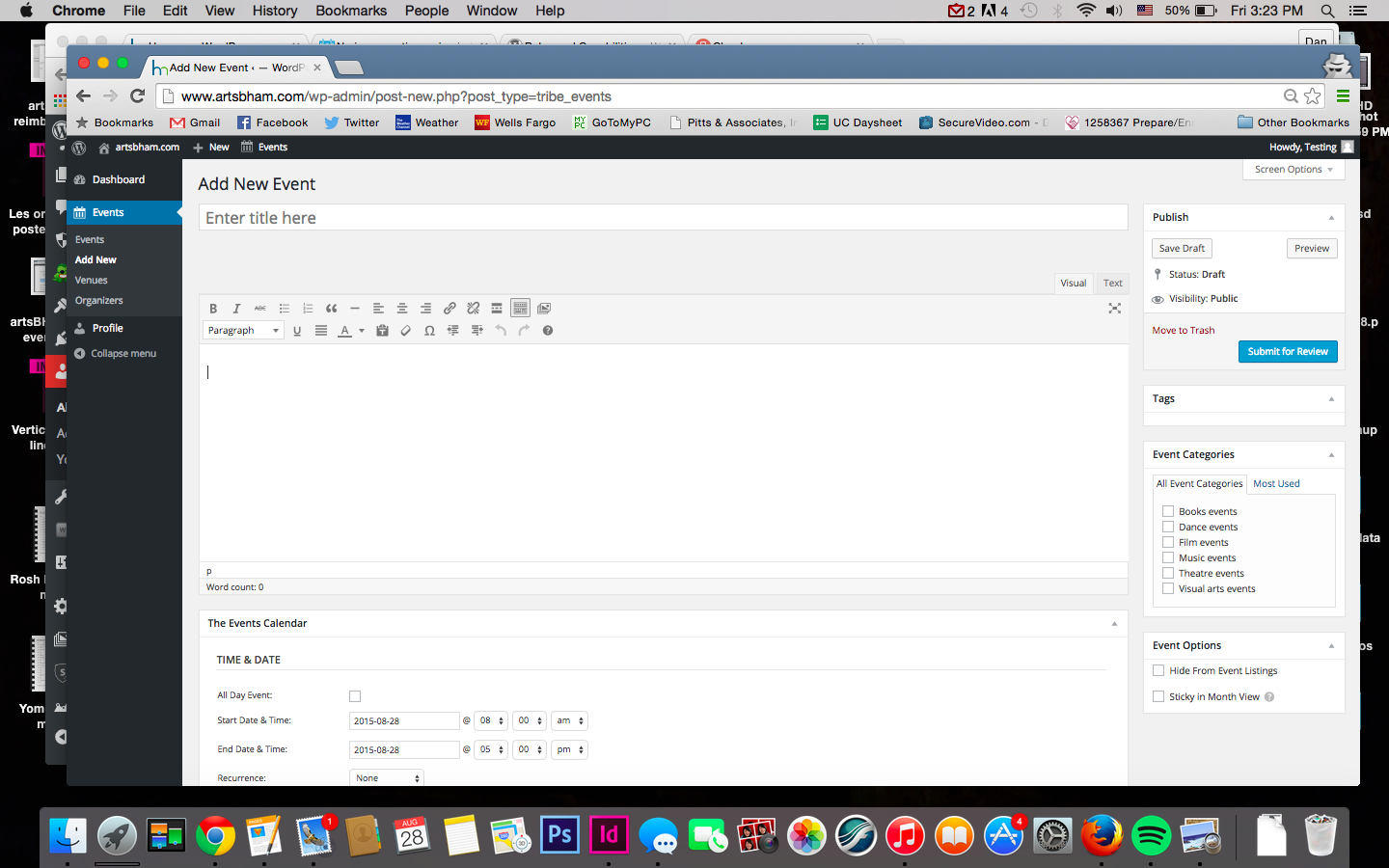
Am I right on this? Notice that there’s no “add media” or upload image button in the second one, even though it’s the same user doing an event add. There’s also no checkbox in screen options for featured image.
So I tell all my community events people to only login via events/community/add?
August 28, 2015 at 1:18 pm in reply to: No image options, sign in issues, and pending review #1000084ParticipantThanks George.
The error message is gone. I changed my Captcha settings to not include registration, and that’s done.
Questions 2 and 3 have me boggled. I have all registrants for Community Events set to “subscriber” by default. I have a test user account I can log into that’s also “subscriber,” so I can see what they see. But my test account shows me a long form event submission, with “submit” at the bottom. As you can see on the image, this user who emailed me about the issue is seeing what an “author” would see–looks like a regular post or page add. How is this possible? I can only see it that way if I change my test account to “author,” but I checked and she’s still a subscriber.
-
AuthorPosts