
Home › Forums › Calendar Products › Events Calendar PRO › Reorder events in all views
- This topic has 4 replies, 3 voices, and was last updated 10 years, 8 months ago by
Support Droid.
-
AuthorPosts
-
January 20, 2016 at 9:09 am #1059329
Daniel
ParticipantHi,
Using PRO and Community events on our site, and I’ve noticed that all recurring events tend to show up above one-off events. For instance, we have art gallery shows that go on for a month, and then an opera that’s only on a Friday and a Sunday. I’d like to be able to prioritize single events (non-recurring or short-term like theatre) over long-term recurring events, and it would be great if day/month/home widget views all reflected this prioritization.Is this something doable, or something for future releases? Thanks!
Dan
January 20, 2016 at 9:16 pm #1059634Cliff
MemberHi Daniel.
I looked at my local testing site to try to figure out a pattern and couldn’t determine one. I checked for the following, of which it wasn’t any:
- start time on each day
- alphabetical by event title
- recurring above non-
- all-day events above non-
I also searched through other past forum threads asking for custom sorting of events on each day of the month view and didn’t find anything terribly helpful to point you to. This one may be helpful (although that line of code is now on Line 883 of the-events-calendar/src/Tribe/Query.php)
This one may be of help too if you really want to pursue this customization.
===
Here are some quick thoughts that might help though:
Can you check if any of the events have “Sticky” checked?
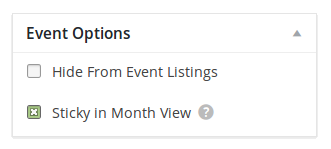
Do any of your events span multiple days (i.e. a single occurrence, if part of a recurrence series, starts at 8pm and ends the following day at 9am)? This might be a way they display above other events.
Could you try adding a few events on a specific day and see if there’s any way you can get your top event to get “bumped” (moved down in the display) by another event?
===
You may want to find or post a new idea for control over sorting at our UserVoice ideas site.
Thanks.
January 23, 2016 at 10:41 am #1061082ParticipantIt seems making one-and-done events “sticky” solves the problem. Not a perfect solution, but at least a start. Not sure I can get my community posters to follow the rule perfectly–may be something I have to police. Would be nice if there was some functionality to filter recurring events to the bottom of a list, or auto-order events per day based on custom fields.
January 24, 2016 at 7:53 am #1061372MemberThanks for letting me know you have a workaround for now.
For sharing feature ideas, please see if that idea exists — and if it doesn’t, please submit a new idea — at our tribe.uservoice.com.
Thanks!
February 19, 2016 at 8:35 am #1078199KeymasterThis topic has not been active for quite some time and will now be closed.
If you still need assistance please simply open a new topic (linking to this one if necessary)
and one of the team will be only too happy to help. -
AuthorPosts
- The topic ‘Reorder events in all views’ is closed to new replies.