
Home › Forums › Welcome! › Pre-Sales Questions › Which views are being used in your "Live Music" example?
- This topic has 5 replies, 2 voices, and was last updated 10 years, 10 months ago by
Brian.
-
AuthorPosts
-
November 26, 2015 at 8:08 pm #1031329
Joel Laviolette
GuestHi,
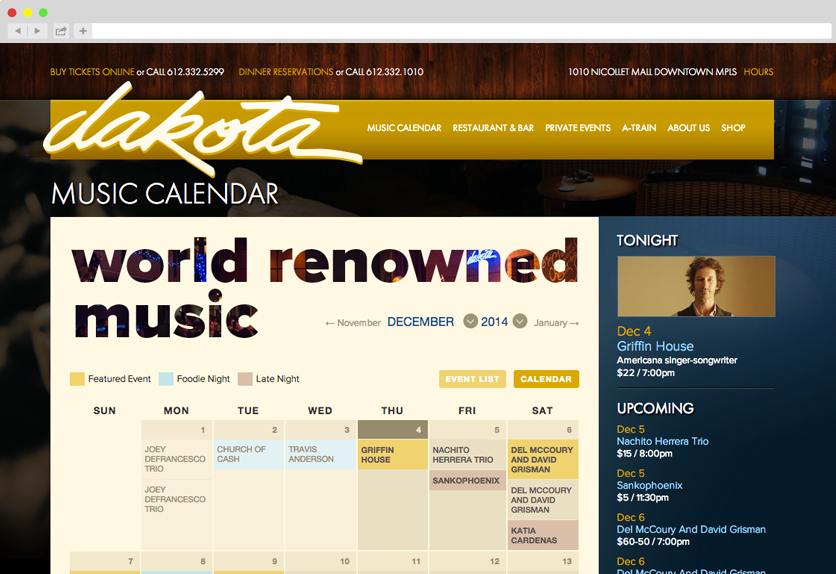
We are interested in getting the event calendar. In your examples, you have a “Live Music” example. Here is the image:
https://theeventscalendar.com/content/uploads/2014/12/example_dakota2.pngSome questions:
We are wondering what extensions-if any-do we need to achieve that look? I see a monthly view, and I guess the side panel is a list view? We especially like the top right where it displays the “Tonight” event. Are we able to have all this set up in a way where the “Today” view will go to the next upcoming event automatically?On that list view on the left, can we have out ticket links and facebook event links there if we have those add ons?
Lastly, we have a band and a music school where we display the same calendar on two different websites. Will we be able to do that with a single license?
Thank you all for your time, and thank you for including important things like facebook event integration and ticket sales!
November 29, 2015 at 9:52 am #1032159MemberHi,
Thanks for the interest in our plugins I can answer your questions.
The default view of our plugin is here:
To get a different look for the calendar like the site you referenced will take customization that is beyond the support we can provide.
We are wondering what extensions-if any-do we need to achieve that look? I see a monthly view, and I guess the side panel is a list view? We especially like the top right where it displays the “Tonight” event. Are we able to have all this set up in a way where the “Today” view will go to the next upcoming event automatically?
I would compare their view to the month view in the link I provided and the differences are all customizations by the developer.
The tonight and featured event is a custom coding by the developer of that site so I am not sure how they did it nor can we support that. You might be able to use the Event List Widget to show the next upcoming events instead of this.
On that list view on the left, can we have out ticket links and facebook event links there if we have those add ons?
This would be possible to edit by customization following our themer’s guide:
https://theeventscalendar.com/knowledgebase/themers-guide/
Also these custom fields have information you can use:
https://theeventscalendar.com/knowledgebase/wordpress-post-meta-data/
Lastly, we have a band and a music school where we display the same calendar on two different websites. Will we be able to do that with a single license?
The licenses are for installs of WordPress so that would be 2 different sites and two licenses would be needed.
Please note we do not have a feature to share events between two different installs of WordPress.
Let me know if you have any follow up questions.
Thanks
November 29, 2015 at 10:35 am #1032166Joel
ParticipantI would compare their view to the month view in the link I provided and the differences are all customizations by the developer.
The tonight and featured event is a custom coding by the developer of that site so I am not sure how they did it nor can we support that. You might be able to use the Event List Widget to show the next upcoming events instead of this.
Wow, that’s a real bummer as I assumed since you have it as an example on your own website that that view would be supported out of the box. We just bought the pro version and several plugins based on the assumption that the views you are showing on your website are something that you actually support.
November 29, 2015 at 11:42 am #1032174MemberNope that is incorrect assumption. It is a showcase of what people have done with the plugin and not a representation of what it does out of the box.
If you feel it is no longer good for you as you cannot make those customization then to request a refund please follow our policy outlined here:
And we can take care of it. Thanks
November 29, 2015 at 11:56 am #1032178ParticipantThanks for the refund offer. I will see if we can get the features as they are to work for our needs.
I understand that is an incorrect assumption. I’d like to also say that as someone that is brand new to your service that it is not easy for us to automatically know that that particular view does not in fact come with the product. i imagine you look at The Events Calendar every day so you can quickly look at that picture and see that what is being shown is not what actually comes with the product. As a new customer, it is not the case for me. You guys might not care, but I wanted you to know that was our situation.
But hey-that’s what this pre-sales forum is for! Take care and happy holidays.
November 29, 2015 at 12:09 pm #1032185MemberHi,
Sorry about that we do not want people to have the wrong expectations when they purchase the plugins.
I will bring this up with the team and see about adding a disclaimer to the showcase that there are customized features that might not be included with our plugins and to ask if you have any questions.
Another plugin that might help get you closer to what you are looking for is the Event Category Colors:
Thanks for your feedback.
-
AuthorPosts
- The topic ‘Which views are being used in your "Live Music" example?’ is closed to new replies.