
Home › Forums › Calendar Products › Events Calendar PRO › Visual Editor does display when clicked and other related issues
- This topic has 2 replies, 3 voices, and was last updated 10 years, 7 months ago by
Support Droid.
-
AuthorPosts
-
February 29, 2016 at 7:29 am #1083311
REYNALDO
ParticipantI have The event calendar installed on several website. All work fine except this one site…www.letitbeus.org
I have updated wordpress and all the plugins, including the event calendar to 4.06
Here are the issues I am having:
I have uploaded a short screencast so you can see what is happening. I hope this helps identify the problem https://cloudup.com/c3PQp9iG4TC
Issue 1: In the editor, the Visual editor is not clickable.
Therefore, you cannot style anything via the wysiwyg. I uninstalled and reinstalled the both the base Calendar and Calendar Pro plugins several times.Issue 2: When trying to add a feature image, I get a different Media Library layout.
But only in your product. Everything works perfect if adding a feature image to a page, for example. (See Video)Issue: 3: The date picker is not popping up.
I am a complete loss of what to do.. HELP!
ORIGINAL THREAD
February 29, 2016 at 7:56 am #1083341George
ParticipantHey @Reynaldo,
Thank you for sharing this screencast!
There is a theme or plugin code conflict that is at the root of this problem. Before getting into a full set of troubleshooting steps, I’m wondering if you could first clarify where the edit-screen elements in the following screenshot from your video come from?
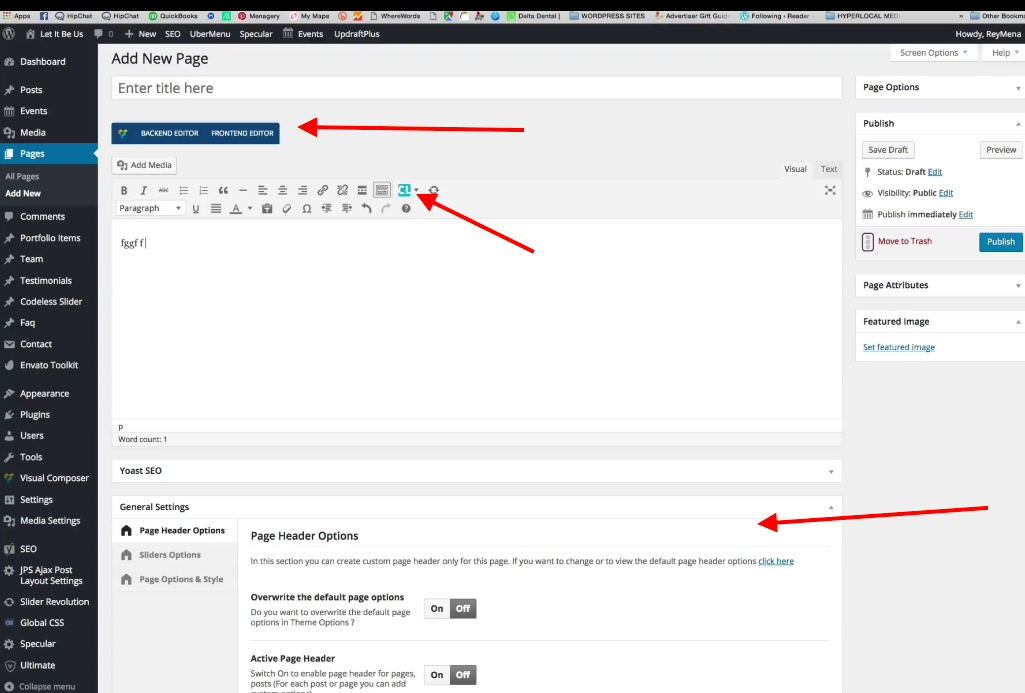
If these all come from the “Visual Composer” plugin, for example, then is there any requirement within that plugin to “register” the features of that plugin on specific post types? That might be the case: “Pages” are a default post type, of course, so it would make sense for those features to automatically load on default types. “Events” are a custom type, so perhaps it takes extra settings—or even code—to register those features on that post type? I would recommend investigating this, and reaching out to the Visual Composer support team for assistance if you think is relevant.
Next, we cannot log into customer sites for any reason, but if you’re comfortable with using your browser console, would you be able to open the console and view an “edit-event” screen? If there are JavaScript errors, which there definitely appears to be, they will be displayed in the console. If possible, and you see these errors, could you then share the text of the errors and the file locations from where they emerge?
If you’re not familiar with using a browser console, I would recommend simply Googling “how to use the console in {browser name}”, for whichever browser you use. (It appears to be Chrome browser in your video, but I cannot 100% tell.)
I hope these steps lead to the revealing of some more information here—let us know what you find!
Thank you,
GeorgeMarch 15, 2016 at 9:35 am #1089157KeymasterThis topic has not been active for quite some time and will now be closed.
If you still need assistance please simply open a new topic (linking to this one if necessary)
and one of the team will be only too happy to help. -
AuthorPosts
- The topic ‘Visual Editor does display when clicked and other related issues’ is closed to new replies.