
Home › Forums › Calendar Products › Community Events › the photo view does not work well
- This topic has 24 replies, 3 voices, and was last updated 10 years, 1 month ago by
George.
-
AuthorPosts
-
February 27, 2016 at 1:00 pm #1082978Participant
Hi Douglas,
The support droid auto-bot closes threads automatically after 2 weeks of inactivity. There is no pinpointed bug here at this time, so we will have to continue investigating this and that could take weeks or months until we are able to isolate the problem and publish a fix.
That will be longer than 2 weeks, and so the bot will close this thread regardless before a resolution is had.
I will be closing this thread unless @Stephaneperrin has further questions. I encourage you to open a thread of your own for problems on your site.
— George
February 27, 2016 at 1:38 pm #1082996Douglas
ParticipantMy apologies for the last post. User error. If it can be deleted please do so. I have been unable to.
What I was trying to post was this.
@george the definition of a verified bug is when software does not work as intended or designed. This is a verified bug. Just because you can’t figure it out does not lower its priority or subtract from its importance.This is the second time that you personallyrb have offended me as a customer. And since this keeps happening. And the software has not worked as offered when I bought, with the continued lack of urgency to resolve it, I request that me licensing fees be refunded. With this I am still eating my costs for my time loss of business because the aspects of your product that I was sold are not priority enough to make me a marginally important customer.
Please do not respond to me any further. Any communication other than somebody with some authority over the product and customer satisfaction, will be fruitless.
Former fan boy of theeventscalendar product and its potential.
February 27, 2016 at 5:53 pm #1083021ParticipantHi Douglas,
We are unfortunately only able to process refunds for items within thirty days from their date of purchase. However, we would be happy to try initiating a refund despite this. It MAY be possible by working with the payment processor, though I cannot guarantee that outcome.
To help us try and help you get a refund, please follow the same steps as normal for a refund as described in this article → https://theeventscalendar.com/knowledgebase/refund-policy/
We will respond to your email from there to continue this conversation.
— George
February 27, 2016 at 5:54 pm #1083022ParticipantHi @stephaneperrin,
I would like to share an update regarding some aspects of the Photo View issues here. It’s a Saturday night, so I didn’t expect to make much progress with this today, but one of our developers, Brian, has come up with something that might help temporarily until we can properly fix this in our code.
To try out this custom solution, simply copy and paste the following code into the bottom of your theme’s style.css file:
.tribe-events-photo #tribe-events-photo-events {

   opacity: 1;

}
Let us know if adding that snippet to that file improves any of the Photo View behavior on your site!
Thanks,
GeorgeFebruary 27, 2016 at 6:25 pm #1083029stephaneperrin
ParticipantGeorge, I now have added
.tribe-events-photo #tribe-events-photo-events {
opacity: 1;
}to the css of the theme as requested and the photo view is now appearing on mobiles and tablets which is great improvement. 🙂
Thanks for that.
But there is still a huge problem: Only 5 events are appearing on all support (desktop computers, mobiles and tablets) and when I click following events, I get nothing.
Have a look at https://cursos.patriciacupcakes.com/eventos/foto/ Only the next 5 events are listed and if you click on next events then you got an error message telling that there is more events.
The problem is that there are other events. You can see the events using the month view: https://cursos.patriciacupcakes.com/eventos/
I don’t understand why only 5 events are displayed in the photo view.
Any clue about that?
February 27, 2016 at 6:38 pm #1083032ParticipantHey @stephaneperrin,
I’m really glad to hear about some progress with the display of Photo View!
When it comes to the number of events being limited to 5, this is another odd issue that is likely the result of a theme or plugin conflict.
I would recommend first head to Settings → Reading in your site’s wp-admin.
In this settings page, there should be two options which I’ve shown in this screenshot:
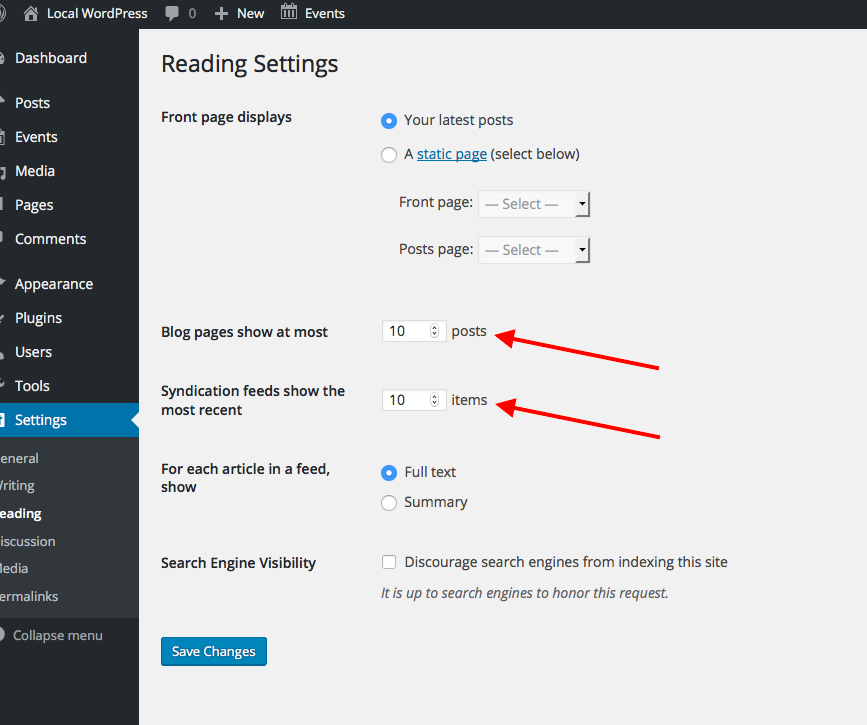
What are the current values of these options? If either one is 5, does changing that option to something else alter the number of events loaded in your Photo View and such?
If neither option is set to 5, then unfortunately the “plugin or theme conflict” is even more likely the culprit here 🙁 In this case, I would recommend that you perform EACH troubleshooting step outlined on this page → https://theeventscalendar.com/knowledgebase/testing-for-conflicts/
After EACH step in that process, check on the Photo Views you’ve described here—see if the number of events changes from 5 at all, and see if “previous” and “next” event links work any better….
Let us know what you find!
Thank you so much for your patience here, @stephaneperrin.
Sincerely,
GeorgeFebruary 27, 2016 at 7:36 pm #1083040Participant@George just for the record, the last 3 post I have done on this problem have been closed and treated as resolved when they were in fact not. The last one that was closed here before I could answer the question. https://theeventscalendar.com/support/forums/topic/photo-view-for-calendar-still-not-working-in-4-0-2/
To tell me you are going to close the issue if the other person on the thread has no issues in spite of me still having validated issue by your testing that I verified. Is totally unprofessional and unacceptable.
February 29, 2016 at 12:58 pm #1083540ParticipantHi Douglas,
This thread seems to be getting off topic. In the interest of making sure I help @stephaneperrine, will you please open a new thread? That will allow us to directly support you without interfering the current thread.
Thanks for your understanding!
@stephaneperrine, I’m looking forward to continue to help you out here and Douglas, we’ll see you in the other thread.
Thanks,
GeorgeFebruary 29, 2016 at 1:03 pm #1083545ParticipantHi George,
You can close this topic now as I have finally sorted out the issues thanks to your help.
Thanks,
February 29, 2016 at 4:47 pm #1083629ParticipantGlad to hear it!
Thanks for the update.
Sincerely,
George -
AuthorPosts
- The topic ‘the photo view does not work well’ is closed to new replies.