
Home › Forums › Calendar Products › Community Events › the photo view does not work well
- This topic has 24 replies, 3 voices, and was last updated 10 years, 1 month ago by
George.
-
AuthorPosts
-
February 18, 2016 at 2:57 am #1074819
stephaneperrin
ParticipantAntes the photo view was not displayed properly on mobiles which is making the pro solution useless as the only addon of the pro version seems to me this additional view. Well, now since the new update, the photo view does not display properly on desktop browsers… The events are displayed only on 1 column making the most of the page empty.
I had to reverse to the month view which I hate but that is the only way to make the thing working. Shame…
Can you please make sure that your very expensive addons work before publishing them? That would help a lot.
A very unsatisfied “client”…
-
This topic was modified 10 years, 1 month ago by
-
This topic was modified 10 years, 1 month ago by
Geoff.
February 18, 2016 at 10:00 am #1077156ParticipantHey @stephaneperrin,
Our Photo View is fully responsive and works well in all modern browsers. It sounds like your theme or perhaps another plugin on your site is breaking things.
1. Can you share a link to your Events page so that I can investigate the source of the problem?
2. Can you share your “System Information” with us? Here’s how → https://theeventscalendar.com/knowledgebase/sharing-sys-info/
Thanks,
GeorgeFebruary 18, 2016 at 10:13 am #1077174ParticipantThis reply is private.
February 19, 2016 at 12:21 pm #1078443ParticipantThank you for this information!
In your reply you said, “For the moment I rolled back the month view because the photo view is not showing well.” However, I could not even see the photo view on your site 🙁
1. How did you “roll back the month view” and “hide the photo view,” specifically? This seems to reveal that you are using custom code on your website, which could be a factor in the poor display of your Photo View.
2. Can you temporarily make it so that the Photo View is accessible and visible? I will take a look and try to isolate its specific problems.
Thank you!
GeorgeFebruary 19, 2016 at 6:53 pm #1078664Douglas
ParticipantHey George, photo view has been acting up since the previous major release.
If you go to my site http://Eastcounty.rocks, you can select photo view and see it acting up in real time. There are times when accessing photo view as your primary view or go to it from another view that the page builds and loads but does not actually display the photo section until after you select the find button when the search bar is displayed. I personally believe that the bug is so prolific that most implementations of your add on have chosen to disable it completely. It has also always been my proferred default landing view. So to be able to see it and when it is fixed I just changed the default landing view to list.
Previous to this becoming an issue this time, a similar bug was once determined to be a web server configuration issue.
In the release I installed today, there was a reference to a photo view fix for mobile browser access. I have not found that to have fixed this issue. Please feel free to contact me if you have additional questions.
I have also confirmed the bug to exist, in a vanilla test setup using versions prior to today’s releases.
February 19, 2016 at 11:41 pm #1078729ParticipantThanks Douglas for confirming that the bug does exist. As I was suspected they allege that there script is so well done that it is my theme that causes the problem and let me down. I am not really surprised anyway.
Of course the photo view has bug since the beginning. It does not work on mobiles and now since the last version it is worst as it still does not work on mobiles and worst it now display only one column on desktop version. For this reason I changed the setup recently and only selected the month view which is horrible (but it is only my opinion). The only reason why I bought this script was the photo view and obviously I made the wrong choice.
I am not expected anything from this support. The only thing they were able to reply to me is that:
1- The script is so well done that it is probably the theme I choose that is causing the issue
2- They don’t really trust me so they ask me to setup the page with the not working photo view to let them see the problemI am not going to propose to my clients a view that is not working just to let this support to figure out that their script got bugs.
I have difficulties to realize that they are even not able to test their own script on their own machines and of course they will realize that this view got a bug…
I am so unsatisfied that I am not thinking to use another similar script to display my events.
February 20, 2016 at 6:03 am #1078802ParticipantWell, to follow up since the amazing support team does not seem to be interested by the problem. I fixed the issue. Now as you can see https://cursos.patriciacupcakes.com/eventos the display of the events is on 3 columns. There is still a small problem with the full width but well we come from so far that I consider it as ok.
I checked on mobile and nothing display. This is a complete blank page while it is supposed to be filled with the photo icons.
Obviously the last update did not fix anything in spite of what it is said in the notes.
And I just received a 30% offer to renew the script… What a joke!
February 22, 2016 at 6:08 am #1079691ParticipantWell, is there anyone from support who can really answer seriously to the issue? Until now I did not get any answer.
Your script with the view mode got obviously a problem to display on mobile phones and tablets. I tested it on my iphone and ipad and it does not work. I got a blank space and nothing display. It displays correctly on computers now after I removed a plugin that was making your script displaying only on one column.
When are going to fix the script to make it working on mobiles?
Waiting for a serious answer. Thanks
February 22, 2016 at 11:25 am #1080089ParticipantHi @stephaneperrin,
Our response time on support threads is 24 hours during the workweek.
Your reply after Douglas’s was posted on a Friday night, and then there was the two-day weekend.
So that is why there was not a response.
As for these issues, can you please confirm what you find if you view this Photo View on your mobile device → http://wpshindig.com/events/photo/
On your mobile device, how does that specific Photo View I linked to behave? Is there a blank white page and other issues that you describe on your own Photo View?
Thanks,
GeorgeFebruary 22, 2016 at 3:38 pm #1080267ParticipantGeorge, I can confirm the negative results on my iPad/safari. However on iPad/Chrome it works correctly. However on iPhone/Safari it works correctly. However on iPhone/Chrome I can confirm the negative results.
This is in regards to Wpshindig.com/events/photo
Doug
February 23, 2016 at 1:49 am #1080558ParticipantFrom my side it takes a lot of time to load it from http://wpshindig.com/events/photo/ but yes it works better than on my website even if there are a problem of display with the photo. They are smaller than the column and it is not a nice display (not like on the desktop version where it is just very well designed).
To come back to my website, which is of more interest for me, if you go to https://cursos.patriciacupcakes.com/eventos then what’s happen? On desktops, now it is all working fine even if the table is not really centered but it should be another issue with the theme. The problem comes with the mobile version where nothing displays and there is just a blank space.
But… if you select a date in the event search tool then the loading gif displays, works and then the events display.
February 23, 2016 at 8:17 am #1080712ParticipantThank you for this information!
Investigating Your Issues
I’ve taken a comprehensive look at your site issues and have indeed been able to reproduce the behavior you describe here:
The problem comes with the mobile version where nothing displays and there is just a blank space.
But… if you select a date in the event search tool then the loading gif displays, works and then the events display.
This does seem to be a theme-related issue—which is not a coded way of saying “we cannot help,” I’m just describing what seems to be the cause thus far.
The reason the theme seems to be such a culprit here is that with our own demo site, and with my own testing site which is using the default Twenty Sixteen theme, I cannot reproduce the “blank space” issue. And as has been reported here, the manifestation of this issue itself is quite inconsistent, and happens in some mobile browsers but not others and on some device sizes but not others.
When there are display-related issues that vary in manifestation as widely as this one, the issue is most commonly one of the following things, a combination of them:
- The validity of the page’s HTML, which is mostly dictated by the active theme.
- JavaScript errors from the theme or a plugin.
I have searched diligently for JavaScript errors to no avail, other than a random “404” in the console over a missing font file—but this 404 would not cause the problems on your page.
So that leaves the validity of the HTML, which I investigated, and it does seem like there are some major errors with your page’s HTML structure. To test this yourself, head over to http://validator.w3.org
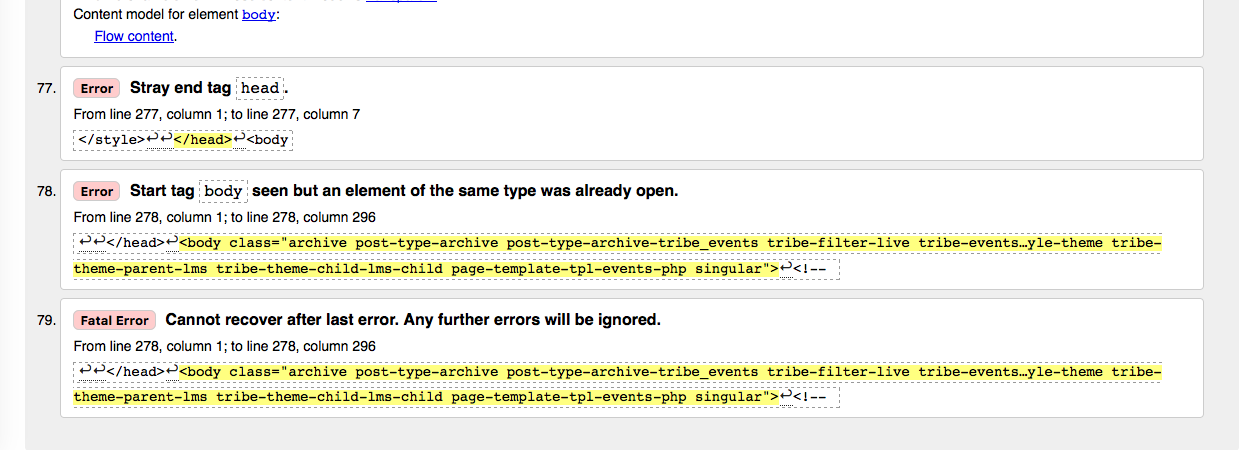
There are many inconsequential little things listed there, but then if you notice near the bottom of the validation report there are some serious breakages, as shown in this screenshot of the error report when I tested it myself:
Where to Go From Here
1. Fixing the page HTML
The screenshot I shared above reveals that some of your page’s HTML is broken. This is NOT the sole source of the problem here, but it will definitely only make things worse and is a big part of the behaviors described here. I would recommend trying to fix the HTML errors reported on the official W3C validator as shown in the image above—you can do this on your own if you’re comfortable with custom coding, but if not, you will have to contact your theme author for assistance in doing this.
2. Testing Plugins
In your “System Information”, it shows that you have a plugin called “Justified Image Grid.” I did not see any specific JavaScript issues on your page, but I’m wondering if anything improves with your Photo View if you temporarily deactivate the Justified Image Grid plugin?
In fact, if possible I would strongly, strongly encourage you go through the complete set of troubleshooting steps outlined here: https://theeventscalendar.com/knowledgebase/testing-for-conflicts/. Check on the Photo View after each step in that process, and see if your issues with it persist. This step is recommended and immensely useful, but optional.
3. A Genuine Bug in Our Code
I have not isolated a specific bug at this time. However, I’ve enlisted the help of another developer on our team and we are both able to reproduce your errors intermittently. We will continue investigating a specific thing within our own code that might be causing—or at least contributing to—this issue. If so, we will be able to make a bug ticket and then try to release a bug fix as soon as possible.
Now, we still have not pinpointed a bug, and if we do, it could take several weeks for an official bug fix to be released. But this process is underway and if there is a reproducible bug we can identify within our code a fix will be on its way promptly.
I hope that steps #1 and #2 above are things you can act upon and that they help bring you closer to a better-working Photo View. In the meantime, we will continue trying to isolate a specific bug here, perhaps a JavaScript solution within our code base. If we can identify such a bug, we will try to ship a fix as soon as possible; we are on faster release cycles these days so hopefully that happens within two to three weeks after we find the bug, if one exists.
Thank you,
GeorgeFebruary 26, 2016 at 12:44 am #1082329ParticipantWell, thanks George for this very expanded email. 🙂 Unfortunately we don’t go very far with that. I have changed the theme now and use a very basic one called Divi. It works better for the photo view on computers but there is still nothing appearing on mobiles. So it is definitively not a problem with the theme. I also tried to switch off all plugins and there is still nothing appearing on mobiles. 🙁
So… I am now presenting the event with the month views which is the only one that works for me.
It is sad because the photo view is really more attractive for the clients and is much more vibrant. But I really cannot continue to display the photo view first because many clients are connected from their mobile and complain to me that the events page is blank.
Other thing.
On computers, when we go to the events view https://cursos.patriciacupcakes.com/eventos/foto/ now it is restricting the events to the month only. The March events are not displayed. Also when I click “next events” it says that is nothing while in fact there are some events in March. There is definitively a bug somewhere.
Thanks for your time anyway.
February 26, 2016 at 9:19 am #1082510ParticipantHey Stephaneperrin,
Thank you for doing all of this testing. There does indeed seem to be a bug, or several, on your site, but I cannot recreate the behavior you describe.
Our developers are working on itemizing a specific bug to work on and fix, though at this time that investigation is still in progress. I do not have an ETA on when that will be fixed 🙁 (Although it will hopefully only be in the next few weeks!)
You end your last post with “Thanks for your time anyway.”—with this, do you want to close this thread and move on with your site, and just wait for future plugin updates to see if they help with these issues? If not, is there anything else I can try to help with here?
I’m sorry about the lack of progress thus far.
Sincerely,
GeorgeFebruary 26, 2016 at 10:53 am #1082618Participant@george please do not close this thread I as well as others also have this issue I we would like to have an easy way to track and follow its status.
Thanks
Doug
This is one of two outstanding issues with the product for my purposes since we starting talking in October:November. Would really like to have some resolution before I have to renew my plugins.
-
This reply was modified 10 years, 1 month ago by
-
This topic was modified 10 years, 1 month ago by
-
AuthorPosts
- The topic ‘the photo view does not work well’ is closed to new replies.