
Home › Forums › Calendar Products › Events Calendar PRO › Search not working
- This topic has 19 replies, 5 voices, and was last updated 9 years, 11 months ago by
Anders.
-
AuthorPosts
-
October 4, 2016 at 5:53 am #1172210
Anders
ParticipantGood afternoon,
We have raised several tickets about this problem with no real answer other than wait and see if your developers fix it.
The problem is now business critical for us so we would like to speak to someone if possible.
If you could call us on +44 2392 822 377 today just to discuss the problem it would be much appreciated as we have several licences and this will effect both.
Previous support tickets are:
Many thanks
Phil Shenton
October 4, 2016 at 9:38 am #1172372Geoff
MemberHi Phil,
Thanks for following up on both of those threads and I appreciate you bearing with us while we look into the search functionality together.
We unfortunately do not provide any phone support, but I do see that both of the threads you linked to are still open. In particular, the one open with Cliff is awaiting your reply and we we would be happy to keep the conversation going over there.
To specifically address the question in the other thread:
I was hoping that the search form could be set up so that only UK cities appear? But my developer has said that The Events Calendar uses a Google API for searches, so this problem can only be fixed by Google. Is this entirely accurate?
We have discussed this as a team and identified this as a feature rather than an issue with the plugin itself. In other words, limiting the geolocation bounds of the Google Maps API feature is something that our plugins have not been designed to do, but is something we are interested in looking into as a future functional enhancement. In other words, we are not tackling this as something that needs to be fixed in a maintenance release, but something that will take additional development to build as a feature.
Cliff pointed out in that thread that someone was able to create a workaround and provided that snippet in this reply. That might be a great starting point to get the ball rolling in the meantime while we consider building this as an officially supported feature.
I hope this helps add some context as well as some some helpful information to work around the fact that the plugins do not support bounding the Google Maps API coordinates at this time.
Thanks,
GeoffOctober 5, 2016 at 3:09 am #1172613ParticipantHi Geoff.
Thanks for the reply. From your reply I believe there may be some crossed wires on the issues here.
Steps to recreate the issues
1. Create an Venue based in the UK (For example Manchester, Postal Code: M24 4RF)
2. Create an event based on that venue
3. Create tickets for that event.
4. Go to the search page and search for ManchesterExpected Result
1. When entering Manchester into the search box, The selection should offer “Manchester, UK” along side it’s US counter Parts (“Manchester, NH, USA” & “Manchester,CT,USA”).
2. When entering just Manchester by it self it should show the Event/Venue based near or at Manchester, UK and the Map should have the Manchester, UK pointer on it.Result site is giving.
1. When entering Manchester into the search box, the selection only gives the US side. No information about Manchester, UK.
2. When entering just Manchester into the search box it doesn’t display any venues or event on the map or page.
3. Map is focused purely on Manchester near Boston (When I believe even without Manchester, UK this is the incorrect response as it should also have focus on the other Manchester, US.)Please let me know if this helps get everyone on the same page, or if I’ve misunderstood your last reply.
Regards
October 5, 2016 at 7:41 am #1172683MemberHi Phil,
Thanks so much for following up. I also really appreciate the steps to replicate the issue you’re facing — those are really nicely outlined and give me exactly what I need to test this out myself.
I followed the steps and it appears things are working correctly on my end. Here’s exactly what I did:
- Made a new venue. I used the University of Manchester along with it’s address and latitude/longitude coordinates to create the venue based on a real-life location. (screenshot)
- Made a new event. I added a ticket for that event and attached the Manchester University venue to that event. (screenshot)
- Published the event.
- Visited the main calendar. I entered “Manchester” into the search bar’s “Near” field and it returned “Manchester UK” as an available option. (screenshot)
A couple of notes on my testing environment:
- The latest version of WordPress (4.6.1)
- The latest versions of The Events Calendar (4.2.7) and Events Calendar PRO (4.2.6)
- Default WordPress Twenty Sixteen theme
Before we move on to troubleshooting the issue further, are the steps I followed correct? If not, please let me know what is missing and I’ll re-test to make sure I’m following the same steps you are.
If what I’ve tested is correct, then I’ll ask you to follow some additional testing steps to see where our testing environments may be different so we can pinpoint where the issue may be coming up.
Thanks!
GeoffOctober 5, 2016 at 8:40 am #1172703ParticipantHi Geoff.
Thanks for coming back to me, from what I can see the steps were followed correctly.
We’re also using wootickets and woocommerence if it’s possible these have an affect on the map.
October 5, 2016 at 9:03 am #1172715ParticipantHi Geoff.
Sorry for the double post. Someone else has been taken a look at the demo site and found the demo site is also giving the same results we’re seeing. Please see the screenshot attached of what we see on the demo site.
October 5, 2016 at 9:09 am #1172721MemberHi Phil,
Sorry, I don’t think the screenshot you provided made it through. Would you be willing to try re-sharing it with me?
Also, it would be extra helpful if you could provide your system information with me so I can check to some of your settings, plugin versions and other information that I can use to mirror my test site against yours in a default WordPress environment.
You can the system information by heading to Events > Settings > Help, copying the system information towards the bottom of the screen and pasting it here as a private reply.
Thanks so much!
GeoffOctober 6, 2016 at 12:57 am #1173116ParticipantThis reply is private.
October 7, 2016 at 1:29 am #1173641ParticipantHi.
Any news on this? Still been trying to resolve this myself without any luck.
October 9, 2016 at 11:49 am #1174296George
ParticipantHey @Anders,
Sorry for the delayed response here. Geoff had to tend to an urgent personal matter so I’ll be taking over this thread for now! 😀
Thanks for your patience.
In regards to these issues, I first want to comment on WP Shindig. There are no events on the site that are occurring the UK, so that is why UK locations are not being recommended.
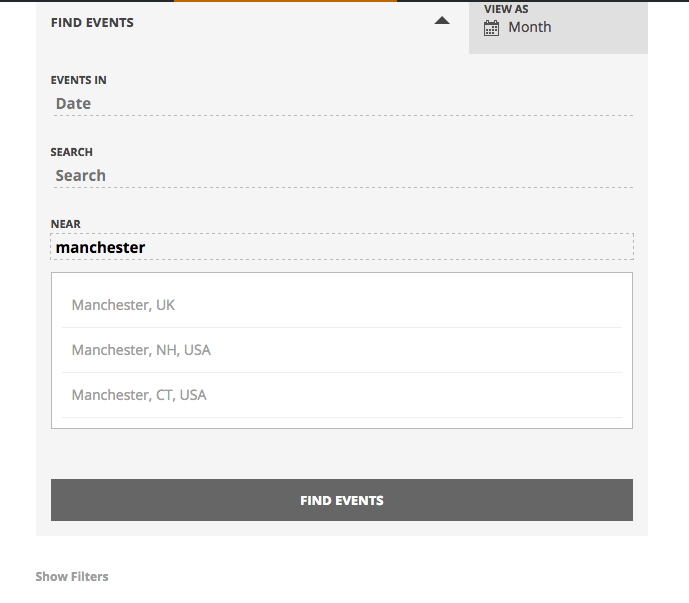
On my own testing site, I added the University of Manchester as a venue and added an event to it, just as Geoff describes doing above. Before I added this to my site, I only saw the US instances of Manchester as you find on your site and on wpshindig.com. However, once I added this to my site, the UK Manchester was recommended fine. Here is a screenshot of that on my local site (click for a larger-sized image):
1. Can you go to an event that is occurring at your Manchester venue, take a screenshot of as much of the edit screen for that event as possible, and then share the screenshot here?
2. Can you also go to the Venue edit screen for that Manchester venue, and post a screenshot of as much of the edit screen as possible?
☝️ For both things above, you may be able to take “full-screen” screenshots of the edit pages which would be immensely helpful. I would recommend seeing if this is possible on Google and searching for how to do it specifically—it’s usually just a few clicks to do it!
Thanks,
GeorgeOctober 9, 2016 at 11:52 am #1174298ParticipantHey Phil,
One additional word here: I really appreciate your patience on this issue. We’re finding different results and so this issue is requiring some close investigation and the requisite back-and-forth that entails. 🙁 I’m sorry there’s not been a quick answer thus far, but am determined to help figure out if there is a bug going on here so that we can best proceed with fixing it.
Thanks,
GeorgeOctober 10, 2016 at 1:16 am #1174401ParticipantHi George
Thanks for getting back to me and can understand there won’t be a quick fix.
Event Screenshot
Venue ScreenshotHere’s the requested screenshots, if you need any additional information to help pinpoint this please let me know.
Thanks
October 10, 2016 at 6:28 am #1174460ParticipantHi George
Further to your information regarding the demo site.
If UK results won’t show in the dropdown if there no events in it, should this not be the same if I have no events in the US?October 10, 2016 at 7:55 pm #1174755ParticipantHey @Anders,
I’m finding weird results here now, too.
Here is a screenshot of what I first found (click for a larger-sized image):
Here is a screenshot of what I now find (click for a larger-sized image):
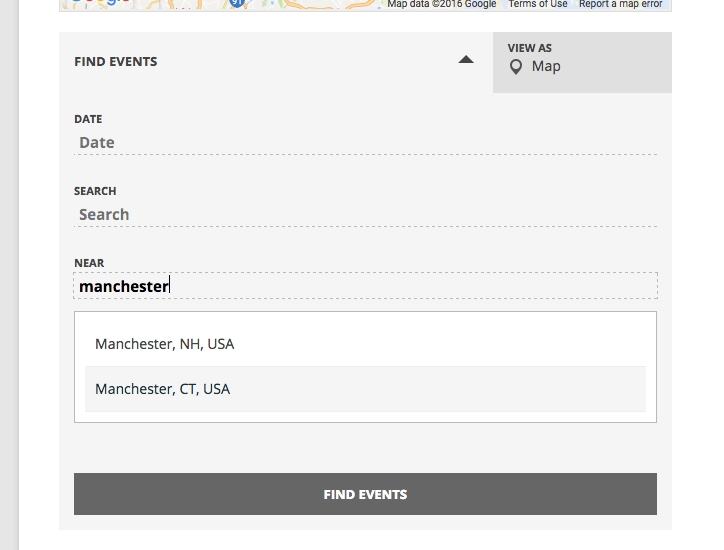
I’m not sure what’s happening here, so will be filing a bug report and escalating this to our development team.
Stay tuned; I will look into this and share updates here as soon as I have more news!
Sincerely,
GeorgeOctober 11, 2016 at 1:12 am #1174809ParticipantHi George
Thanks for putting the bug report in. Do you have any idea how long it’ll roughly be until we hear anything further?
Regards,
-
AuthorPosts


- The topic ‘Search not working’ is closed to new replies.