
Home › Forums › Calendar Products › Events Calendar PRO › Link has expired when submit event
- This topic has 14 replies, 3 voices, and was last updated 8 years ago by
Barry.
-
AuthorPosts
-
August 28, 2018 at 10:20 pm #1608414
kellseystabner
ParticipantWhen someone tries to submit an event i get a message saying the link has expired. I did a plugin conflict testing and found nothing. Also the error does not leave anything in the debug log file?
August 30, 2018 at 6:21 am #1609609Jaime Marchwinski
KeymasterHi Kellsey,
Thanks so much for reaching out!
As a first step, let’s try to rule out if there is some type of conflict at play.
This is usually because of:- A conflict with another plugin
- A conflict with your WordPress theme
- A template customization for the Events Calendar that requires updating
When it comes to that type of issue, it is preferable to troubleshoot in a staging environment if you have one.
A first quick test is to simply temporarily revert back to a default WordPress theme such as twenty-sixteen to see if the issue persists.
The next step would be to go through our testing for conflicts procedure and let us know what you find out.
Basically the goal here is to revert back to a bare WordPress installation to see if the problem persists. It also allows us to pinpoint what the cause of the issue is.
But, before you do that, there are 2 things I would advise:
- Make a backup of your database
- Consider activating a “Maintenance Page” plugin if you are doing this on your live site (to minimize impact on your visitors)
In addition, there are a number of mixed content error messages appearing in the console, so I would recommend installing and configuring a plugin, like this one, in order to resolve those errors.
Let me know how that goes!
Thanks,
Jaime
September 5, 2018 at 12:48 pm #1614566ParticipantHey! Yes I have already done this step with no resolution. It seems like its associated with the image uploader for some reason.
I believe the problem started with the Smush plugin for image optimization. I have since removed the plugin but the form still isnt working.
Can I reinstall the community events plugin? or what can I do now?
September 5, 2018 at 4:04 pm #1614729MemberThough I know you have already tried deactivating other plugins, can we revisit this step before we go any further?
The error you are seeing happens when a nonce check fails (“nonces” being a security mechanism provided by WordPress, which we to protect the Community Events submission form). Sometimes, when caching is in place – and it looks like you are using a caching plugin – the nonce check will fail.
- Can you clear your cache and see if that helps?
- If clearing the cache alone doesn’t help, please also try deactivating your caching plugin
- If that still doesn’t help, please refer to the caching plugin documentation and ensure you’ve followed any steps necessary to completely clear the cache
That last step may seem like overkill, but it can sometimes be the case that caching effects persist even after deactivating a caching plugin (because they don’t remove cached HTML files and because they may add rules to a special file called .htaccess which means the server will continue to serve the previously cached content, even after the caching plugin is removed/deactivated).
Given the nature of the problem, I think this is absolutely worthwhile. Can you give these steps a shot, starting with the easiest (ie, using any facilities that plugin provides to simply clear the cache)?
Thanks – let me know how you get on 🙂
September 5, 2018 at 8:51 pm #1614827Participantok I did all those steps and still no luck. How much time would you say
would be enough to wait for the cache to complete clear? The documentation
says https://www.wpfastestcache.com/tutorial/clear-cache-process/One thing i noticed happens every time is when filling the form on mobile
after clicking recapcha the scroll gets thrown way down.. then i have to
scroll all the way up to hit ‘submit event.’September 6, 2018 at 4:04 pm #1615792MemberHow much time would you say would be enough to wait for the cache to complete clear?
If you followed all steps to clear the cache, then disabled the caching plugin itself (I’m not completely sure if you did this or not) I’d expect things to clean up pretty quickly.
It’s really odd that you’re still hitting this, if so. By any chance to you have a staging or testing site that replicates this one? Does the same problem happen there if so?
If you do (or if you can create one), and if the problem can be reproduced there, would it be possible to deactivate all other plugins and switch to a default theme in that environment then provide a URL so we can see the problem under clean, ‘default’ conditions?
If that’s not possible for any reason, please just let me know and we can think about other options.
September 9, 2018 at 8:23 pm #1617225ParticipantI do have a staging site, but I am unable to recreate it there because the recapcha is invalid so i am unable to submit the form.
September 9, 2018 at 8:26 pm #1617226Participanthttp://yorktonevents.staging.wpengine.com/events/community/add
this is the staging site with plugins deactivated
September 9, 2018 at 8:30 pm #1617227Participanthttp://yorktonevents.staging.wpengine.com/events/community/add
this is the staging site with plugins deactivated
when i submit the form here is is page not found and this url http://yorktonevents.staging.wpengine.com/https:/yorktonevents.staging.wpengine.com/thank-you-for-your-submission/
September 10, 2018 at 11:17 am #1617795MemberI do have a staging site, but I am unable to recreate it there because the recapcha is invalid so i am unable to submit the form.
Can you disable recaptcha?
As a sidebar, if you (temporarily) disable recaptcha on your production site, does that allow the submission of events?
September 10, 2018 at 2:27 pm #1617995ParticipantYes. Same error occurs
Thank you!
September 10, 2018 at 4:06 pm #1618064MemberOK – and can you disable ReCaptcha on the staging site so we can look at things there?
September 12, 2018 at 9:35 am #1619721Participantthe recaptcha is disabled, still the same issue
http://yorktonevents.staging.wpengine.com/events/community/add
this is the staging site with plugins deactivated
when i submit the form here is is page not found and this url http://yorktonevents.staging.wpengine.com/https:/yorktonevents.staging.wpengine.com/thank-you-for-your-submission/
September 14, 2018 at 3:54 pm #1622438ParticipantHi
I got a second opinion and this is what they said:Hello there, after looking through you wp plugins/themes, I was able to identify the form at ‘the-events-calendar-community-events/src/views/community/edit-event.php” as the source of the form displayed. I test the form and it works fine when user is logged in. I suggest you enforce users to login by unchecking “Allow anonymous submission” in events settings. The form submission is validated via ajax call which seems to be tied to the session and thus session is getting invalidated. There are way to many files to review to get to the root of the session invalidation which is beyond scope of the gig. Please contact the plugin/theme developer to troubleshoot form submission without login or enforce login.
Does this help us at all?
September 18, 2018 at 7:34 am #1624194MemberHmm, doesn’t help a great deal, as this is not a generally reproducible problem (we can’t replicate on our side and we’d expect far more reports along similar lines, were this impacting most of our users).
the recaptcha is disabled, still the same issue
http://yorktonevents.staging.wpengine.com/events/community/add
OK, but I still see the Captcha (albeit, it isn’t functional):
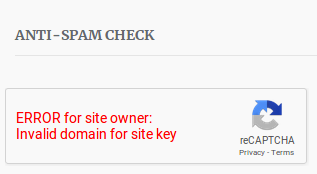
I’m worried this is distorting our picture of things. Within the staging site can you visit Events ‣ Settings ‣ APIs ‣ reCAPTCHA API Keys and ensure the site key and secret key have been completely removed?
With that done, we should no longer see the Captcha or an invalid domain error and we can continue with our testing 🙂
-
AuthorPosts
- The topic ‘Link has expired when submit event’ is closed to new replies.