
Home › Forums › Calendar Products › Events Calendar PRO › Featured events won't display on homepage widget
- This topic has 12 replies, 2 voices, and was last updated 11 years ago by
Brian.
-
AuthorPosts
-
September 24, 2015 at 7:35 am #1008292
Ethan
ParticipantHello —
I’ve tried everything I can think of but can’t seem to figure this one out. My website is http://www.kysu.edu. On the front page there is a widget above the President’s Welcome that is supposed to display upcoming events based on categorizing them as “featured” or “special” events. A few days ago, they just disappeared. As far as I know, nothing has been done differently. I need to get this fixed ASAP and I have no clue what I can do. Please help!
September 24, 2015 at 11:22 am #1008426ParticipantAnybody out there…?
September 24, 2015 at 5:31 pm #1008580MemberHi,
Sorry for the late reply. Please note we may take up to 24 hours to respond to a reply per our terms and conditions.
Anyway I can help out here.
Is this the area you are talking about:
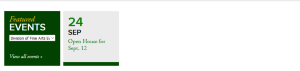
Are more events suppose to show there?
What are the widget settings in the admin?
Let me know and we can go from here.
Thanks
September 25, 2015 at 5:45 am #1008638ParticipantYes, that’s the widget area I am referring to. It should show four squares (similar to the second, light-grey one on your screenshot) each of which is the next event categorized as “featured” on the calendar. They should all link to the corresponding event page.
The Dropbox link below includes a screenshot of every tab on the Events Calendar Pro settings interface. I’ve also included a text doc of the system information, and a screenshot of the settings for ECP on the Widgets page of our website.
https://www.dropbox.com/sh/1woo31v3fjqm8ql/AAB8T03Zm1eRwkrDGPZoJTzEa?dl=0
Also, if you’ll notice, the event that it does display (Open House, September 12) has today’s date on it, and links back to the homepage. Not sure if this has anything to do with it.
I hope we can resolve this as soon as possible. Our University’s website is a resource for our students, and an important part of this resource isn’t functioning right now. This plugin has been down for several days, and we have several important upcoming events that need to be advertised on the homepage. I very much appreciate your help. I’d be extremely grateful if we can troubleshoot this expeditiously. Thank you for your time and assistance, and I hope to hear back from you today.
September 25, 2015 at 7:14 am #1008687MemberHi,
Thanks for all the screenshots. The widget looks to be setup correctly in the admin.
I looked at the source code and it appears the List Widget has some custom event templates, which may need to be updated to fix this.
I believe they are custom templates, because the output is not the standard source code.
In your theme do you have files in these directories:
yourtheme/tribe-events/pro/widgets/
yourtheme/tribe-events/pro/widgets/modules/
Let me know and we can go from here.
September 25, 2015 at 7:56 am #1008712ParticipantI added screenshots of the relevant directories to the Dropbox folder. Here’s what I have:
/wp-content/themes/kysu/tribe-events/ /default-template.php /list.php /month.php /single-event.php /tribe-events.css /wp-content/themes/kysu/tribe-events/pro /photo.php /wp-content/themes/kysu/tribe-events/widgets /list-widget.php-
This reply was modified 11 years ago by
September 25, 2015 at 8:13 am #1008717MemberLooks like this file has to be updated since you are updating from a version before 3.10:
/wp-content/themes/kysu/tribe-events/widgets/list-widget.php
Try replacing this:
// We'll need to utilize the post global

global $post;
With this instead:
// Retrieves the posts used in the List Widget loop.

$posts = tribe_get_list_widget_events();
Let me know if that helps.
September 25, 2015 at 8:47 am #1008732ParticipantThis reply is private.
September 25, 2015 at 9:47 am #1008744MemberHi,
Unfortunately, we only provide support through the forums per our terms and conditions for our licenses.
Although it would work to get the new list-widget.php from Pro it would overwrite the customization in place and would look different.
The developer who made the changes to the widget maybe the best person to resolve this.
However, I can still try to help out.
Since I do not know what changes where made can you put the file (list-widget.php) in dropbox and provide a link in a private reply?
I can then suggest what would need to be changed to fix it.
The other alternative is to downgrade to the last version you were on, which was 3.8.
You can download the older versions from your account here on theeventscalendar.com and older versions of the core plugin here: https://wordpress.org/plugins/the-events-calendar/developers/
And to update you can follow the manual update guide:
September 25, 2015 at 10:31 am #1008756ParticipantI’ve placed the file in the same Dropbox folder as before.
https://www.dropbox.com/sh/1woo31v3fjqm8ql/AAB8T03Zm1eRwkrDGPZoJTzEa?dl=0
September 25, 2015 at 11:07 am #1008764MemberHi,
Please make sure you have a backup of the file, but this might work replace the existing List Widget coding with this:
https://gist.github.com/jesseeproductions/f590eff54503ad691e6c
September 25, 2015 at 11:33 am #1008773ParticipantAwesome! Thank you for all your help. Everything is working correctly now.
September 25, 2015 at 1:24 pm #1008813MemberYou’re Welcome. Glad it helped.
I am going to close this ticket, but if you need anything else related to this topic or another please post a new topic on the forum and we can help you out.
Thanks
-
This reply was modified 11 years ago by
-
AuthorPosts
- The topic ‘Featured events won't display on homepage widget’ is closed to new replies.