
Home › Forums › Ticket Products › Event Tickets Plus › Event tickets not showing
- This topic has 15 replies, 2 voices, and was last updated 9 years, 4 months ago by
David.
-
AuthorPosts
-
April 18, 2017 at 11:08 pm #1271489
David
ParticipantI have pro versions for calendar and tickets. I previously created various tickets/products for our recurring event. But the tickets/products are not showing on the upcoming event.
How do I get them to remain attached to all future Events
Thanks
April 19, 2017 at 7:34 am #1271603Geoff
MemberHi David,
Oh shoot, sorry for the trouble here! Let’s dig into this and see why tickets are not showing up on your events.
The first thing I’d like to check is how the tickets were created. Will you please:
- Send me a screenshot of a ticket you created in the event editor that is not showing up on the event
- Send me a link to an event on your site that has a ticket that is not displaying
Also, it would be super helpful if you could go to the Events > Help screen, copy y0ur System Information, and paste it here for me as a private reply. That will allow me to check some additional settings as we troubleshoot this together.
Let’s start there and see what we find!
Thanks,
GeoffApril 20, 2017 at 1:28 pm #1272376ParticipantThis reply is private.
-
This reply was modified 9 years, 5 months ago by
-
This reply was modified 9 years, 5 months ago by
April 21, 2017 at 7:24 am #1272644MemberHey David,
Thanks so much for the info! This helps a lot.
I see you are running Event Ticket Plus 4.1.3 and Event Tickets 4.4.5. Will you please update Event Tickets Plus to version 4.4.5 as well so the versions are in sync? That is likely the reason the ticketing functionality is not displaying.
Actually, the latest version of both Event Tickets and Event Tickets Plus is 4.4.6. You can update both if you’d like and that, too, will hopefully resolve the issue and get you fully updated in the process. 🙂
Let’s give that a try and see what we find.
Cheers!
GeoffApril 21, 2017 at 4:13 pm #1272928Participantdone. all 4.4.6. also updated woocommerce to 3.0.
nothing has changed.
April 24, 2017 at 6:39 am #1273365MemberHi David,
Will you please send me a screenshot of the editor for an event where you have created a ticket but it is not displaying on the front end?
I am looking for something like this:
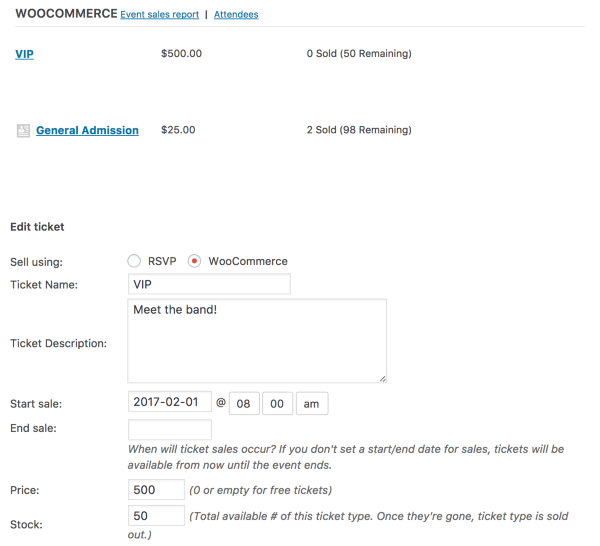
Thanks!
GeoffApril 29, 2017 at 12:14 am #1276193ParticipantMy initial issue was that the tickets that have already been created last year are not showing up on the same recurring event. This years event is requiring me to add all the tickets again and doesn’t have an option to select any of the prior ones created. Why are the current tickets, which all show in the product section, not showing in this recurring event? Do they not continue to be attached to the recurring dates? Am I going to have to recreate them every time?
Thanks
May 1, 2017 at 6:46 am #1276673MemberOh gosh, my sincere apologies, David. I had misread your initial question and missed that you were referring specifically to recurring events.
The problem is that recurring events do not support tickets at this time. We are indeed working on that feature but, in the meantime, there is no way to create a ticket for a recurring event and have it display on the upcoming instances — the ticket will only display on the first event.
You can edit an event in the recurring series and create a ticket for it there. However, you are correct that you would have to do that for each event in the series. Also, editing an event will break it out of the series.
I’m really sorry for not catching that up front but I appreciate you clarifying that for me and hope this helps explain why you have been unable to view tickets on recurring events.
Geoff
May 2, 2017 at 3:09 pm #1277686ParticipantWhen I go to add a ticket, why doesn’t the tickets I have already created in the ‘Products’ section pop up for selection? Any easier way to recover already created tickets or do I have to create each one from scratch each time?
May 5, 2017 at 6:44 am #1279148MemberHi David,
Event Tickets Plus is currently set up so that tickets are created directly in the event editor and, once that ticket is created, it becomes a Product in WooCommerce as well. That is how it is able to associate a ticket with a specific event.
If you are making tickets with registration fields, you can save those fields as a template to be re-used for each ticket you make but, yes, you do indeed need to create a ticket for each event.
Does this help clarify things a bit more? Please let me know.
Thanks,
GeoffMay 5, 2017 at 9:41 am #1279366ParticipantUnfortunately yes. Do you know how I can set up page like:
https://www.chili-cook-off.com/vendor-applications/
May 5, 2017 at 1:21 pm #1279562MemberHi David,
Yeah, I’m sorry again that bad news with creating tickets, but I am glad that helped answer your question.
In general, the event and calendar layouts are designed the way they are right out of the box. That said, you can certainly override any of those templates with your own versions to create custom layouts. It takes some custom development which varies based on what what you want to accomplish, but we have a guide that helps walks you through the process:
https://theeventscalendar.com/knowledgebase/themers-guide/
Did you have any other questions about the ticket creation process? We’d be happy to help answer more questions about layout customizations but if you could open a new thread for that so we can keep this one to a single topic, then that would be awesome and appreciated.
Cheers!
GeoffMay 8, 2017 at 11:26 pm #1280664ParticipantDo I delete the products from last year? Now that I have created new tickets for this year, there are dups in the products. thanks
May 9, 2017 at 5:53 am #1280763MemberHi David,
Yes, you can delete the tickets you created before in the Products area of WooCommerce. It sounds like those had never been attached to any event posts before and, if you don’t need the data from their sales, then there is no need to keep them around.
Cheers,
GeoffMay 31, 2017 at 9:35 am #1291314Support Droid
KeymasterHey there! This thread has been pretty quiet for the last three weeks, so we’re going to go ahead and close it to avoid confusion with other topics. If you’re still looking for help with this, please do open a new thread, reference this one and we’d be more than happy to continue the conversation over there.
Thanks so much!
The Events Calendar Support Team -
AuthorPosts
- The topic ‘Event tickets not showing’ is closed to new replies.