
Home › Forums › Calendar Products › Events Calendar PRO › Calendar view stuck on Photo
- This topic has 9 replies, 2 voices, and was last updated 10 years, 5 months ago by
George.
-
AuthorPosts
-
November 1, 2015 at 1:00 pm #1020612
Tana
ParticipantI am having two issues with the plug in so far. I need the month view to display on the events page but it is stuck on the Photo view. Also, while in photo view the first page displays the last six events and then shows them again on the last page. It is leaving out my first 6 events. What can be causing this and what can I do to fix it?
Thanks
November 2, 2015 at 10:19 am #1020878ParticipantHey Chris,
I’m sorry to hear about these issues!
1. To get started, can you share the website where this is all happening?
2. Can you share your system information with us? Here’s how → https://theeventscalendar.com/knowledgebase/sharing-sys-info/
3. In regards to the issue of things being stuck on “Photo View”, can you head to Events > Settings > Display in your wp-admin, and tell us what you have configured for the “Enable Event Views” option and the “Default View” option? Here’s a screenshot of these options for reference:
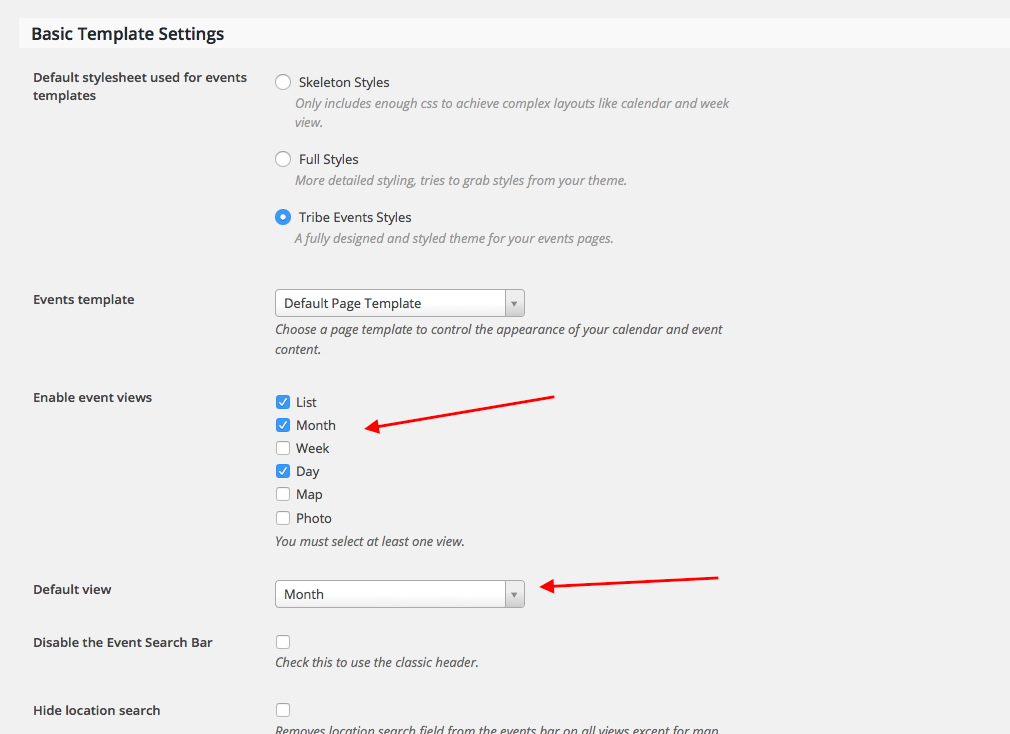
This will help us get started on things; we can address the issue of the first 6 events being left out once we get some of the basic information here. Please address each specific question I mentioned above, in list format even if possible.
We’ll get to the bottom of this; thank you in advance for sharing the information requested here that will help us troubleshoot further!
Cheers,
GeorgeNovember 2, 2015 at 11:16 am #1020916ParticipantThis reply is private.
November 2, 2015 at 2:28 pm #1020990ParticipantThanks for all of this Chris.
On your site, I noticed that the “Calendar” menu-item link goes to /event, but your options say that your Events Calendar slug is /events
I tried going to /events, but it redirected to /event…
What is this page at /event? Is it an actual page that you have created in your WordPress admin or something? If so, please make sure this page’s slug is NOT /event or /events – change it to /calendar or something similar.
—
Finally, for now: what are your site’s permalink settings? These can be found in the aptly named page in your wp-admin at Settings > Permalinks.
Thank you for your patience with this; cheers!
— George
November 3, 2015 at 7:45 am #1021268ParticipantThis is part of the issue I am having. My client needs to have th epage named Calendar, but when I clicked on the “Where’s my calendar? Right Here” link on the general tab it took me to the events page. In addition to this one of the instructions i read in a knowledge base (I think) article said to add the page that you should go to appearance > Menu> Events dropdown box > View all > select events to add a custom menu link. Once I had this link I renamed the navigational link to Calendar.
I currently have my permalinks set to post name.
November 3, 2015 at 10:11 am #1021378ParticipantHey Chris,
If you want the calendar to live at /calendar instead of /events, then delete any “Page” in your wp-admin that has the slug /calendar OR /events.
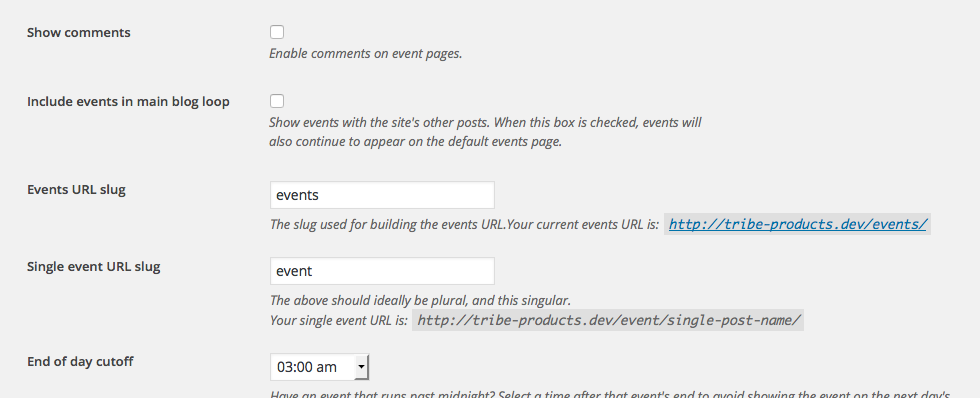
Once that “Page” is deleted, go to Events > Settings. Right there on the “General” tab, set the “Event slug” option to calendar. Here’s a screenshot of this option:
Then go to Settings > Permalinks in your admin area, and just click “Save Changes” without actually making any changes. (This may seem like an odd thing to do but is a little “trick” within WordPress to get the permalinks across your site to refresh, which might also help here).
Let me know what happens if you do these exact steps….
Thank you for your patience @Chris!
Cheers,
GeorgeNovember 3, 2015 at 8:14 pm #1021534ParticipantI have done all of these and still have the exact same results showing. I don’t even have a link in the menu and am going strait to the display page via the link with in the general settings tab. What is I deactivate and uninstall and reinstall? Will I lose all of my events if I try this?
November 4, 2015 at 10:40 am #1021797ParticipantThank you for testing that stuff Chris – while uninstalling and reinstalling The Events Calendar and its add-ons should result in any data loss whatsoever, before doing that I would recommend doing the complete set of troubleshooting steps outlined here → https://theeventscalendar.com/knowledgebase/testing-for-conflicts/
After each step, go to Settings > Permalinks in your admin area, and just click “Save Changes” without actually making any changes. This may seem like an odd thing to do but is a little “trick” within WordPress to get the permalinks across your site to refresh.
And then check on the issues and see how things are behaving.
If this sounds tedious, I can assure that it goes much faster than it sounds; and these steps will be essential at this point because I still am unable to recreate this problem at all 🙁
Thank you so much for your patience with this, @Chris! Let us know what you find.
Sincerely,
GeorgeNovember 6, 2015 at 1:50 pm #1022687ParticipantWell, I finally got to test these and the first one seems to be the issue. It is apparently a conflict with the theme. I am using the Ultimatum Theme with a child theme. What would you suggest to work around this issue?
November 9, 2015 at 1:04 pm #1023427ParticipantThank you so much for testing that, @Chris – revealing that it’s a conflict is a great first step. With this testing information, the next best step is to contact the Ultimatum theme support team about the conflict. Hopefully they can help troubleshoot their theme in this case, or spot specific issues in your child theme of it.
— George
-
AuthorPosts
- The topic ‘Calendar view stuck on Photo’ is closed to new replies.