
Home › Forums › Calendar Products › Community Events › Anonymous Submissions – Not Working
- This topic has 11 replies, 4 voices, and was last updated 10 years, 6 months ago by
Support Droid.
-
AuthorPosts
-
September 2, 2015 at 11:57 am #1001375
sbatech
ParticipantI saw this issue got solved in another post but that fix did not work for me. I am able to submit events when logged in but after trying to submit one without logging in I get this error message:
ERROR: Sorry, there was an error. Please be sure JavaScript and Cookies are enabled in your browser and try again.
Any help would be greatly appreciated. Thanks
September 3, 2015 at 3:08 am #1001553Jeff Rose
ParticipantI am also having the same issue but instead of an error message, I am redirected to the home page without any message.
Even though I’m on the home page, the url is the home page url plus /calendars/community/add
Thanks for any help you can provide.
September 3, 2015 at 9:04 am #1001673George
ParticipantHey @sbatech,
I went to your site and tried submitting an event (anonymous, of course 🙂 ) and it actually worked fine for me:
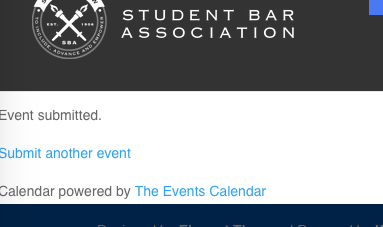
What browser and operating system are you using? If you use a different browser and/or computer does anything improve?
Thanks!
GeorgeSeptember 3, 2015 at 9:05 am #1001674ParticipantHey Jeff,
If you head to Events > Settings > Community and scroll down to the “Access Control” settings area, what are all of your settings there? Take a screenshot of the whole area if possible – you can upload it to a site like imgur.com or flickr and share a link to that here, we’ll take a closer look.
If possible, can you also please share your system information with us? Here’s how to do that → https://theeventscalendar.com/knowledgebase/sharing-sys-info/
Thanks!
GeorgeSeptember 4, 2015 at 3:02 am #1002019ParticipantThis reply is private.
September 4, 2015 at 7:32 am #1002098ParticipantThank you for this information Jeff! I’m curious – if you remove the URL from that “Redirect URL” option under the Access Control options, does anything improve here? There may be a bug where this redirect is happening even though it shouldn’t be.
Thanks!
GeorgeSeptember 4, 2015 at 10:08 am #1002172ParticipantOddly enough, before I made any changes, I tried it again and was able to submit an event anonymously. However, when I logged in to delete the event, the search function did not return the event with the text of ‘test’. Instead, I received a 404 page not found error.
September 8, 2015 at 8:19 am #1002927ParticipantThat’s indeed some odd behavior, Jeff, behavior that seems to indicate a potential code conflict. I wouldn’t be surprised if that’s a factor here and would encourage you to run through our full set of troubleshooting steps here → https://theeventscalendar.com/knowledgebase/testing-for-conflicts/
Before doing that, however, did anything improve with my suggestion to remove the URL from the “Redirect URL” option under the Access Control options?
Just curious. If not, then I’d recommend doing those general troubleshooting steps – try some test anonymous submissions after EACH step in that process along the way, and notice how the behavior changes if at all during the process.
Thanks for your patience and persistence with this issue!
GeorgeSeptember 9, 2015 at 4:42 am #1003181ParticipantHi George,
I didn’t need to modify the ‘redirect url’ to succeed in the anonymous submission.
The search feature is now working again.
In between, I had another error that seemed to be resolved by following the advice I found on another post:
5. Try setting your permalinks to ‘postname’ in Settings > Permalinks
6. Try refreshing your permalinks by visiting Settings > Permalinks (it does it automatically)I didn’t go through the process of ‘testing for conflicts’ since this is a live site and no test site is currently available.
Hopefully, these problems will not return.
Thanks for your help George.
September 9, 2015 at 6:43 am #1003209ParticipantHey Jeff,
Thanks for the update – I’m glad things are resolved for now, and apologize for not thinking of that Permalinks trick!
If further issues arise, open a new thread on the forums here and we’ll help out again as soon as possible. Best of luck with your site!
Cheers,
GeorgeSeptember 9, 2015 at 6:44 am #1003210ParticipantSeptember 24, 2015 at 7:05 am #1008241KeymasterThis topic has not been active for quite some time and will now be closed.
If you still need assistance please simply open a new topic (linking to this one if necessary)
and one of the team will be only too happy to help. -
AuthorPosts
- The topic ‘Anonymous Submissions – Not Working’ is closed to new replies.