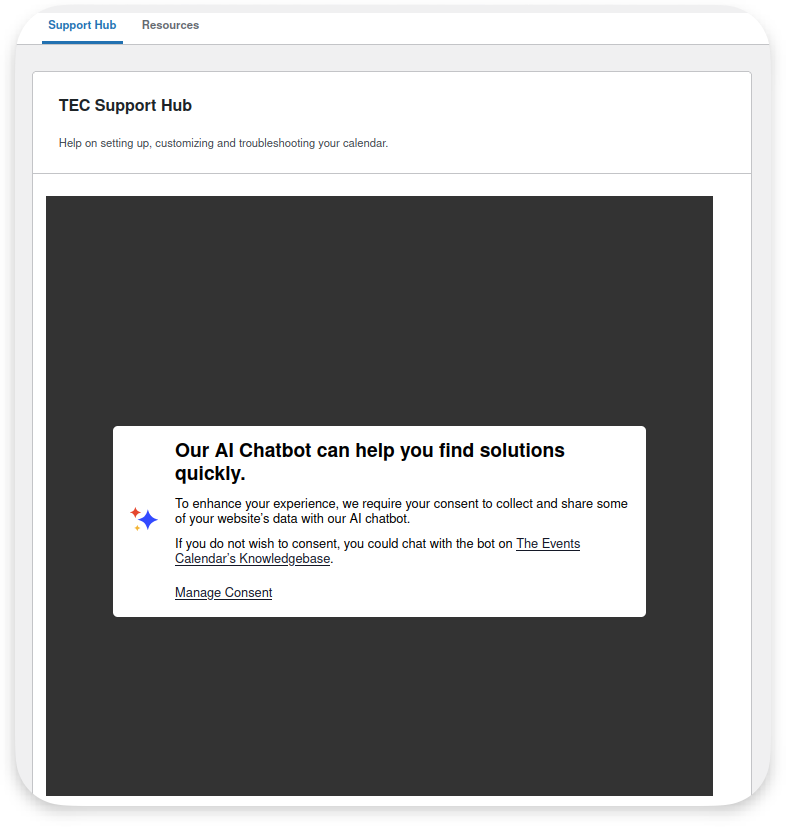
Working on your site and need some help? You can chat with our AI chatbot or get connected to a live human from our support team, right from within your WordPress Dashboard. Under Events > Help > Support Hub, you’ll see some different options depending on whether or not you have an active license and have given consent to telemetry.
Our chatbot is available for all users, no license required. This bot is thoroughly trained on our knowledgebase and can answer many different types of questions ranging from what features are available and how they can be set up to troubleshooting issues you may be experiencing. It’s also available to help immediately, 24/7/365.
Our support team is here to help via live chat 8am – 5pm ET Monday – Friday for our active license-holders. If you need help outside of these hours or a chat agent is not available during this time (for instance, if the chat queue is full), you can also submit a ticket to our support team from the Support Hub. We will review your ticket and follow up with you ASAP.
 Note: Some issues, particularly when it comes to technical troubleshooting, may require our team to do more in-depth investigation and testing than can be done over chat. We may not be able to solve all issues immediately. In these cases, the chat agent will help as much as possible and then collect any info we need to continue the investigation on our end. We’ll convert the chat to a ticket and follow up with you from there.
License connection
With an active license, you will be able to connect with our human support team after consenting to telemetry (see below for more information on this consent).
You can check if you have an active license connected under Events > Settings > Licenses. Additionally, you can tell based on which of these two options you see on your Support Hub screen:
| No active license connected | Active license connected |
 |  |
Telemetry consent
In order for our chatbot to be able to connect to your site, you will need to consent to sharing some specific information. You can consent by clicking the Manage Consent link when prompted.