Forum Replies Created
-
AuthorPosts
-
Emily Tarrant
ParticipantHi Cliff
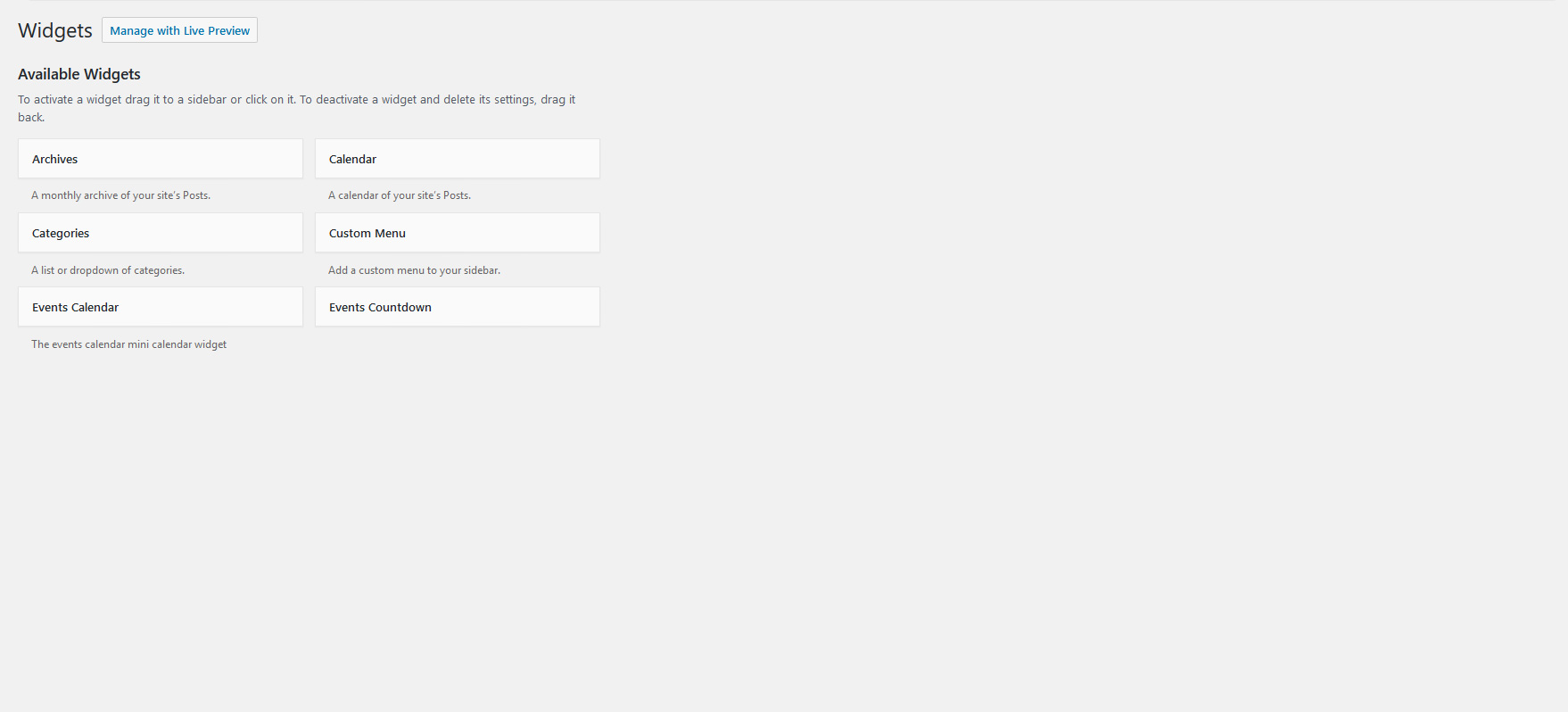
Apologies if I’ve confused you. What I hadn’t realised was that the sytem changes my file names when uploading jpgs, so pointing you at the file name for the screenshot understandably hasn’t worked. This is the screenshot that shows what happens with the events plugins enabled:
https://theeventscalendar.com/content/uploads/2016/12/f5f6f825c16ca414.jpg
To be absolutely clear, I’m not using the Events Countdown widget – the issue is that with the events plugins enabled (and specifically The Events Calendar Pro) the widgets page stops loading once it’s gets to the Events Countdown widget on the left hand side of the page. This is with ONLY Tribe Events plugins enabled, not WooCommerce or any of the other plugins that are installed.
Cheers, Emily
ParticipantHi Cliff
Thanks for the heads up about the updates. I’ve updated everything to the latest versions. It’s not made a difference I’m afraid. Here’s a run through:
1. With WooCommerce and Tribe Events plugins activated
I get a completely blank widgets screen (Appearance > Widgets).The debug log gives this:
[22-Dec-2016 09:48:20 UTC] PHP Fatal error: Out of memory (allocated 182190080) (tried to allocate 83 bytes) in /home/sites/wfdevelopment.co.uk/public_html/lymelrm/lrm/wp-includes/wp-db.php on line 24162. With just the Tribe Events plugins activated (WooCommerce deactivated)
The widgets page partially loads but gets stuck at Events Countdown (please see screenshot: screenshot-tribe-events.jpg).
I’m not using the Events Countdown Widget so there are no settings to provide – it’s the available widgets that it gets stuck at, the rest of the screen doesn’t load (as demonstrated by the screenshot).The debug log gives this:
[22-Dec-2016 09:49:50 UTC] PHP Fatal error: Out of memory (allocated 182452224) (tried to allocate 81 bytes) in /home/sites/wfdevelopment.co.uk/public_html/lymelrm/lrm/wp-includes/wp-db.php on line 24163. With just WooCommerce enabled (Tribe Events plugins deactivated)
The widgets page loads completely (please see screenshot: screenshot-woocommerce.jpg)The debug log gives this:
[22-Dec-2016 09:52:52 UTC] WordPress database error Duplicate key name ‘location_type_code’ for query ALTER TABLE lm_woocommerce_tax_rate_locations ADD KEYlocation_type_code(location_type(40),location_code(90)) made by activate_plugin, do_action(‘activate_woocommerce/woocommerce.php’), WP_Hook->do_action, WP_Hook->apply_filters, call_user_func_array, WC_Install::install, WC_Install::create_tables, dbDelta
[22-Dec-2016 09:52:52 UTC] WordPress database error Duplicate key name ‘location_type_code’ for query ALTER TABLE lm_woocommerce_shipping_zone_locations ADD KEYlocation_type_code(location_type(40),location_code(90)) made by activate_plugin, do_action(‘activate_woocommerce/woocommerce.php’), WP_Hook->do_action, WP_Hook->apply_filters, call_user_func_array, WC_Install::install, WC_Install::create_tables, dbDeltaA search for the duplicate key error brings up this: https://core.trac.wordpress.org/ticket/34870
I don’t fully understand the discussion, but it’s interesting that there’s also someone from 2 weeks ago saying that they experience the issue when using a combination of WooCommerce and The Event Calendar. Is that useful?Cheers, Emily
ParticipantHi Cliff
Thanks for following up. I haven’t had EDD installed on the site – it’s been WooCommerce (and the events plugins) from the start. The problem seems to have arisen since I entered a batch of events (with tickets) into the calendar over the last couple of weeks. Could it be related to that in some way?
Before I go down the WooCommerce route, can I check something with you? Even with WooCommerce disabled I have an issue with the widgets page loading – it only loads partially (I think I included a screenshot in an earlier reply). It gets stuck at the Events Countdown widget. If this is happening with only the Tribe Events plugins enabled doesn’t that suggest that there’s an issue with the events plugin?
I’ve found this thread which also mentions the widgets page stopping at Events Countdown: https://theeventscalendar.com/support/forums/topic/widgets-only-half-displaying-in-admin-area/
Is that relevant do you think?Cheers, Emily
ParticipantThis reply is private.
ParticipantHi Cliff
WooCommerce was deactivated as I was following your instructions to deactivate all plugins apart from Tribe Events plugins…
I have now reactived WooCommerce, so the only plugins activated are the Tribe plugins and WooCommerce. If I got to Appearance > Widgets I get a completely blank page.
I will send you the updated debug log in a private ticket.
Thanks for your continued help with this!
Best wishes, EmilyParticipantThis reply is private.
ParticipantThis reply is private.
ParticipantHi Cliff
I’ve run through the troubleshooting as requested. Here are my findings:
1. Enabling WP_DEGUG and WP_DEBUG_LOG
Front End- Home page: no errors
- Events page: no errors
- Single events page: no errors
Back End
- Changing ticket quantity: no errors
- Adding event: no errors
- Appearance > Widgets: completely blank page with all plugins activated (no errors displaying)
2. Testing for Conflicts
1. Switched to Twenty Sixteen
Widgets page still blank
2. Disabled all plugins except Tribe Events plugins
Left activated:- Event Tickets
- Event Tickets Plus
- The Events Calendar
- The Events Calendar PRO
- The Events Calendar: Remove Export Links
Widgets page partially loads. Gets as far as Events Countdown (which doesn’t fully load). See attached screenshot
3. Cleared browser cache and retested
Widgets page still partial load as above.3. System Information
System Information sent separately (in private thread). Could you please clarify what you mean by ‘in Testing for Conflicts Mode’?
If I select the option to automatically share my system information I get the following error:
No route was found matching the URL and request method Code:rest_no_route Status:4044. Console Errors
I’m not sure what I’m looking for here. I can’t immediately see any errors but I’m not very familiar with using the Chrome console. I’m happy to give you access to the WordPress admin if that will help.-
This reply was modified 9 years, 10 months ago by
ParticipantHi Cliff, thanks for getting back to me. I’ll work through your troubleshooting steps and let you know what I find.
Best wishes, Emily -
AuthorPosts