Forum Replies Created
-
AuthorPosts
-
January 31, 2017 at 10:14 pm in reply to: I think my problem relates to the Community Events plugin #1227357
Doug De Stefano
ParticipantThis reply is private.
January 28, 2017 at 5:22 pm in reply to: I think my problem relates to the Community Events plugin #1225740ParticipantGeoff….I isolated it to the tribe-events-community.css file in the Child so I opened the file with the same name that I found in the Plugins->the-events-calendar-community-events->src–>resources–>css folder. and I found that the one in my Childs–tribe-events–> community folder Only had one line in there that was not even found in the other file. It had #post_title{width:350px;} Which I think my guy put in there to make the title field larger like we use to have. But having that in there seems to mess up the layout of the add events page. It does make the title field larger like a wanted but when I null it out the add events page looks better over all. EXCEPT…this one issue where the Add Venue section is missing its drop down function showing existing venues in the database to choose from before creating one. I will give a screen shot of how it looks below. The Add Organizer section shows up fine with its dropdown in tack. I think I see the code for them both on the tribe-events-community.css file but not sure if its there thats causing that problem. I mean right now this is the way it looks without the override from the childs theme so this should be the way you intended it too look I would assume but I don’t think its right.
Again Thanks….DougJanuary 23, 2017 at 9:07 pm in reply to: I think my problem relates to the Community Events plugin #1222756ParticipantGeoff…Thanks! So the first thing I did was the easiest and that was rename the /tribe-events/ folder in the child theme to /z_tribe-events/ And that made the Events submission page correct itself. Now there are some custom design work we did thats gone but atleast this tells me the new 4.4 should work but must be conflicting somehow with something in the child folder tribe-events. Would you agree. So knowing this what would your next step be? I want to be able to keep the custom work we did. I need to isolate where all that is coming from I guess. So that I could replace that whole tribe-events folder with the new one and then just re-introduce those changes again in the files that pertain. Does that make sense?
January 21, 2017 at 1:19 am in reply to: I think my problem relates to the Community Events plugin #1221844ParticipantI also in testing the Event Submission as a user got this after submitting it.
Warning: Invalid argument supplied for foreach() in /home/theinn10/public_html/wp-content/plugins/the-events-calendar-community-events/src/Tribe/Submission_Handler.php on line 214
This seems to relate to this code:
//Check For Venue ID in Array
foreach ( $submission[‘Venue’][‘VenueID’] as $key => $venue_id ) {
//We have an ID for an existing Organizer
if ( 0 < $venue_id ) {
return true;
}
Not sure what it means but I did notice something wrong when on the submission page I got to the Venue entry
it did not offer a drop down list of Previous Venues. The Organizer section did but the Venue did not.
And I do have a bunch of Pre-existing Venues. And that list shows up on the Admin side for adding an event.
So I think something is wrong. Any ideas on how to fix it?And with my Test event I did choose a Current Date of Feb 2, 2017 and on the Admin side it showed up in Drafts
as January 1, 1970. Seriously wrong.
Also on that Users Add Event page the area of Categories is one long huge block shouldn’t it have a little down arrow in the upper right of that section that closes it after checking your categories? See below screen shot of what I’m talking about.
And also on that screen shot notice the top title field is atleast 1/3 the size in length it used to be
how and where would I go to change that? We also use to have within it some light grey words that said
something like : Use Seven words or less in Title.
And that is not showing up anymore and I’m not sure where the original coder would have put that
and why it disappeared. I would think he had it in the Childs folder that shouldn’t get effected by
new version upgrades. As you can see I am having quite a few issues. Thanks…January 17, 2017 at 4:40 pm in reply to: Monthly events hover images and event page images not showing up #1219964ParticipantThis reply is private.
January 16, 2017 at 4:55 pm in reply to: Monthly events hover images and event page images not showing up #1219344ParticipantThis reply is private.
July 29, 2016 at 2:51 pm in reply to: how can I update my staging site to mirror my live site? #1145715ParticipantMy friend who maintains a Tribe Cal site said WP Migrate Pro didn’t import the events properly. Images didn’t migrate nor did recurring events.
So with iCal Importer will it do everything new at once or just one at a time what you tell it?
Will it bring over all images and recurring info etc. Whats the distinction from Updating on a
recurring basis and syncing information?Thanks…Doug
Again I am just wanting to catch up the Calendar changes on the live site to the staging site.
So they are the same when I make the staging Live.-
This reply was modified 9 years, 8 months ago by
July 29, 2016 at 12:41 pm in reply to: how can I update my staging site to mirror my live site? #1145662ParticipantGeoff…Thanks for getting back to me. So when you say with ical importer it will update events on a recurring scheduled basis. I can update all the events on my Calendar live site to my staging and then keep it updated by having a daily schedule to update?
Would you recommend that over the MigratePro? Would WP Migrate Pro update any changes
in my whole WP site vs iCal Importer just updating Tribe Calendar posts?Thanks…D
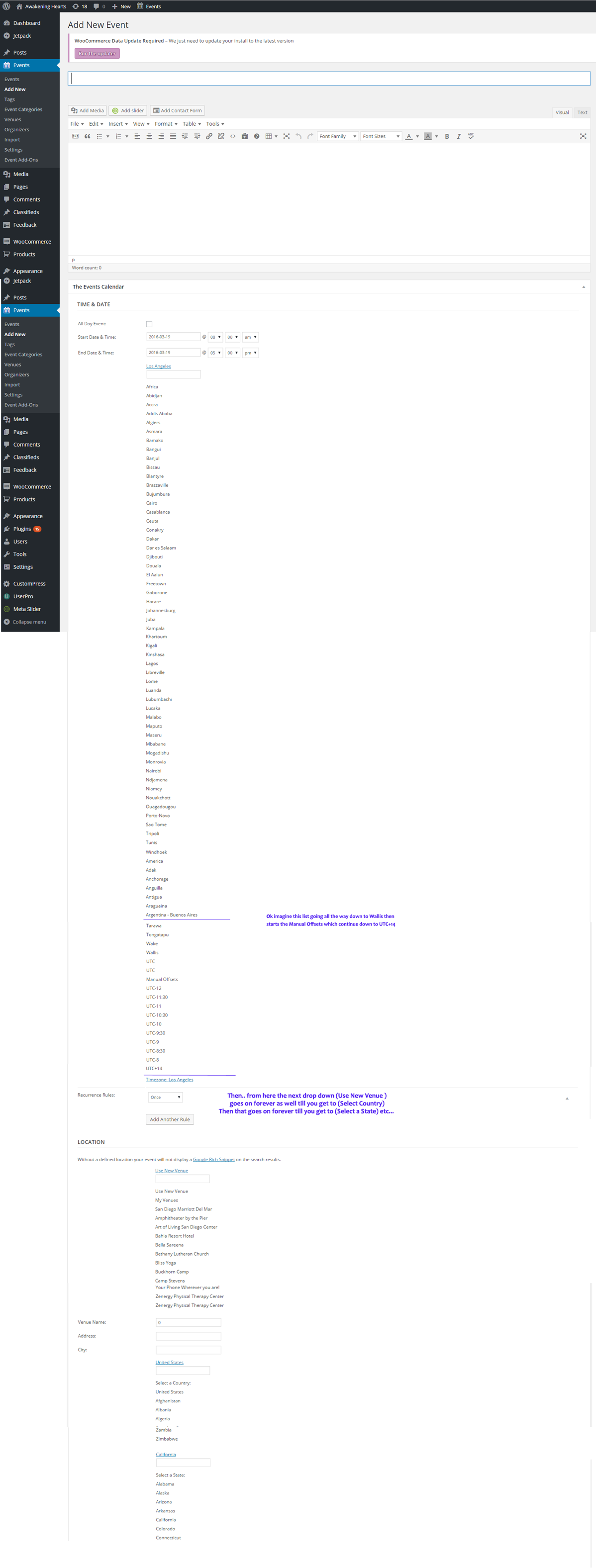
ParticipantWell ok here is a partical screen shopt mocked up with PS since as you will see it would be 5x as long if I tried to actually capture it all. http://www.innernetevents.com/sample_screenshots/DropdwnIssue_screenshots.png
But what you see here continues through Locations etc.
Here is my System Information: Hope this all clarifies it and gives you an idea…Thanks!
HOME URL
SITE URL
INSTALL KEYSWORDPRESS VERSION
4.4.2
PHP VERSION
5.5.33
PLUGINS
Akismet version 3.0.2 by Automattic(http://automattic.com/wordpress-plugins/)
Banner Upload version 1.3.1 by vinoth06(http://buffercode.com/)
Classifieds version 2.3.6.1 by WPMU DEV(http://premium.wpmudev.org)
Duplicate TEC Event version 1.5 by Ben Lobaugh(http://ben.lobaugh.net)
The Events Calendar PRO version 4.1 by Modern Tribe, Inc.(http://m.tri.be/20)
Jetpack by WordPress.com version 3.8.0 by Automattic(http://jetpack.me)
Meta Slider version 3.0.1 by Matcha Labs(http://www.metaslider.com)
Regenerate Thumbnails version 2.2.4 by Viper007Bond(http://www.viper007bond.com/)
The Events Calendar: Community Events version 4.1 by Modern Tribe, Inc.(http://m.tri.be/21)
The Events Calendar: Filter Bar version 4.1 by Modern Tribe, Inc.(http://m.tri.be/25)
The Events Calendar version 4.1 by Modern Tribe, Inc.(http://m.tri.be/1x)
TinyMCE Advanced version 4.2.5 by Andrew Ozz(http://www.laptoptips.ca/)
UserPro version 2.65 by Deluxe Themes(http://codecanyon.net/user/DeluxeThemes/portfolio?ref=DeluxeThemes)
Velvet Blues Update URLs version 3.2.4 by VelvetBlues.com(http://www.velvetblues.com/)
WooCommerce version 2.5.5 by WooThemes(http://woothemes.com)
WP Mail From II version 1.0.2 by Ben Huson
WPMU DEV Dashboard version 3.4.6 by WPMU DEV(http://premium.wpmudev.org/)
NETWORK PLUGINS
–
MU PLUGINS
Gateway Relay version 1.0 by Arnold Bailey (Incsub)(http://premium.wpmudev.org)
WPMU Assist version 1.0.2 by Arnold Bailey (Incsub)(http://premium.wpmudev.org)
THEME
Twenty Thirteen Child Theme
MULTISITE
–
SETTINGS
recurring_events_are_hidden = exposed
tribeEventsTemplate =
tribeEventsBeforeHTML =
tribeEventsAfterHTML =
previous_ecp_versions = Array
(
[0] => 0
[1] => 3.6.1
[2] => 3.7
)
latest_ecp_version = 4.1
welcome_notice = 1
stylesheetOption = tribe
tribeEnableViews = Array
(
[0] => upcoming
[1] => month
[2] => day
)
viewOption = month
tribeDisableTribeBar =
monthEventAmount = 6
dateWithYearFormat = F j, Y
dateWithoutYearFormat = F j
monthAndYearFormat = F Y
dateTimeSeparator = @
timeRangeSeparator = –
datepickerFormat = 0
earliest_date = 2014-08-18 08:00:00
latest_date = 2017-01-29 12:00:00
defaultValueReplace =
disable_metabox_custom_fields = show
pro-schema-version = 4.1
hideLocationSearch =
hideRelatedEvents = 1
weekDayFormat = D jS
events_filters_layout = horizontal
events_filters_default_state = open
donate-link =
postsPerPage = 10
liveFiltersUpdate = 1
hideSubsequentRecurrencesDefault = 1
userToggleSubsequentRecurrences =
recurrenceMaxMonthsBefore = 24
recurrenceMaxMonthsAfter = 12
showComments =
showEventsInMainLoop =
multiDayCutoff = 00:00
defaultCurrencySymbol = $
reverseCurrencyPosition =
embedGoogleMaps = 1
geoloc_default_geofence = 50
geoloc_default_unit = miles
embedGoogleMapsZoom = 10
debugEvents =
eventsDefaultOrganizerID = 0
eventsDefaultVenueID = 0
eventsDefaultAddress =
eventsDefaultCity =
eventsDefaultState = CA
eventsDefaultProvince =
eventsDefaultZip =
defaultCountry = Array
(
[0] => US
[1] => United States
)
eventsDefaultPhone =
tribeEventsCountries =
eventsSlug = events
singleEventSlug = event
organizer_venue_amalgamation = 1
schema-version = 4.1
earliest_date_markers = Array
(
[0] => 37
)
latest_date_markers = Array
(
[0] => 5549
)
WORDPRESS TIMEZONE
America/Los_Angeles
SERVER TIMEZONE
UTC
COMMON LIBRARY DIR
/home/theinn10/public_html/wp-content/plugins/the-events-calendar/common/src/Tribe
COMMON LIBRARY VERSION
4.1
Recent Template ChangesInformation about recent template changes and potentially impacted template overrides is provided below.
EVENTS CALENDAR PRO
Templates introduced or updated with this release (4.1):widgets/mini-calendar-widget.php
COMMUNITY EVENTSParticipantHi Geoff…I have another question here thats important to me. You know how you can set in the monthly Calendar view the amount of events that show and then have a link that says whatever View More etc. What I would like to do is have that View More link when moused over give a quick view of all the other event titles listed. So someone at a glance can see what else is happening that day without having to click over to the List View. Sort of like how when you mouse over an event title on the Calendar you get the quick pop up preview. But in this situation you just get a drop down list of the other event titles that you can then go down to and click on what you want to open. If there is not a way to do this already I think you should add it to the list of cool new features. Let me know if its already doable within the backend or if it needs to be a custom job and if so maybe point to how you would do it.
Thanks…Doug
ParticipantWhat about the Community Tickets where/how does that fit with the Event Tickets and Event Ticket Plus features. Does it add anything or is redundant and not needed etc.?
ParticipantThanks Geoff….but would you mention your view on Evenitca and Avada as far as working with your plugins please..
Thanks..DParticipantI have that code on my style.css in the twentythirteen-child theme directory
on this site staging.awakeninghearts.com and it allows the pop-up on the Computer
but also on my iphone 4s. And I used this code:
@media (max-width: 600px) {
body .tribe-events-calendar .tribe-events-tooltip { visibility:hidden; }
}
Is that correct? What does the (max-width: 600px) actually mean?ParticipantBrook….I replaced the previous code with that and its not working. I go to my site with my Iphone 4s and when
I click on an event it still gives me the pop-up preview window not the full detailed event page.
Any ideas?ParticipantWell I used the style.css file in the Child directory and just added it to that. It works.
The pop-ups when hovering over an event have stopped. Now ideally I would just like that to
happen for the Mobile Device users not the Computer users. Is there a way to isolate it so
that its just turned off for mobile devices? See when your on a phone and go to my calendar
if you click on an event it shows you only the pop-up hover view and the user doesn’t get all
the details. They don’t know they need to click on the event a second time to get the details
page. So I figured best if I just turn it off for now but it would be ideal if it was off only
for the mobile devices. I think the computer users like it and its intuitive enough then for them
to know to click the event for details. Hope that is clearer. Thanks. -
This reply was modified 9 years, 8 months ago by
-
AuthorPosts