

Forum Replies Created
-
AuthorPosts
-
Elizabeth
ParticipantWe ran into the same issue, and it is a confirmed bug. See our thread here: https://theeventscalendar.com/support/forums/topic/cannot-override-select-php/
ParticipantYeah I think you’re on to something with line 222 in that file.
We’re making this quick change to the plugin locally (not perfect by any means) and it seems to fix the issue for us. We’re assuming once the fix is deployed it’ll overwrite our plugin change but our custom template edits in our theme will keep working.
    $filepath = $_SERVER['DOCUMENT_ROOT'] . '/wp-content/themes/our-theme/tribe-events/meta/'. $template;
    if (file_exists($filepath)) {
      include $filepath;
    } else {
      include Tribe__Tickets_Plus__Main::instance()->plugin_path . "src/views/meta/{$template}";
    }
Hope that helps others as a quick patch. Let us know if you’d advise against this.
Thanks!
-
This reply was modified 9 years, 9 months ago by
ParticipantWe’re having the same issue with overriding the Meta fields. We’ve tried multiple locations and options and no luck.
It should be noted that the meta.php does override properly.
[your-theme]/tribe-events/meta.phpAnything within the meta folder does not:
[your-theme]/tribe-events/meta/text.phpSteps we’ve taken:
- Disable all other plugins
- Try twenty sixteen theme
Here is a screenshot of all the places we’ve tried in our theme and had no luck:
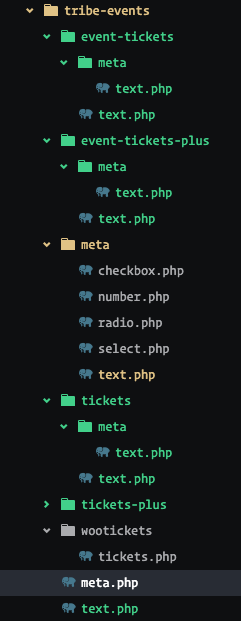
Is there anything we might be missing? We would like to avoid making changes to the plugin core files to accomplish what we need.
Thanks!
-
This reply was modified 9 years, 9 months ago by
-
AuthorPosts