
Home › Forums › Ticket Products › Event Tickets Plus › Where does attendee information go?
- This topic has 25 replies, 4 voices, and was last updated 9 years, 1 month ago by
Robert.
-
AuthorPosts
-
January 25, 2017 at 7:33 am #1223565
Robert
ParticipantMy client made a sale and we cannot find where the attendee information goes after purchase! I created a test ticket on a post with very similar parameters and have confirmed we cannot find it in either case.
I see others in the forum are having this same issue. Is there a solution?
January 25, 2017 at 7:47 am #1223573ParticipantMy client also noted that exporting the attendees list to a CSV shows the custom Attendee Information fields we added but not the data for each field.
January 25, 2017 at 1:23 pm #1223947ParticipantI was able to confirm that RSVPs collect the information perfectly and it shows up in the Attendees view as well as the exported CSV. It appears that this is only a problem with paid or free tickets (in my case using WooCommerce).
January 25, 2017 at 1:26 pm #1223948ParticipantThis reply is private.
January 25, 2017 at 11:41 pm #1224194Geoff B.
MemberGood evening Robert and welcome to the Events Calendar Support forum!
Thank you for reaching out to us.
We are sorry to hear about the additional attendee info disappearing on your for WooCommerce tickets. Yikes!
I would love to help you with this topic.
With that in mind, I just ran a test with a similar setup as yours and unfortunately could not reproduce the issue.
Could you please send me screenshots of the exact setup for the Edit Event screen AND Edit Tickets screen of that example ?
Furthermore, could you please send me a copy of the latest version of your WordPress theme / child theme via a link to a .zip file link (stored Dropbox or Google Drive) so that I can run some tests on my end ? I recommend a private reply for that purpose.
Please ensure you are using the latest files as found on your actual website.
This way I will get access to any updates or customizations you might have made.In the meantime, if you get a chance, can you tell me if this issue persists while using a default WordPress theme such as twenty-sixteen ?
Hang in there!
Best regards,
Geoff B.
January 26, 2017 at 7:06 am #1224331ParticipantThis reply is private.
January 26, 2017 at 7:22 am #1224345ParticipantThis reply is private.
January 26, 2017 at 7:24 am #1224349ParticipantThis reply is private.
January 26, 2017 at 11:59 pm #1224950MemberGood evening Robert,
Thank you for writing back and for the screenshots.
This helped me realize that you are using the “standalone” version of tickets (in a post, instead of in an event).
With that in mind, I ran some tests.
Alas, I was unable to complete the purchase process with your theme installed.This is because it uses deprecated WordPress functions. As such WordPress versions starting at 4.3x will likely break in different ways.
I would recommend taking a look at this when you get a chance (you could turn WP debug on).
On my end, I need to complete a few more tests.
I should get back to you tomorrow about this.
Best regards,
Geoff B.
January 27, 2017 at 12:04 am #1224952MemberHello again Robert,
Good news! I actually found the answer I was looking for.
When you use tickets on posts, the only way to access the attendee information and sales report is within the “Edit Post” page itself.
Look for the “Ticket” section and click on the link (see screenshot)
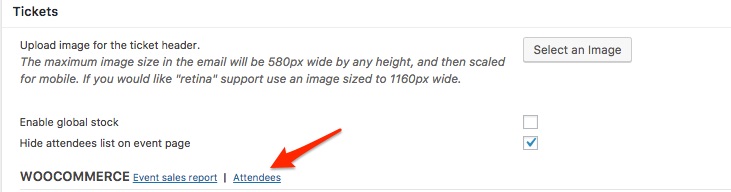
Let me know if that helps.
Have a great day!
Geoff B.
January 27, 2017 at 1:04 pm #1225374ParticipantYup, that’s exactly where it’s supposed to go. The attached screenshot is what we see. The green circle is a test we did early on. A t-shirt is not a ticket, so we changed it to a Product. The red circle is what we see (no extra information saved).
I’m going to run a test to see if making this event an Event item instead of a Post helps.
January 27, 2017 at 1:28 pm #1225396ParticipantUgh. Even using the ticket on an Event doesn’t seem to gather the information. I’m not a developer, so any help you can give would be greatly appreciated.
I also noticed that AJAX doesn’t work on the Events filter bar. Are these issues related? Are they both related to the theme? Is this subject a different thread altogether?
January 27, 2017 at 11:33 pm #1225557MemberGood evening Robert,
I am sorry that you were not successful in seeing the attendee info.
To the best of my knowledge this can happen in the following cases:
- Somebody tampers with the quantity after the tickets are in the cart
- A plugin or the theme is interfering.
By the sound of it, it looks like there is some type of conflict at play.
This is usually because of:- A conflict with another plugin
- A conflict with your WordPress theme
- A template customization for the Events Calendar that requires updating
A first quick test is to simply temporarily revert back to a default WordPress theme such as twenty-sixteen to see if the issue persists.
The next step would be to go through our testing for conflicts procedure (preferably in a staging/dev environment or local install of your WordPress website) and let us know what you find out.
Basically the goal here is to revert back to a bare WordPress installation to see if the problem persists. It also allows us to pinpoint what the cause of the issue is.
But, before you do that, there are 2 things I would advise:
- Make a backup of your database
- Consider activating a “Maintenance Page” plugin if you are doing this on your live site (to minimize impact on your visitors)
I realize this is not much fun to do, but it should allow us to get to the bottom of this.
Let me know how that goes.
Best regards,
Geoff B.January 30, 2017 at 9:28 pm #1226642ParticipantI was able to replicate this using the Twenty Sixteen and Twenty Seventeen themes. The Ticket meta data isn’t being stored.
The only enabled plugins are:
Event Tickets Plus by Modern Tribe, Inc. – 4.4.1
Event Tickets by Modern Tribe, Inc. – 4.4.1
The Events Calendar PRO by Modern Tribe, Inc. – 4.4.1
Maintenance by fruitfulcode – 3.3
The Events Calendar by Modern Tribe, Inc. – 4.4.1.1
WooCommerce by WooThemes – 2.6.13
WooCommerce Helper by WooCommerce – 1.7.2RSVP still works fine. I also figured out that I can add info to the ticket AFTER purchase on the ticket page. The data then shows up in the Details column of the Attendees view. It appears to me to be a problem with the integration with the checkout process in WooCommerce.
January 31, 2017 at 10:20 pm #1227360MemberThis reply is private.
-
AuthorPosts
- The topic ‘Where does attendee information go?’ is closed to new replies.