
Home › Forums › Calendar Products › Community Events › What happens if they change their event?
- This topic has 4 replies, 3 voices, and was last updated 10 years, 7 months ago by
Support Droid.
-
AuthorPosts
-
February 9, 2016 at 7:41 am #1070286
Leia
ParticipantWhat happens if they change their event and I have choosen to check all events before they go live?
Do admin have to prove it again or does it go automatically?
Thanks!February 9, 2016 at 8:02 am #1070308George
ParticipantHey Leia,
Thanks for reaching out. Can you clarify who “they” is, in this context?
Can you also clarify what you mean about them “changing their event”?
It sounds like you are referring to that users who submit events through the Community Events submission form on your site; by default, these submitted events are set to some event status other than “Published.” And so what you’re asking is if they edit their event in the Community Events “My Events” list, will this change the event content before you click “Publish” to publish that event.
Is this accurate? If so, then yes: changes made in the “My Events” view will be applied to the event automatically.
I hope this helps!
— George
February 10, 2016 at 1:22 am #1070597ParticipantHi again!
Okej, yes, thats’s what I meant. Thanks. Sorry.
My issue is that I only want some events with a link to their webpage.
But if they can update the events once published then they can add it themselves even if I would delete it.Is there any other way to do this? To make all changed events go through admin for approval?
February 10, 2016 at 11:30 pm #1071189ParticipantHey @Leia,
Sure thing, you should be able to get some more control over this process by doing a few things in your Community Events settings.
So, first go to Events > Settings > Community in your wp-admin.
Then, find this option and make sure it is un-checked:

Next, set the “default submission status” for submitted events to “Draft” or “Pending Review”. This will ensure that events from the community have to be manually approved before being visible on your site:
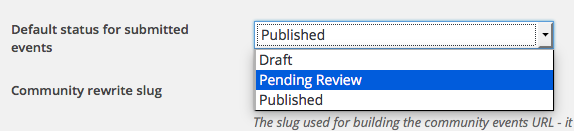
Finally, make sure the “Edit their submissions” option is un-checked as shown here:
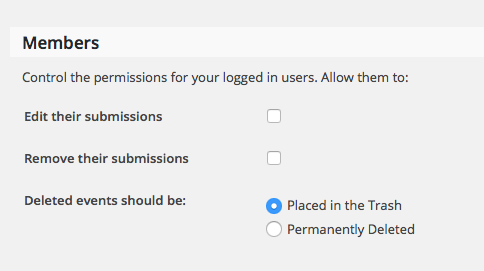
I hope this helps!
Cheers,
GeorgeFebruary 25, 2016 at 8:35 am #1082022KeymasterThis topic has not been active for quite some time and will now be closed.
If you still need assistance please simply open a new topic (linking to this one if necessary)
and one of the team will be only too happy to help. -
AuthorPosts
- The topic ‘What happens if they change their event?’ is closed to new replies.