
Home › Forums › Calendar Products › Events Calendar PRO › Venue address displays without spaces
- This topic has 7 replies, 3 voices, and was last updated 9 years, 6 months ago by
Australian Skeptics.
-
AuthorPosts
-
February 27, 2017 at 2:21 pm #1246485
Australian Skeptics
ParticipantWe use the Pro calendar on our website skeptics.com.au, and have noticed that venue addresses display without any spaces between the words. Attached is a screenshot of an incorrectly displayed address, and a screenshot of our display settings. This does not appear to be a theme conflict. Any advice would be much appreciated!
Thanks,
SigneFebruary 28, 2017 at 1:32 pm #1247188Geoff B.
MemberGood afternoon Signe and welcome to the Events Calendar Support forum!
Thank you for reaching out to us.
We are sorry to hear about the faulty display of the venue. Yikes!
I would love to help you with this topic.Could you please send me a copy of the latest version of your WordPress theme / child theme via a link to a .zip file link (stored Dropbox or Google Drive) ?
I recommend a private reply for that purpose.Please ensure you are using the latest files as found on your actual website.
This way I will get access to any updates or customizations you might have made.I understand this might not be a theme conflict, however I would like to be able to reproduce the issue on my end.
In the meantime, try adding the following CSS rule to your style.css file or in your Custom CSS metabox:
.tribe-events-event-meta .tribe-events-meta-group address.tribe-events-address {

padding: 0 !important;

}
.tribe-delimiter, .tribe-region {margin: 0px 6px 0px 0px;}.tribe-events-gmap {display:block; clear: both;}Let me know if that helps.
Have a great day!
Geoff B.
February 28, 2017 at 6:21 pm #1247321ParticipantThis reply is private.
February 28, 2017 at 8:15 pm #1247378ParticipantHi Geoff,
me again! I’ve added the CSS to our theme’s child style.css and it worked! Looks so much better – the only exception now is the country that still has no space before it (see screenshot). Ideally country should be on its own line, too. Perhaps you can recommend a CSS snippet to fix that, too?
Thank you,
SigneMarch 1, 2017 at 11:48 am #1247892MemberGood afternoon Signe,
I am glad that helped to make some progress.
I will run some tests with your theme and get back to you.
In the meantime, try:.tribe-country-name {
clear: both;
display: block;
}Cheers,
Geoff B.March 1, 2017 at 11:24 pm #1248203ParticipantHi Geoff,
thanks, that looks great! As far as I’m concerned, the issue is fixed – although I’m guessing you would like to get to the bottom of the problem from a back-end perspective.
Thanks,
SigneMarch 2, 2017 at 9:46 pm #1248768MemberGood evening Signe,
I am really glad you like the results.
On my end, tests with your theme yielded the following results
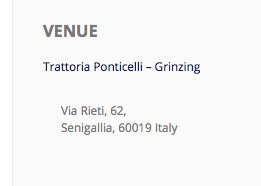
Which, aside from the left-padding (which we fixed), is very similar to what is found in twenty-sixteen. If anything yours look better.
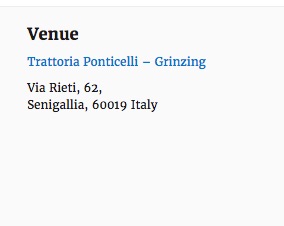
So it looks like this mystery will remain unsolved, but with a happy customer.
You are welcome back in our support forums any time 🙂
For now, I am going to close this thread.
Have a great week!
Geoff B.
-
AuthorPosts
- The topic ‘Venue address displays without spaces’ is closed to new replies.