
Home › Forums › Calendar Products › Events Calendar PRO › Tickets not showing up all of a sudden
- This topic has 12 replies, 4 voices, and was last updated 9 years, 3 months ago by
Tina Stent.
-
AuthorPosts
-
November 24, 2016 at 8:38 pm #1197215
Tina Stent
ParticipantI had the site running perfectly now all of a sudden the tickets have stopped showing up – the event is there but no option to purchase tickets anymore.
I have already updated everything, cheked the woo commerce version, updated the server etc.
Really upsetting as the client has only been live for 4 weeks and already the system is not working.November 25, 2016 at 4:30 am #1197307Andras
KeymasterHello wma333,
Thanks for using our plugins and welcome to the forums! I’m sorry you are having this issue. Indeed it is upsetting if the tickets don’t show up.
Could you pinpoint me to where the issue is?
I have checked you site and I did find events with tickets, e.g.:
Also can you share some screenshots of the event settings and the ticket settings which is having an issue?
Thanks and cheers,
AndrasNovember 27, 2016 at 3:09 pm #1198052ParticipantHi Andras,
I managed to roll back the theme on that site to get it working but I have another site with the same issue – using the same theme. Is there any chance you can have a look and let me know what I can do to fix it? Or let the theme developers know what the conflict is so they can fix it? the events pro/tickets used to work really well with this theme
November 28, 2016 at 4:13 am #1198196KeymasterHi wma333,
Happy to hear that the roll-back helped. I see you are using Divi, I’m a big fan of that theme. Lately we had some reports of Divi updates jumbling sites, unfortunately.
Can you let me know which version was / is working and to which one you updated to that caused the issue. I would like to test this, so if someone else comes with the question I can give them some guidelines, as well as to you if I find something.
Meanwhile you can contact Elegant Themes with the issue so they can correct it with the next release.
Cheers,
AndrasNovember 28, 2016 at 4:00 pm #1198789ParticipantHi Andras,
We are running Divi 3.0.21 and WordPress 4.6.1 with the conflict whilst Divi was resolved with 3.0.16
I have let Elegant Themes know – thanks
November 29, 2016 at 1:46 pm #1199397KeymasterHi wma333,
Thanks for letting me know.
On my local install I have updated a while back to 3.0.21 and didn’t notice any issues.
I just did a rollback to .16 and did an update to .21 to compare. Everything looks pretty much ok on the month, list, day, single event views. Only notable little difference is the header / top menu height, but not much.
I’m not sure if it was a local issue on your install due to some customization or maybe a failed update… Hopefully the ET guys will be able to help you out with this.
Since this is in their ballpark would you be OK if I closed this thread?
Thanks for letting me know.
Cheers,
AndrasNovember 29, 2016 at 2:21 pm #1199405ParticipantHi Andras,
The problem is not with the views, it’s with the ability to purchase tickets – the ticket options don’t show up
November 29, 2016 at 3:31 pm #1199433KeymasterAh sorry, that’s my bad! :blush:
I checked a single event page that has a ticket and an rsvp on my local install and it looks OK. This is what I see:
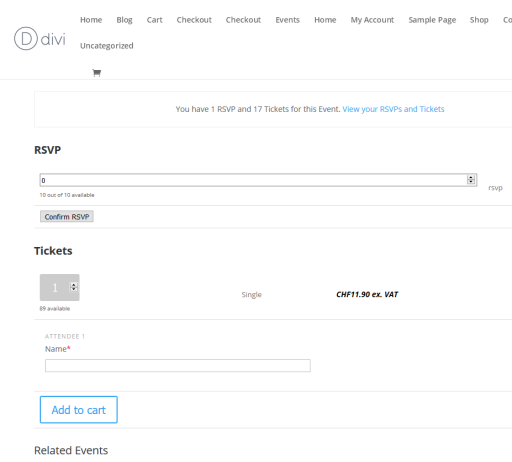
Do you possibly have a screenshot, maybe a dev site where we could take a look at the issue?
Andras
November 29, 2016 at 3:54 pm #1199451ParticipantHi Andras,
here is the link to an event where there are tickets
Thanks for your assistance
November 30, 2016 at 7:23 am #1199703KeymasterHi wma333,
I checked your site and I found that your calendar plugins are not up to date plus there are some mismatching version numbers. Could you please update all the plugins to the latest version and check if the issue is still there?
A.
November 30, 2016 at 7:29 am #1199708KeymasterAfter the update I also recommend you to run a test for conflicts based on this guide:
Let me know the results.
Cheers,
AndrasDecember 22, 2016 at 8:35 am #1209509Support Droid
KeymasterHey there! This thread has been pretty quiet for the last three weeks, so we’re going to go ahead and close it to avoid confusion with other topics. If you’re still looking for help with this, please do open a new thread, reference this one and we’d be more than happy to continue the conversation over there.
Thanks so much!
The Events Calendar Support Team -
AuthorPosts
- The topic ‘Tickets not showing up all of a sudden’ is closed to new replies.