
Home › Forums › Ticket Products › Community Tickets › "The ticket with ID XXXXXX has already been checked in."
- This topic has 16 replies, 5 voices, and was last updated 9 years, 6 months ago by
Robert Rainbow.
-
AuthorPosts
-
October 15, 2016 at 10:58 pm #1177378
Robert Rainbow
ParticipantHi EC,
First of all, the plugins you guys have put together are not just awesome, but are completely a joy to work with! However, I’m having one slight problem with Community Tickets which goes a little something like this…
When a user creates a new event on our site with a paid ticket through WooCommerce and somebody buys it, each time we attempt to scan the QR code, we are taken to the WordPress Dashboard and given the message “The ticket with ID XXXXXX has already been checked in.” even when the QR code has never been scanned before.
This is where it starts to get a bit strange – from here, on the backend of the site, we see the user actually has been recorded as being checked in. However, on the organiser’s front-end attendee’s page, this change does not replicate and the user is still marked as having not arrived. This is where we want the organiser to be viewing attendees, and thus keeping access to the back-end as minimal as possible (QR scanner is logged into an account named ‘Scanner’ set up with contributor role giving only the lowest access possible to scan tickets).
— another minor issue —
Also on the front-end attendees page, the organiser can check-in and undo check-ins using the button on the right. However the buttons on the left offering the same feature, as well as selecting and attempting to do them in bulk, do not work at all.
Attached are a few images which show my problem.
Looking forward to hearing from you!
October 15, 2016 at 11:10 pm #1177380Participant(This image did not upload with the original post)
October 15, 2016 at 11:19 pm #1177384Participant…
October 17, 2016 at 2:54 pm #1177967Andras
KeymasterHey Joe,
Thanks for reaching our and for the super kind words!!! 🙂
I’m sorry you are having an issue here with the community tickets. I did some testing, this is what I found.
First, I registered as a user and set up a new community event with a ticket.
Then in a different browser I purchased a ticket for the event as a guest / new user.
Then I checked the WooCommerce orders and this order was marked as Processing.
As the admin of the site I went to the event attendees and indeed, as you said, I cannot check in the person, only view the order.

Went to the Event Organizers attendee list and there I can check in / out the buyer.

I believe this reproduces your issue until now.
However, when you mark the WooCommerce order completed, you will be able to check in and out the buyer as an admin as well.
Does this help / answer your question?
Let me know.
Cheers,
AndrasOctober 18, 2016 at 12:27 am #1178172ParticipantHi András, thank you for the quick response! There seems to be a bit on an inconsistency between our installations – on my website, once a ticket has been purchased and payment completed, the order is immediately set to ‘completed’ within WooCommerce and the tickets sent via email, so I am not able to set them to ‘completed’ manually from a ‘pending’ status. Even though these orders are completed, I am not able to check-in a user.
Thanks!
Joe
October 18, 2016 at 8:26 am #1178331KeymasterHey Joe,
There is a setting under Events > Settings > Tickets tab which can try to automatically set ticket purchases to completed:
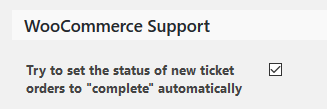
Maybe that is switched on on the other site.
If the order is automatically marked completed, then I believe you should be able to go to the attendee list and see the Check in button. Clicking it will check in the person. I tested again on a local install and worked for me. Can you please check and confirm:
- when the order status is set to complete automatically
- the order <span style=”text-decoration: underline;”>does</span> automatically get completed (we have experienced glitches)
- go to attendee list and you see the check in button
- when clicking the button the user gets checked in
Thanks! I’ll be waiting for the results.
Andras
October 19, 2016 at 3:01 am #1178959ParticipantHey András,
I can confirm that this setting is turned on and that clicking ‘check-in’ does indeed check in user, however when I use QR codes, the site is still giving the same error. 🙁
Thanks,
October 19, 2016 at 3:06 am #1178965ParticipantThis reply is private.
October 20, 2016 at 8:56 am #1179849KeymasterThis reply is private.
October 20, 2016 at 9:46 pm #1180366ParticipantHey András!
Yes, that is 100% correct. I can check people in on the back-end, but QR codes links still give the “The ticket with ID XXXXXX has already been checked in.” error.
The event organiser can also check people in using the right-hand button on the front-end panel, but not using the left-hand buttons.
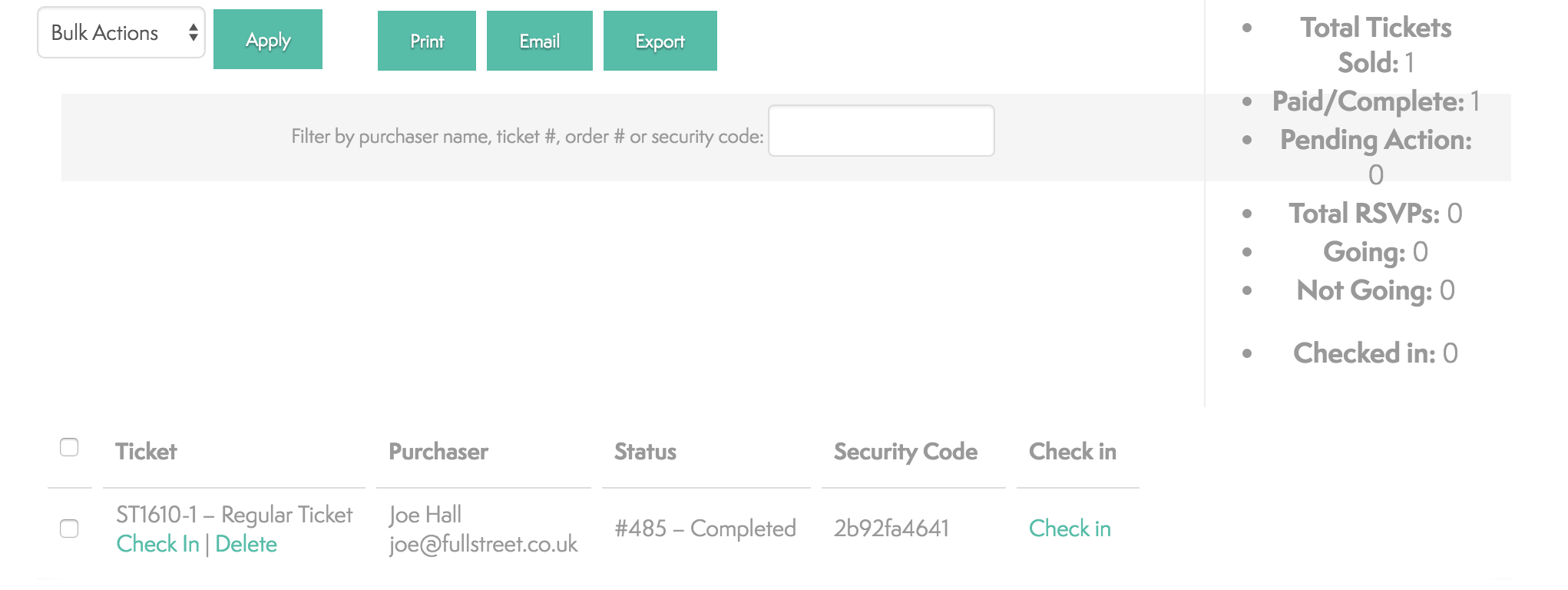
Thanks,
October 21, 2016 at 12:11 pm #1180854KeymasterHi Joe,
Thanks for all the details!
I did a lot of testing on this and even though I managed to use both (actually all 4: left and right; admin and event organizer) check-in options, I can confirm there are two bugs here.
1. When you check in with the link on the right, the label of the URL doesn’t update until you do a page reload. When you use the link on the left, that produces a page reload so seems to work fine.
2. When using the QR code to check in, then although there is an error message saying the user is already checked in, the checking in still happens. So I suppose what happens is:
- you scan the code
- user gets checked in
- system checks whether user is checked in
- since user got checked in in step 2, you get the error message 🙂
Thanks for reporting this and I’m sorry about this bug. I already filed the 2 bugreports, so hopefully a fix will be on its way soon. I ask for your patience until then.
Although I haven’t tested it for these bugs, if you desperately need this to work without issues right now, than you can try downgrading to the last version before 4.3 until the fix arrives.
Is there anything else I can help you with?
Cheers,
AndrasOctober 22, 2016 at 9:25 pm #1181454ParticipantHi András,
Just wanted to say thanks so much for all your help in this and for providing a solution so quickly. Fortunately our site is not yet live so we should be ok to hold out for the next release.
You guys seem to offer some of the best support (and products) out there.Go easy
October 24, 2016 at 12:44 pm #1182073KeymasterHello Joe,
Thanks for the kind words and I’m stoked to hear you are so satisfied with our support!
I am going to close this ticket to new replies, but the issue is still open and we will update this ticket once we release a fix.
If you have any new questions or issues please create a new ticket and reference this one.
Good luck with your project!
Thanks and cheers,
Andras
October 24, 2016 at 12:45 pm #1182075KeymasterOh, and If you like our plugin, and you didn’t yet do so 🙂 we would be happy to receive a review in the wordpress.org repository. Thanks a lot!
https://wordpress.org/support/view/plugin-reviews/the-events-calendarPS2: We’d be also grateful if you would give us feedback on your satisfaction with support. Just click on one of the classy looking emojis below. 🙂 If you can spare a few words, that’s even better. Doublethanks!
March 8, 2017 at 9:26 pm #1251552George
ParticipantHello!
I wanted to post a quick note here that we have published a new Maintenance Release today that should address some of the problems reported in this thread.
You can read about the details of this release here → https://theeventscalendar.com/maintenance-release-events-calendar-4-4-4-event-tickets-4-4-4-premium-add-ons/
I hope this update helps!
If issues persist, open a new thread in the forums and be sure to include your site’s complete, un-edited “System Information” as per the instructions in this knowledgebase guide.
Cheers,
George -
AuthorPosts
- The topic ‘"The ticket with ID XXXXXX has already been checked in."’ is closed to new replies.