
Home › Forums › Calendar Products › Events Calendar PRO › Slow Speed
- This topic has 5 replies, 2 voices, and was last updated 12 years, 8 months ago by
Brook.
-
AuthorPosts
-
January 21, 2014 at 9:12 am #95195
ohlmanngroup
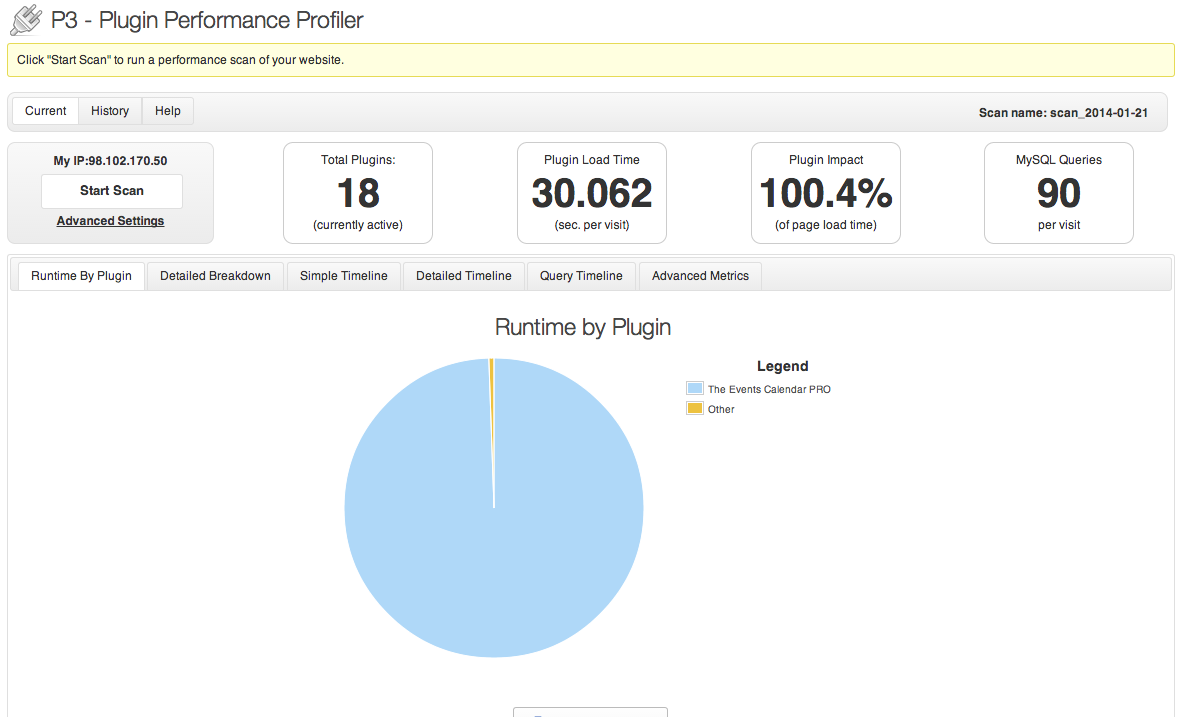
ParticipantWe have a client that is experiencing a slow load time on the homepage (http://vandaliaperfectfit.com) which displays the List events. In the backend there is just over 400 events (not a lot but enough). I ran the P3 Plugin Profiler to check the runtime and…well here is the results:
<br>
It’s taking close to 30 seconds for the plugin to load. Here are some of the metrics:
Advanced Metrics- Total Load Time: 30.0647seconds avg.
- Site Load Time 29.9345seconds avg.
- Profile Overhead: 0.1302seconds avg.
- Plugin Load Time: 30.0624seconds avg.
- Theme Load Time: 0.0000seconds avg.
- Core Load Time: 0.0001seconds avg.
- Margin of Error: -0.1280seconds avg.
- (30.0647 observed, 30.1927 expected)
- Visits: 1
- Number of PHP ticks: 35 calls avg.
- Memory Usage: 5.75 MB avg.
- MySQL Queries: 90 queries avg.
…. any suggestions?
January 21, 2014 at 6:08 pm #95498ParticipantHowdy ohlmanngroup,
Thank you for thoroughly detailing the problem. That is a big help.
Could you try adding this gist to your theme’s function.php file? We have seen similar issues before that are the result of hosts with very stringent MySQL resource requirements.
Some of the more powerful features of our plugin require a little extra horsepower to run, mostly in the form of database queries. While very rare, we have seen a handful of complaints from our thousands of users that this has caused their site to run slow. Usually those users are running their site on an extremely cheap host. Or, their hosting provider has set very low artificial limits on certain resources, that the host allows you to adjust as needed. That could be the case here as well.
Please let me know if that gist helps. Thanks!
– Brook
January 22, 2014 at 1:26 pm #95723ParticipantThis reply is private.
January 24, 2014 at 9:42 am #96477ParticipantHowdy ohlmanngroup,
It looks like that helped a lot. By my count we cut the plugin load time by 470x! That’s a big improvement in my book, it’s down to .06 seconds now.
The only real requirement out of the norm is that we do run some pretty big select statements. The gist you used simply optimizes SQL to run those. If you need to know more details it really depends on your environment. The plugin you are running will give you a good idea of the amount of queries WordPress is running and some other numbers that might be helpful to your IT department, but those are all site dependent so you would have to collect those. WordPress does tend to run a pretty high amount of queries, and her API basically encourages plugins to do the same. It is a rather powerful API, but optimized for speed it is not. That is why you see so many WP sites run caching plugins.
Does that all make sense? Any other questions? Thanks!
– Brook
February 3, 2014 at 7:25 am #99955ParticipantThis reply is private.
February 5, 2014 at 3:01 pm #101160ParticipantFor sure! You could tell the IT staff that The Events Calendar runs some pretty big select statements, to the point that we have to enable SQL_BIG_SELECTS (via SET SQL_BIG_SELECTS=1). That could give them some guidance. It is entirely possible that the server config is already as optimized as possible.
Please let me know if you need anything else. Cheers!
– Brook
-
AuthorPosts
- The topic ‘Slow Speed’ is closed to new replies.