
Home › Forums › Calendar Products › Community Events › Set United States Time Zone in Community "Add" Event Page
- This topic has 3 replies, 2 voices, and was last updated 10 years, 8 months ago by
Nico.
-
AuthorPosts
-
February 11, 2016 at 3:25 pm #1071762
Elizabeth
ParticipantOriginal Post here for reference (timed -out)
I attempted to follow the items listed as help related in the previous post but unfortunately they did not work.
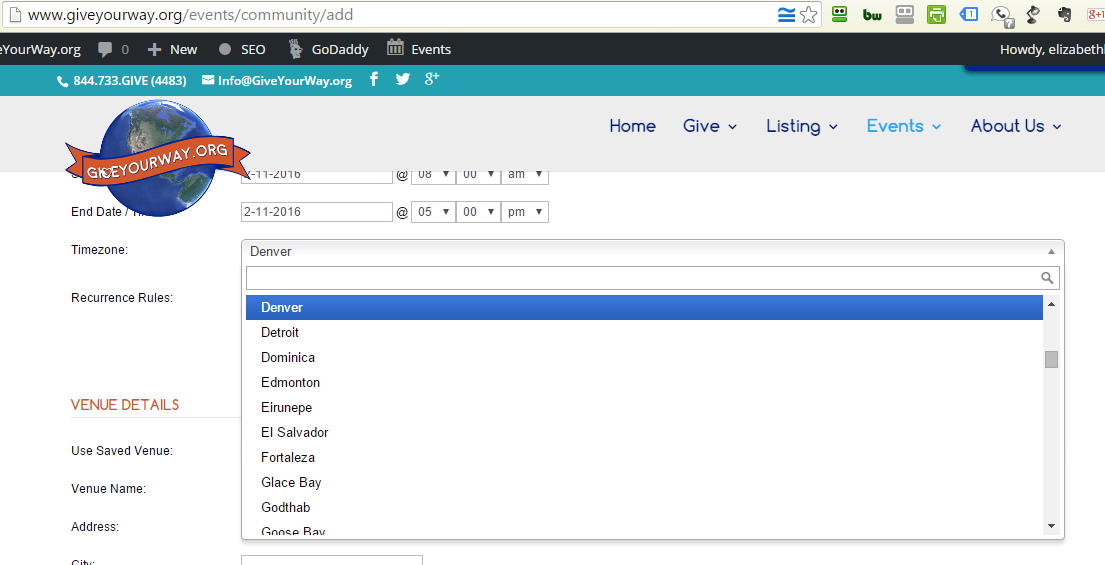
1> When adding a new event post I would like to limit the timezone zone option (help link: https://cldup.com/2enwUD586c.png ) to those time zones only within the United States. I understand you must choose relevant “cites” in such time zones to achieve this. But within the time zone drop down option I need only 5 time zone options. (http://php.net/manual/en/timezones.america.php)
Hawaii-Aleutian Time Zone UTC-10:00
Alaska Time Zone UTC-09:00
Pacific Time Zone UTC-08:00
Mountain Time Zone UTC-07:00
Central Time Zone UTC-06:00
Eastern Time Zone UTC-05:00
Atlantic Time Zone UTC-04:00Note: I do not have access to the wp-includes>function.php option.
This Themer Guide as far as I can see it does not have the option to adjust the incoming new event listing option only the displaying theme after the fact.
https://theeventscalendar.com/knowledgebase/themers-guide/Help Please!
I need to get this working. What code and where should I place it to get ONLY USA timezone to be an option within the drop down menu?February 12, 2016 at 9:57 am #1072220MemberHi Elizabeth,
Thanks for getting in touch, I’ll point you on the right direction to get this working…
As Brian said you’ll need to create an override of the template located at: wp-content/plugins/the-events-calendar-community-events/src/views/community/modules/datepickers.php and replace the function that generates the timezone options at line 93, with just the America options. The replacement code should looks like the following:
...

<option value="America/Chicago">Chicago</option>

<option selected="selected" value="America/New_York">New York</option>

...
The process of creating template overrides is described in our themer’s guide.
Please let me know if you can it working with these tips,
Best,
NicoFebruary 12, 2016 at 11:21 am #1072244ParticipantTHAT WAS AMAZING!! thank you so much. It worked. Here is the final code I replaced at line 93.
...
						<option value="America/Chicago">Central_Chicago</option>
						<option value="America/Los_Angeles">Pacific_Los_Angeles</option>
						<option value="America/Phoenix">Mountain_no_DST_Phoenix</option>
						<option value="America/Denver">Mountain_Denver</option>
						<option value="America/Anchorage">Alaska_Anchorage</option>
						<option value="America/Adak">Hawaii</option>
						<option value="Pacific/Honolulu">Hawaii_no_DST_Pacific/Honolulu</option>
						<option selected="selected" value="America/New_York">New York</option>
						...					</select>
February 13, 2016 at 10:53 am #1072607MemberSuper stocked to hear Elizabeth! Thanks for sharing the final code 🙂
I’ll go ahead and close out this thread, but if you need help with anything else please don’t hesitate to create a new one and we will be happy to assist you.
Have a great weekend,
Nico -
AuthorPosts
- The topic ‘Set United States Time Zone in Community "Add" Event Page’ is closed to new replies.