
Home › Forums › Calendar Products › Community Events › Restricting information when adding event
- This topic has 5 replies, 4 voices, and was last updated 9 years, 8 months ago by
Matt Gray.
-
AuthorPosts
-
January 5, 2017 at 5:29 pm #1214124
Matt Gray
ParticipantHi,
I’ve just bought the community events plugin and have a couple of questions regarding how it can be customised…
I want to force a couple of things…
Firstly, I want to force a category that anyone who creates a ‘community’ event. I don’t want them to have the option of any category – how is that done?
Secondly, I want to force the organiser to be themselves, so that they can only post an event if they are the organiser… is that possible too?
Finally, I want to be able to hide specific entry fields… google maps, google map links, payment… is there a function to do that, or is it just a case of removing the fields themselves from a template file?
Thanks,
MattJanuary 5, 2017 at 9:34 pm #1214189Hunter
ModeratorHey Matt,
Welcome back and Happy New Year 🙂
Firstly, I want to force a category that anyone who creates a ‘community’ event. I don’t want them to have the option of any category – how is that done?
To disable users from being able to add categories when submitting events via the Community Events submit event form, you could simply delete the code from the template. Please review our Themer’s Guide for details on how to properly create and save customizations to avoid losing them next time updates are available. Let me know if you need any help and I’ll provide as much assistance as I’m permitted.
Secondly, I want to force the organiser to be themselves, so that they can only post an event if they are the organiser… is that possible too?
Forgive me, but I am a little confused by your question. Do you mind rephrasing it and possibly give an example so I can better understand?
Finally, I want to be able to hide specific entry fields… google maps, google map links, payment… is there a function to do that, or is it just a case of removing the fields themselves from a template file?
The Themer’s Guide I linked to above is going to be the simplest way to remove the fields you want from the submit event form. Again, let me know if you need any help and I’ll do the best I can. For what we are able to cover in the forums, please refer to our What support is provided for license holders? Knowledgebase article.
Thank you and have a great evening. Cheers!
January 6, 2017 at 1:11 am #1214218ParticipantHi Hunter,
Thanks for your speedy response, and Happy New Year to you too!
In terms of the category, that’s fine to remove the code, but how is it possible to force the specific category that the post goes into… i.e. all custom submitted events go into category ID 1 for example?
For the user one… if I am logged in as “Matt” – I want the organiser field to only allow them to use themselves as the organiser, and populate the field with their own name – i.e. the organiser name wouldn’t have a drop down to choose an organiser, or ability to add a secondary organiser. Phone / Email / Website will only need to be populated on the first event that they create, and then it’ll populate it for them afterwards…
Basically, I want the person who is creating the event to always be the organiser.
On removing the other fields – that’s all fine, thanks… easy enough to do!
Finally, I’ve set a function that changes the word “Event” to “Class” everywhere else throughout the Events Calendar, but it doesn’t seem to take effect on this sub-plugin… is it possible to make that happen too, or is that just a bug?
Cheers,
MattJanuary 7, 2017 at 2:06 pm #1214771ModeratorHey Matt,
Thank you for your patience. To assign a category once an event submitted via the Community Events form, please add the following snippet to the bottom of your theme’s functions.php file:
/* Tribe, assign a category after a Community Events submission is saved */

function tribe_ce_force_category ( $event_id ) {

	wp_set_object_terms( $event_id, 'category1', Tribe__Events__Main::TAXONOMY );

}

add_action( 'tribe_community_event_created', 'tribe_ce_force_category' );
Change the category1 text to the slug of the category you’d like events assigned to. Let me know how it works out for you.
To auto-populate the Community Events form with the organizer adding an event would require a bit more custom code than I’m permitted to spend writing. I also looked for existing examples but wasn’t able to come up with anything. Sorry I can’t do more here, but I see the validity in the request, so your best best bet is to submit the request to our UserVoice Feature Ideas or build out the functionality yourself.
Finally, I’ve set a function that changes the word “Event” to “Class” everywhere else throughout the Events Calendar, but it doesn’t seem to take effect on this sub-plugin… is it possible to make that happen too, or is that just a bug?
I’m using the code from our Changing the word ‘events’ to something else Knowledgebase article and it seems to be working everywhere for me. Please see the screenshot of my Community Events form below for reference.
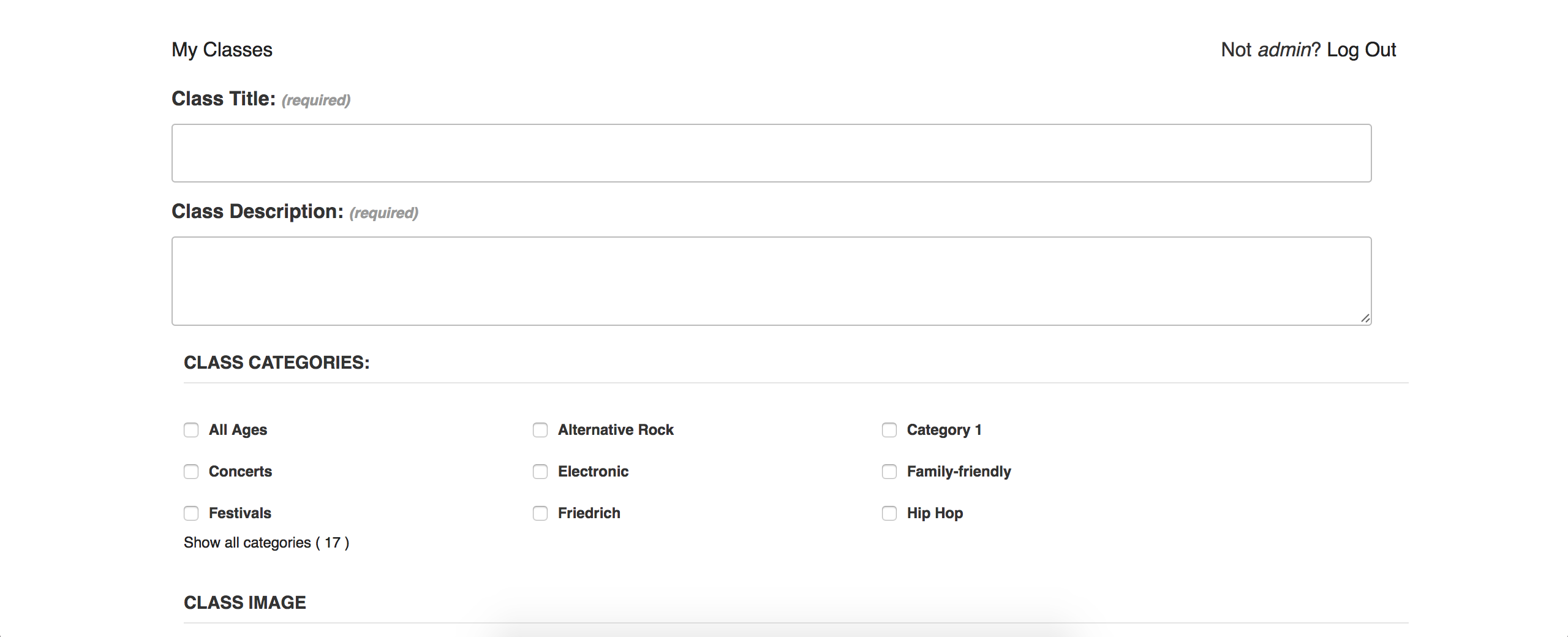
Are you using the code provided in the linked above Knowledgebase article? If so, please elaborate where it is not working and provide screenshots if possible. Thank you and have a great rest of your weekend. Cheers 🙂
January 29, 2017 at 8:35 am #1225881Support Droid
KeymasterHey there! This thread has been pretty quiet for the last three weeks, so we’re going to go ahead and close it to avoid confusion with other topics. If you’re still looking for help with this, please do open a new thread, reference this one and we’d be more than happy to continue the conversation over there.
Thanks so much!
The Events Calendar Support Team -
AuthorPosts
- The topic ‘Restricting information when adding event’ is closed to new replies.