
Home › Forums › Ticket Products › Event Tickets Plus › Recurring ticket End sale
- This topic has 9 replies, 3 voices, and was last updated 10 years, 6 months ago by
Support Droid.
-
AuthorPosts
-
March 31, 2016 at 8:51 am #1096421
Dr.
ParticipantI have a question about “End sale” for edited recurring events.
- I set up a recurring event in Event Tickets Plus with two Tickets. I use WooCommerce with Event Tickets Plus. The first of the recurring events happens on April 1 at 10am. and repeats every day thereafter until May 1.
- I save the recurring event
- Under my event listings, I choose “Edit All” for the recurring event.
- Under Tickets >> WooCommerce I choose “Edit” for my ticket type, and I set the “End sale” for March 31 at 4pm. I click “Save this ticket”
- I update the event
My question is this: how is the “End sale” date set up for each of the recurring events? Do they each have an “End sale” date of 4pm for the day before? Do they each have an “End sale” date for March 31 at 4pm?
Thanks for any info you can give.
~ Sean O’Daniels
April 1, 2016 at 11:46 am #1097186Hunter
ModeratorHey Sean,
First off, thanks for choosing PRO for your calendar needs! We love seeing new faces around here 🙂
After some testing and research, the way recurring events handles tickets is broken down like this:
When creating a series of recurring events, tickets are basically “global” – meaning when you try and edit a single event’s ticket information, it will break the event from the recurring series completely. So beware of that.
When adding tickets to recurring events, you can see the option below the Ticket section End Sale date picker on when to stop selling tickets for this series of events. If you leave it blank, tickets will be available from now until the event ends.
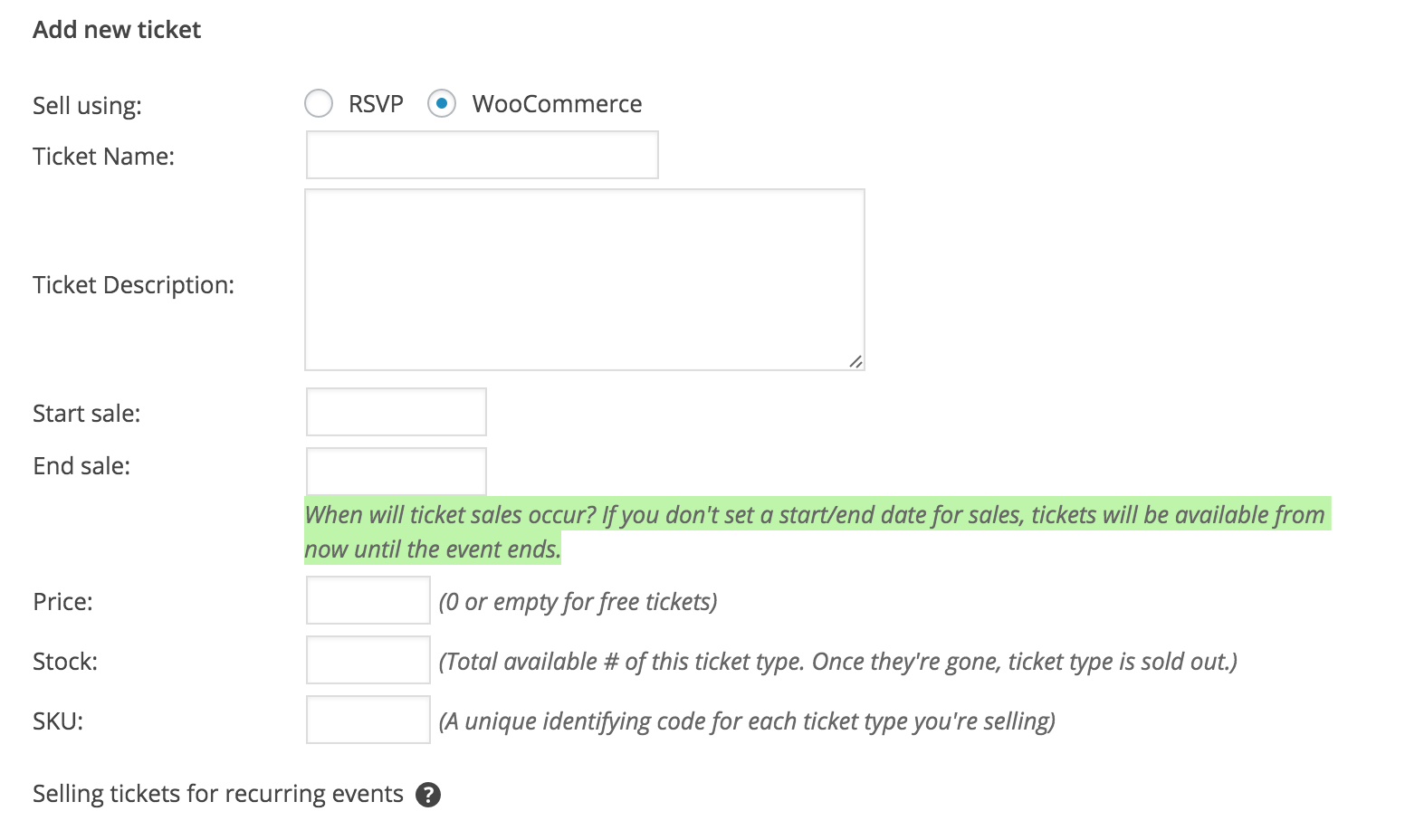
Also, you keep saying March 31st, but the dates of your events are April 1st-May 1st. If you can clarify the dates a bit better, I can fully address your question if I haven’t already.
Thanks again for choosing PRO and enjoy your weekend.
April 4, 2016 at 5:42 am #1097791ParticipantI think it would be better if I stated a need instead of asking a question.
I would like to set up a series of recurring events and have the ticket sales for each individual event end x hours before the event starts. As it stands, the “End sale” field for a ticket only allows the user to enter a specific date and time, which does not make any sense for recurring events.
Thanks for your attention, and for a great plugin 🙂
~ Sean
April 4, 2016 at 5:51 am #1097800ParticipantAnd just to reiterate the importance of this…I am having to delete my recurring events right now (recurring events is the main reason I purchased the plugin) and enter in all 232 events in individually so that I can set the end time for ticket sales for each event.
It is going to be a busy morning.
April 4, 2016 at 5:58 am #1097805ParticipantApril 4, 2016 at 6:09 am #1097811ParticipantOk, maybe this is not going to work.
If I add in all 232 events, each event with two ticket types, this is going to add 464 new products to my WooCommerce, creating a huge mess in the products area.
Hopefully you will respond to this message with an update on adding in end sale dates for recurring events. I am eagerly awaiting your reply.
~ Sean
April 4, 2016 at 4:55 pm #1098112ModeratorHello and welcome back,
Thanks for the patience while I’ve looked more into your response. I understand your frustration and also what you’re trying to accomplish. Unfortunately, if you have 232 separate events with 2 different ticket types, our current setup doesn’t allow for a global stock for all recurring events nor the ability to edit individual end ticket sales time.
These are definitely an idea worth mentioning via our UserVoice Feature Ideas if they haven’t be submitted already.
I truly do apologize we don’t offer the functionality you need and if you can’t seem to get everything working, we offer a 30-day money back guarantee. If that’s the route you need to take, you can get the process started by visiting our Contact page and we’d be happy to help you out.
Best of luck and thanks for the patience and understanding.
April 5, 2016 at 9:36 am #1098415ParticipantI dont think you understand. The only reason I have 232 separate events is because I cannot use the recurring events feature. The reason I cannot use the recurring events feature is because you do not have a working way to have ticket sale end times for recurring events.
If you offered recurring events with the ability to set an end sale time, then my problem would be solved.
April 5, 2016 at 3:16 pm #1098651ModeratorHello,
I believe we are on the same page as I was trying to describe the same thing to you; so that’s good!
I can’t give you an exact date, but I do want to assure you the functionality you describe is on our radar and set to be released in the very near future. Hang tight while we get the product ready for release and you’ll see it in your wp-admin and updates can also be found on theeventscalendar.com/blog.
Thank you so much while we worked towards a mutual understanding. Sometimes it can be difficult to communicate via text and I apologize if I made this a more difficult process than it should’ve been. Have a good one and thanks for choosing PRO 🙂
April 20, 2016 at 9:35 am #1104913KeymasterThis topic has not been active for quite some time and will now be closed.
If you still need assistance please simply open a new topic (linking to this one if necessary)
and one of the team will be only too happy to help. -
AuthorPosts
- The topic ‘Recurring ticket End sale’ is closed to new replies.