
Home › Forums › Ticket Products › Event Tickets Plus › QR and Ticket number in email
- This topic has 9 replies, 2 voices, and was last updated 9 years, 6 months ago by
Abdulrahman.
-
AuthorPosts
-
March 7, 2017 at 12:31 am #1250313
Abdulrahman
ParticipantGreetings Guys,
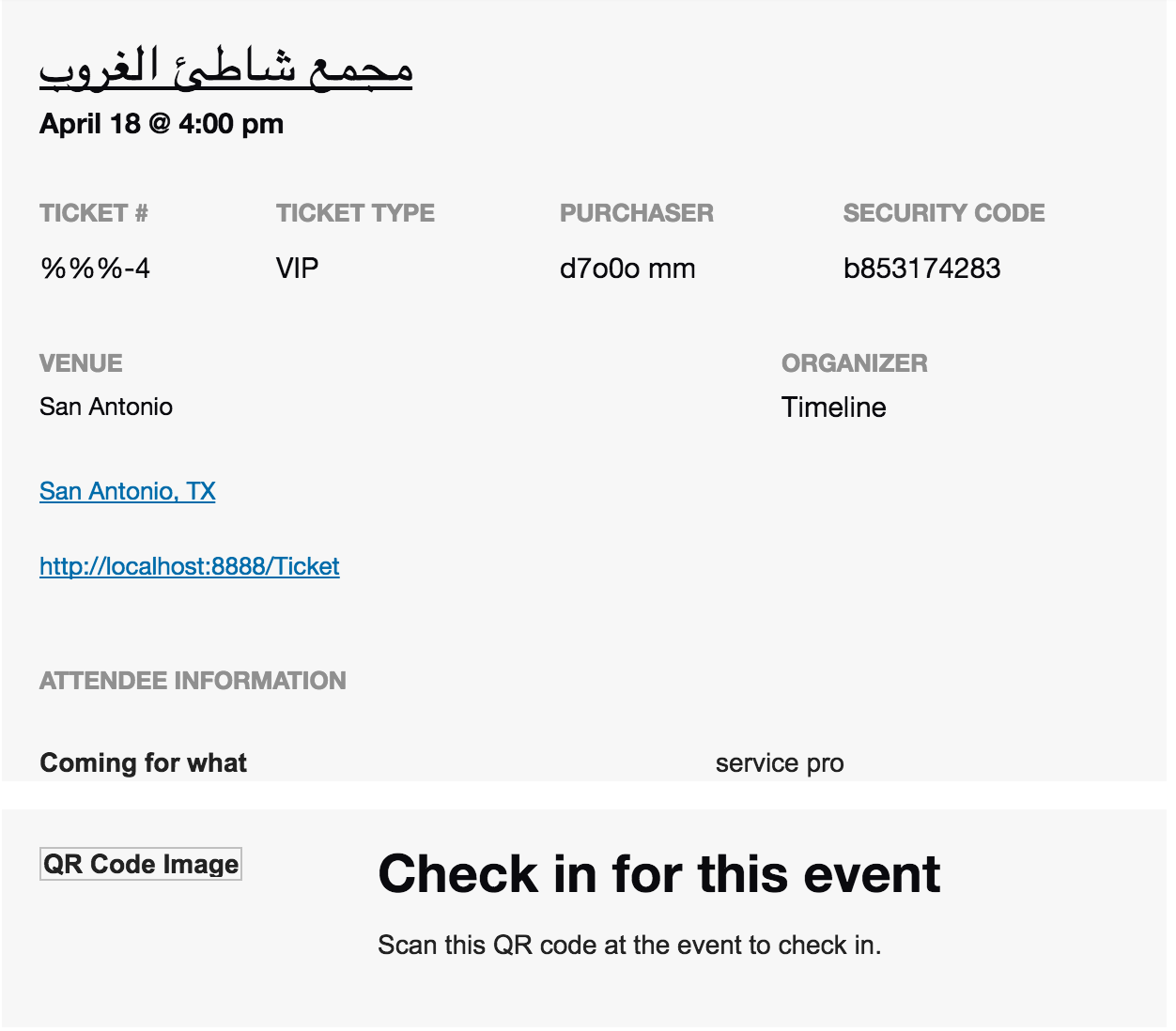
it seems that I cannot send the ticket number and QR image to customer email. please check the attached image
https://theeventscalendar.com/content/uploads/2017/03/91ca5a4b1df19dbf.png
March 7, 2017 at 8:39 pm #1250859Cliff
MemberHi. Sorry you’re experiencing this.
Please tell me the img src of the QR code image that is broken. You can discover this by viewing the email message in a web browser (like Chrome), right-clicking on the broken QR code image, and clicking Inspect.
Please also share your System Information. That will give me a lot of extra information to help diagnose the problem.
March 7, 2017 at 11:41 pm #1250915ParticipantThis reply is private.
March 8, 2017 at 10:47 am #1251242MemberThe src you copied is likely when you’re viewing in Gmail, so it looks like the actual file would be at http://localhost:8888/Ticket/wp-content/uploads/2017/03/qr_0273291a12af6e81f4a6ba3c5080b8a0.png
- Does that file exist at that location? If not, do other files exist in your uploads directory that begin with “qr_”?
- Do you have WordPress installed in a subdirectory called “Ticket”?
- Are you buying an RSVP ticket or a WooCommerce ticket?
- Please enable WP_DEBUG and WP_DEBUG_LOG and share any debug messages you see while buying a ticket.
March 8, 2017 at 9:05 pm #1251508ParticipantThis reply is private.
March 9, 2017 at 1:33 pm #1251998MemberMy 3rd question was what type of tickets are these: RSVP, WooCommerce, Easy Digital Downloads?
So does this file exist: http://localhost:8888/Ticket/wp-content/uploads/2017/03/qr_0273291a12af6e81f4a6ba3c5080b8a0.png if you try to load it in your browser?
Could you please provide a screenshot of the ticket in your email? I wonder if, since the email is loading via Gmail, that it can’t see your localhost’s files. Do you maybe have a mail client like Outlook on your same computer that can open the email and maybe it’ll work that way? If this does work, then I’d guess you don’t have any issue at all for when you publish your site live.
March 11, 2017 at 12:06 am #1252792ParticipantGreeting Cliff,
thank you for following up my issue.
My 3rd question was what type of tickets are these: RSVP, WooCommerce, Easy Digital Downloads?
reply: WooCommerceSo does this file exist: http://localhost:8888/Ticket/wp-content/uploads/2017/03/qr_0273291a12af6e81f4a6ba3c5080b8a0.png if you try to load it in your browser?
Reply: YesCould you please provide a screenshot of the ticket in your email? I wonder if, since the email is loading via Gmail, that it can’t see your localhost’s files. Do you maybe have a mail client like Outlook on your same computer that can open the email and maybe it’ll work that way? If this does work, then I’d guess you don’t have any issue at all for when you publish your site live.
I don’t have any other email provider in my computer. also the ticket number is not their.
March 13, 2017 at 4:18 pm #1253587Member1)
I’m pretty sure the issue with the QR code is that the Gmail servers cannot load your locally-hosted file and that if you moved your site from localhost to a publicly-accessible web server, the emails would load the QR code image correctly.
2)
From your screenshot, I do see the %%%-4 ticket number, which is odd.
Could you please provide me the database export for this post and its postmeta from the database?
Also, is it correct that your site’s language should be set to English? I ask because of this event’s title being in another language.
April 4, 2017 at 9:35 am #1264231Support Droid
KeymasterHey there! This thread has been pretty quiet for the last three weeks, so we’re going to go ahead and close it to avoid confusion with other topics. If you’re still looking for help with this, please do open a new thread, reference this one and we’d be more than happy to continue the conversation over there.
Thanks so much!
The Events Calendar Support Team -
AuthorPosts

- The topic ‘QR and Ticket number in email’ is closed to new replies.