
Home › Forums › Calendar Products › Events Calendar PRO › Purchased Event Calendar Pro for Recurring Events – now event display a mess
- This topic has 6 replies, 4 voices, and was last updated 10 years, 8 months ago by
Support Droid.
-
AuthorPosts
-
December 8, 2015 at 12:27 pm #1037802
Ryan
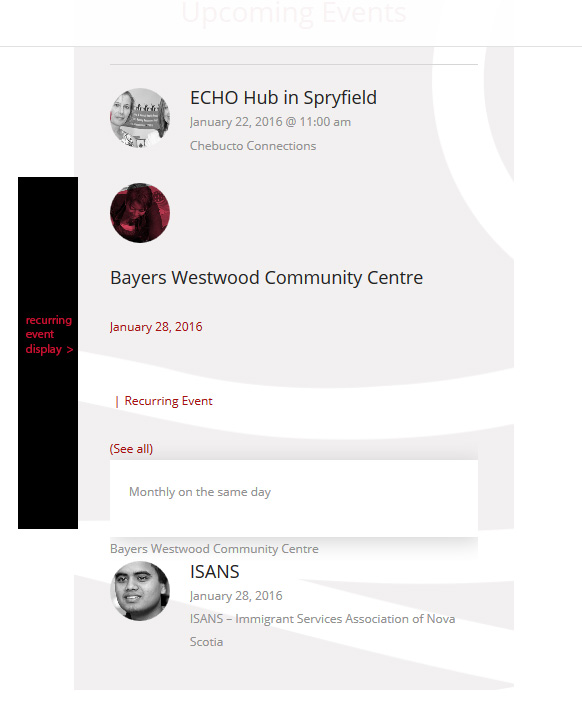
ParticipantI installed the free Event Calendar but upgrade to Pro to have recurring events. However, the display of the recurring events versus the non-recurring events has a very different and awkward looking display. Specifically, the home page plugin addition that came with the Enfold theme (which includes the Event Calendar) outputs messy recurring CSS event output and looks “wrong” (new lines, awkward spaces, etc) compared to non-recurring events.
Here is a screen shot of the non recurring event display versus recurring events output on the site homepage:
December 8, 2015 at 9:55 pm #1037992Brook
ParticipantHowdy Ryan,
That is certainly awkward looking. It looks like Enfold does need to release an update to the theme so it is comatible with Pro’s widgets. That said I might be able to craft a custom CSS patch if I could view your website in my browser. I tried clicking the link you provided but it asked for a password. If you can provide a password or live link for me to see the issue and the HTML behind it, I can probably help further.
Cheers!
– Brook
December 9, 2015 at 5:03 am #1038042ParticipantHi Brook,
Thanks for the fast response.
Here is the URL: http://nslegal.nicomitcms.com/
Password Protect Login: [redacted](* Note I added another calendar widget under it, but hope to not have to use it if we can get the CSS fixed!)
Let me know if you need anything else.
Thanks!
December 10, 2015 at 12:43 pm #1039095ParticipantI am happy to help, Ryan. Hmm, I can’t login with that password though. Says invalid password.
Note, if you prefer you can check the box “Private reply” to hide your password from the pubic. I realized this password shouldn’t give access to your WP Admin, but just in case you prefer to keep it private then Private Reply is the way to go. Do you mind sharing a working password?
Cheers!
– Brook
January 12, 2016 at 7:42 pm #1054937Brahim
ParticipantAdd this code the the bottom of your functions.php file in wp-content/themes/enfold
$tep = TribeEventsPro::instance();
$tep->disable_recurring_info_tooltip();
January 12, 2016 at 10:05 pm #1054976ParticipantThat is an interesting approach. It will disable the tooltip. But the CSS looks like it might still need a fair amount of love to be shipshape and Bristol fashion. To correct that, I’d really need to be able to inspect the site with a CSS inspector.
Thanks for sharing that possibility Brahim.
- Brook
February 18, 2016 at 8:34 am #1076730KeymasterThis topic has not been active for quite some time and will now be closed.
If you still need assistance please simply open a new topic (linking to this one if necessary)
and one of the team will be only too happy to help. -
AuthorPosts
- The topic ‘Purchased Event Calendar Pro for Recurring Events – now event display a mess’ is closed to new replies.