
Home › Forums › Additional Help › Translations › Problem with preserving links to original translation while translate event
- This topic has 7 replies, 3 voices, and was last updated 10 years, 8 months ago by
Support Droid.
-
AuthorPosts
-
January 25, 2016 at 1:21 am #1061505
Andy
ParticipantHello
First of all I have to say that I have read Your article here:But still I have some problem. We’ve created a webpage for a client using Your plugin. All was working fine after moving it to client’s live server but from some time there is a strange problem when adding translation for an event.
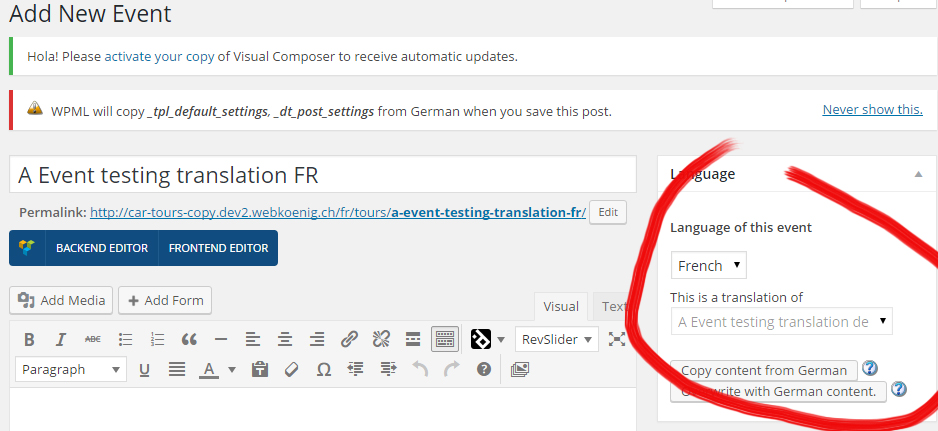
I’m adding new event (I got Trendy Travel theme installed) in default language and publish it.
After that I use a ‘plus’ link for this event to add a translation fot it.
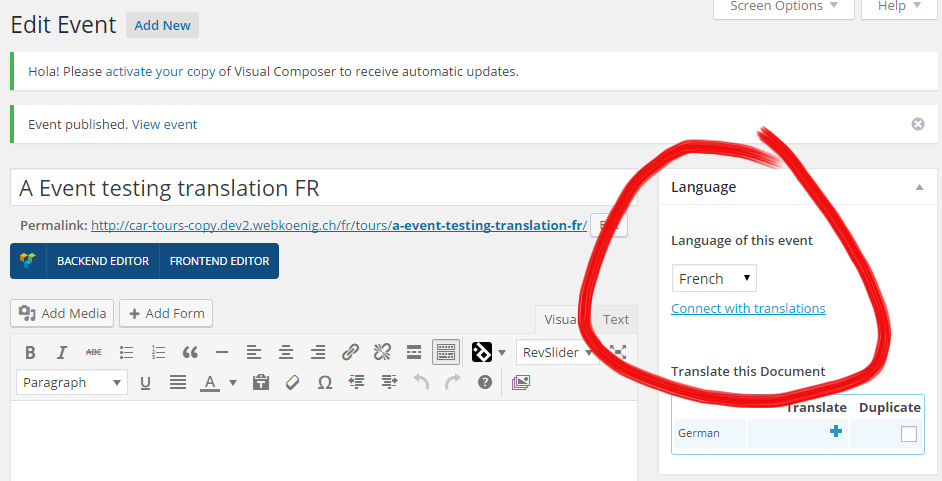
In adding form of this translation I correctly see that this new translation is connected with correct event in default language BUT after specifying a title and PUBLISHING/SAVING it this translation’s connection to oryginal event is lost and I see only link ‘Connect with translation’.Client want this to work that way because she sais that this way it’s easier for her, especialy that it was working before. And another issue is that after SECOND saving the event in permalilnk appears an attribute which was not there before ‘?lang=de’, client also wants to know where it came from, because there was not such behaviour before.
And I have request for quick answer because I writing with this issue to othe support teams already for few weeks and client is unpatient now…
Below are pasted System Settings from live server, but I have also a copy of the webpage on testing server. On both runs the latest version of your plugin which is 4.0.5 and on both the same problem exists.
Below some screenshots:
https://d2salfytceyqoe.cloudfront.net/wp-content/uploads/2016/01/785185-EventsTranslation.jpg
https://d2salfytceyqoe.cloudfront.net/wp-content/uploads/2016/01/785185-EventsTranslation2.jpgJanuary 25, 2016 at 11:00 am #1062021Nico
MemberHowdy Andy,
Welcome to our support forums and thanks for reaching out to us. I’ll help you figuring out what’s going one here!
First of all, Can you please follow the steps described in our Testing for conflicts guide? This way we can see if this is a problem in our plugin or a conflict with the theme or other installed plugins. You can test this in your local/dev server.
Then can you give me a couple of details from your set-up so I can try to re-create this on my end. Languages seem to be French and German, right? Which one is the default? Can you also please indicate which permalink structure you are using?
And I have request for quick answer because I writing with this issue to othe support teams already for few weeks and client is unpatient now…
Hey not sure about what other support teams you are referring to here (maybe WPML support). We try to reply once every 24hrs during week days so that’s what you should expect from us.
Thanks for the detailed report, hope we can get this right soon,
Best,
NicoJanuary 25, 2016 at 11:09 pm #1062213ParticipantThis is I who was writing in the first place.
So accordig to Your question.
Yes, there are 2 languages – German(default) and French.
Permalinks structure which is set now is ‘Post name’I’ve followed this ‘Testing for conflicts guide’ but with no success. The problem persists.
January 27, 2016 at 1:52 pm #1063409MemberHi Andy,
Thanks for your patience while I worked to test this!
I’ve tested this in my local install with the setup up described in the article Setting up The Events Calendar with WPML. When creating the translations as suggested I’m not able to reproduce the error you mention.
Are you using the ‘Overwrite with English(main language) content’ option? Can you try again with a new event while the site is in default conditions (default theme and no other plugins active? Be sure to follow the steps in the guide when doing so.
Regarding the URL, you can configure how that works for every language. Go to WP-Admin > WPML > Languages > Language URL format, there you’ll find the options to change this.
Please give that a second try and let me know about it,
Best,
NicoJanuary 28, 2016 at 12:31 am #1063519ParticipantIf I’m creating translation as suggested in this article it also works fine.
But I’m talking about situation when client want to create the translation NOT USING button ‘Overwrite with German content.’ As I described at the begining. I checked it also on clean installation here http://car-tours-clean-copy.dev2.webkoenig.ch and it works the same.
So once again. Client want to have possibility to create translations for event WITHOUT USING button ‘Overwrite with German content.’ but preserving connection to event in original language. Now it’s impossible with Your plugin event.
When You don’t use button ‘Overwrite with German content.’ then – after saving – connection to oryginal event is always lost.
Also after SECOND update there is always added in event’s permalink this e.g. ‘?lang=fr’ parameter and ONLY for events. So something have to be wrong with this plugin.
January 28, 2016 at 12:48 am #1063523ParticipantIs there any chance to talk about this through skype/live? This would I hope bring the solution to us much quicker….
January 28, 2016 at 11:13 am #1063940MemberHi Andy,
Thanks for following up on this issue.
But I’m talking about situation when client want to create the translation NOT USING button ‘Overwrite with German content.’
As you state this is not possible right now, as when the content is overwritten the metadata of the event is copied over to the translation ensuring no data is missing. Sorry but for now there’s not another way of doing this we support.
I’m sorry to say the forum is the only channel we use to support our clients (more details on our support policy). If you feel this limitation is a showstopper for you and the license was purchased within the last 30 days you can always ask for a full refund. We certainly don’t want to tie you to our products if they do not work for your project.
Please let me know about it,
Best,
NicoFebruary 21, 2016 at 8:35 am #1079267KeymasterThis topic has not been active for quite some time and will now be closed.
If you still need assistance please simply open a new topic (linking to this one if necessary)
and one of the team will be only too happy to help. -
AuthorPosts
- The topic ‘Problem with preserving links to original translation while translate event’ is closed to new replies.