
Home › Forums › Calendar Products › Events Calendar PRO › Photo View Not Sorting Properly
- This topic has 9 replies, 3 voices, and was last updated 12 years, 6 months ago by
Barry.
-
AuthorPosts
-
March 4, 2014 at 4:14 pm #112548
Joseph Coppola
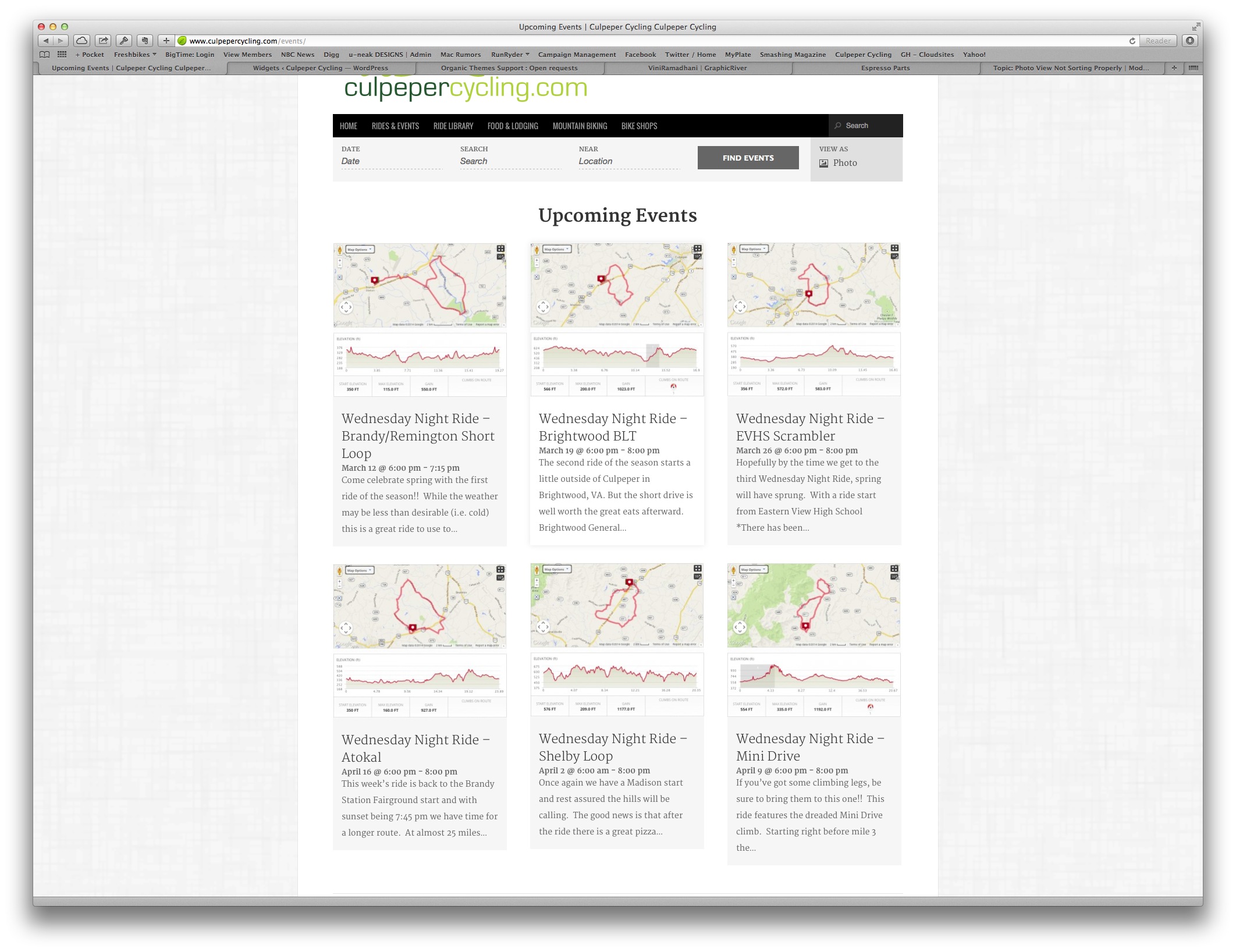
ParticipantRegardless of the sort options I choose my events are not sorting in date ascending order. See here:
http://www.culpepercycling.com/events/upcoming/Notice that April 16th event comes before April 2
March 5, 2014 at 9:20 am #113358MemberHi.
I can appreciate your frustration here: photo view can be slightly confusing in this regard as the events are rearranged to a degree in order to make best use of space.
That said, at least within my browser, the event dated April 16 is actually further down the page (in terms of how high the box starts) than the events starting April 2nd/9th and so this isn’t unusual or unexpected: on the other hand, if you found that within photo view an event from July (just as an example) was surrounded both above, below and to the sides by events dated sometime April then that would definitely be concerning and unexpected – but what I’m seeing on your site actually looks to be in order.
If you need a more rigid layout it may be worth reformatting list view into a grid like system of a more rigid form than photo view provides.
Does that clarify things?
March 5, 2014 at 9:24 am #113363ParticipantThe whole reason I purchased the PRO version is for this layout. Nowhere in your sales documentation does it state you cannot control the order of items in photo view. And it makes NO sense why that it would be random. If I wanted to code a completely new view I would have went with another plugin.
March 5, 2014 at 9:26 am #113367ParticipantSee this screen cap for the out of order.
http://s3.amazonaws.com/CulpeperCycling/Website_Content/CueSheets/ScreenCap-1.jpgMarch 5, 2014 at 9:42 am #113373MemberI can understand your annoyance, but can I clarify a few things:
Nowhere in your sales documentation does it state you cannot control the order of items in photo view.
We don’t actually state that there is any user interface with which to re-order the displayed items, either (and I’m not sure that is generally something many of our users would want). With that said, just like any other view, you can dictate the order and many other facets of how the view functions by means of customization work. The following resources could be helpful if you want to explore that:
The layout of photo view is certainly one of its attractions – bear in mind though there is an inherent challenge in terms of not being able to precisely dictate the height of each item (the length of any descriptions/excerpts, the title and other elements can all vary, after all) which is at the root of what you are describing. If you’d like to propose an alternative strategy we’re certainly open to ideas – you can post any requests on our UserVoice page.
And it makes NO sense why that it would be random.
It’s not random, I’m sorry if I didn’t make that clear enough: like other event views the ordering is chronological, however it is intended to have a more organic, free-flowing layout than others.
If you consider this representation you can see that the sequence is well ordered – and that’s basically what we’re seeing on your site – with event 4 appearing to the right of event 5 (which I think is the source of your confusion) it does actually starts above it. With photo view, in other words, you cannot try to interpret the results as a rigid grid of columns and rows.
If I wanted to code a completely new view I would have went with another plugin.
I appreciate that, but since the expected behaviour of photo view isn’t to your liking I wanted to present an alternative approach for you to investigate – I’m sorry that wasn’t helpful in your case.
If we can help with anything else, please let me know.
March 5, 2014 at 9:50 am #113377MemberThanks for sharing your screengrab (I didn’t see it before my last post as I was already typing my reply) – but here is what I see:

I’m surprised your own screenshot is so different as a colleague on a different OS/different browser basically saw the same as I did. Can I ask what browser you are using here?
March 17, 2014 at 3:42 pm #120171csusummerarts
ParticipantHi Barry,
I am having the same issue. What I have found is that in Chrome the dates are in the incorrect order but in Firefox, and IE things are fine. Please advise on correcting this issue. Thanks. Also where can I insert a technical lead email as I am not the client who bought this plugin?
March 18, 2014 at 1:29 pm #120839ParticipantHi Barry,
After a bit of research I believe the issue lies within the way that Isotope(javascript) is interacting with the data.
March 19, 2014 at 9:23 am #121101ParticipantHi Barry,
I have ound out that this issue will disappear after swithcing to a non “full width” layout.April 3, 2014 at 6:29 am #127326MemberI’m sorry we didn’t see your posts there, csusummerarts. In future I’d recommend posting a new thread of your own – even if the problem seems very similar – which should avoid your posts being missed … and if you still need help that is definitely going to be the best course of action at this point.
@fxidesign: as this thread’s not seen much activity from you over the last couple of weeks so I’ll go ahead and close it. Of course if you still need help with this or any other issue please don’t hesitate to create a new thread (or threads) and one of the team will be only too happy to help. Thanks!
-
AuthorPosts

- The topic ‘Photo View Not Sorting Properly’ is closed to new replies.