
Home › Forums › Ticket Products › Event Tickets Plus › Need to add additional fields to event creation
- This topic has 8 replies, 2 voices, and was last updated 11 years, 9 months ago by
Brian.
-
AuthorPosts
-
January 12, 2015 at 10:53 am #931650
Sonya
ParticipantI have searched and I cannot locate a solution or tool for this. I see that in the creation of an event there is the “Details”, “Venue” and “organizer”. Our events will have different presenters or instructors and we would like to have these featured in the event details area.
Also, on the same note we would like to add an area where the customer can add a note to their checkout and have the ability to rename the title of the comment box, (ie., Please include additional guests names or add a comment for the promoter here).
How can we achieve this?
Thanks!January 12, 2015 at 10:54 am #931651ParticipantI meant to say:
Also, on the same note we would like to add an area where the customer can add a note to their checkout. we would lie to have the ability to rename the title of the comment box, (ie., Please include additional guests names or add a comment for the promoter here).Thx!
January 13, 2015 at 7:58 am #932018MemberHi,
I can try to help you out here, but we are limited in provided support for customizations.
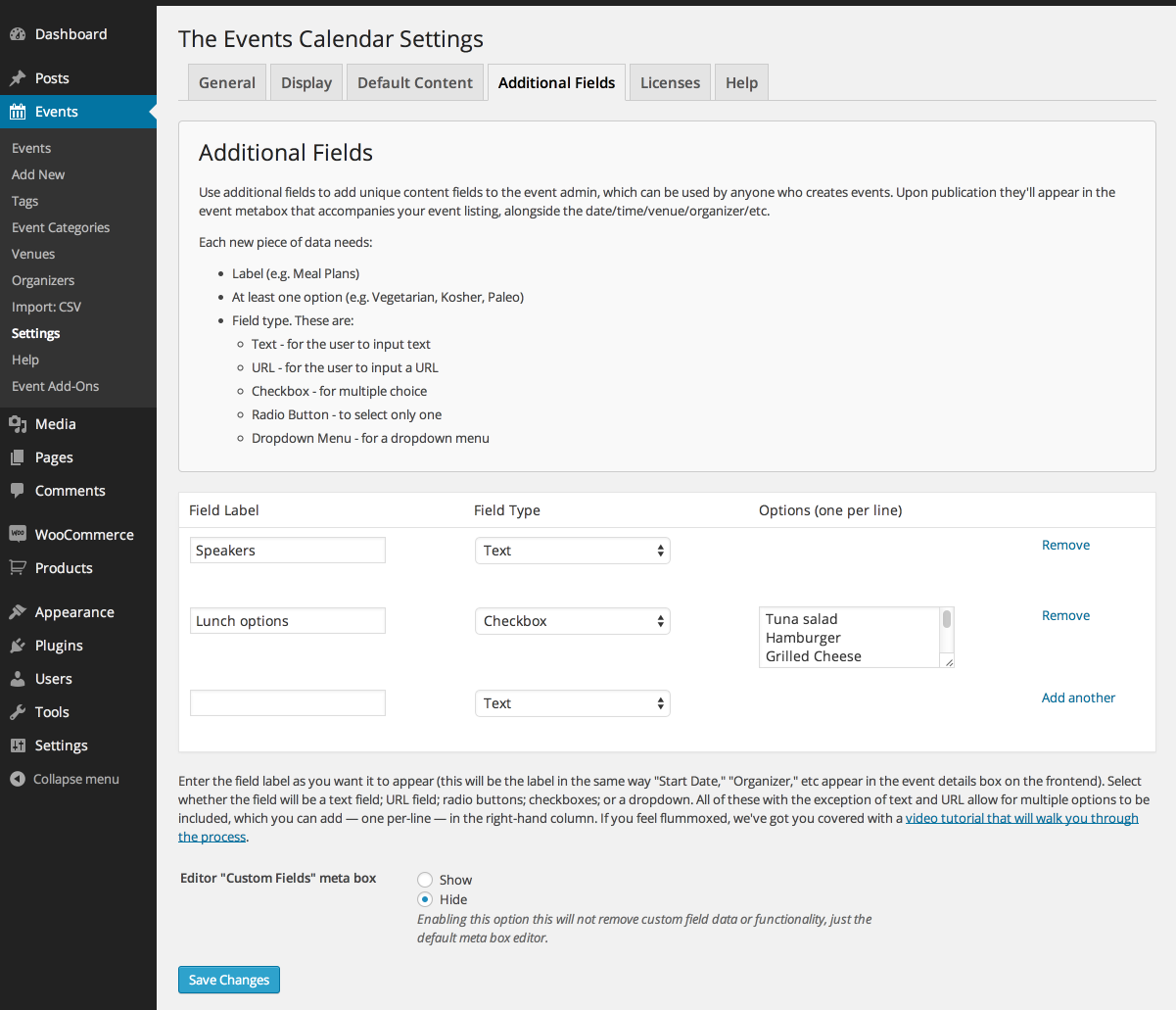
If you are trying to add more information to an Event the easiest way is in the Content Area of the Event. Pro does have Additional Fields you can create and show on the Event Page. Beyond that you could try a custom field plugin and then edit the event templates and try to put custom fields in that way.
WooCommerce
If you are looking to add fields to the WooCommerce checkout page that is handled by that plugin and this is a free plugin that can help add a field there:Let me know if you have any follow up questions.
Thanks
January 13, 2015 at 9:02 am #932087ParticipantHi there Brian, thank you for your response. So what I’m understanding is in order for me to have more easy to implement options I really need to upgrade from Event Calendar to Event Calendar Pro. I need to purchase and install the ECP plug-in and then deactivate “event calendar”.
I search the website and cannot locate a grid that shows the differences. Is there such a thing?
Thanks!January 13, 2015 at 10:31 am #932155MemberYou still need The Events Calendar from WordPress.org as it is the base for all our plugins.
So there is no grid of differences as Pro adds features to the Core.
All of Pro features are listed here:
https://theeventscalendar.com/product/wordpress-events-calendar-pro/
So Pro adds the Additional Fields option to display in the Events.
This is the tab it creates in the settings:
https://theeventscalendar.com/content/uploads/2013/02/15-PRO-Additional-Fields-Settings.png
It does not enable those fields for the checkout process as that is still handled by WooCommerce itself.
So Pro is one way you could add fields, but it is possible with a little customization to do it with custom meta fields built into WordPress as well.
Let me know if you have any more questions.
Thanks
January 13, 2015 at 10:49 am #932160ParticipantThank you, i’ll go ahead and purchase the pro version. Do I not deactivate the basic version then?
January 13, 2015 at 10:56 am #932164MemberNope keep the basic version active. That is needed for all our plugins.
January 22, 2015 at 6:32 pm #936524ParticipantSince purchasing the PRO version, these are working fine. THANK YOU!
January 23, 2015 at 7:24 am #936713MemberGreat, glad it working out for you, I am going to go ahead and close this ticket as the original question has been answered, but if you need help on this or something else please post a new ticket.
Thanks!
-
AuthorPosts
- The topic ‘Need to add additional fields to event creation’ is closed to new replies.