
Home › Forums › Calendar Products › Events Calendar PRO › mousover not working with autooptimize plugin
- This topic has 8 replies, 3 voices, and was last updated 10 years, 1 month ago by
Support Droid.
-
AuthorPosts
-
November 29, 2015 at 11:06 am #1032168
Jacob
ParticipantDear tribe team,
I’d like to exclude the js file that produces the mouseover effect of the calendar (month view). Can you tell me what the name and path of thi file is?
Best,
JacobNovember 30, 2015 at 7:48 am #1032627George
ParticipantHey @Jacob,
Can you clarify what exact mouseover effect you are referring to? I will double-check once you do so to see if this is possible – however, as things stand right now you cannot just isolate that mouseover effect and exclude it without excluding an entire file which would break many, many other pieces of functionality on the calendar page, not just the mouseover effect 🙁
Sorry about this!
— George
December 2, 2015 at 1:08 pm #1034107ParticipantSure, I will explain more detailled. When I mouseover on an event, a popup appears. that is correct. However, the content of the popup is something like: “=dateDisplay if(imageTooltipScr.length) {}…” and so on. So it shows some source code instead of the human readable content.
December 2, 2015 at 1:46 pm #1034143ParticipantThank you for explaining @Jacob!
Can you link to where this source code displays on your site? I will take a closer look.
This normally happens because of a code conflict that comes from your theme or a plugin on your site. I will take a look and try to identify the source of the conflict 😀
Cheers!
GeorgeDecember 2, 2015 at 2:05 pm #1034156Participantyes, here is the link: http://spiritberlin.org/events/monat/?tribe_venues%5B%5D=29
December 3, 2015 at 4:03 pm #1035130ParticipantThanks Jacob,
I’m unfortunately not able to identify a specific culprit there 🙁 I’m sorry! There aren’t JavaScript errors outright, but a code conflict is still the most likely candidate. To dig deeper and find out the source of the problem, I would recommend going through the troubleshooting steps outlined here → https://theeventscalendar.com/knowledgebase/testing-for-conflicts/
Check on the issue after each step in that process and let us know what you find!
Thank you for your patience with this 🙂
George
December 4, 2015 at 8:33 am #1035566ParticipantHi George,
I already know which plugin causes the conflict, but I dont know the name of your javascript file affected. I need that name in order to exclude it from the minify plugin. Can you tell me the name of that file?
Best,
JacobDecember 4, 2015 at 11:40 am #1035689ParticipantSure thing Jacob, apologies for not understanding that clearly!
I would recommend excluding any of these file names from minification:
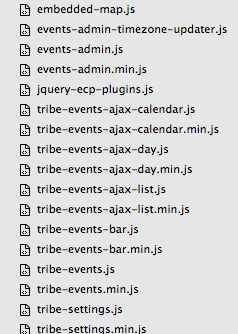
Now, I am not saying that all of these file names will show up – many will not even show up, which is fine. But if you see any of these filenames and you can exclude them, you should 🙂
I hope this helps!
GeorgeFebruary 18, 2016 at 8:32 am #1075941KeymasterThis topic has not been active for quite some time and will now be closed.
If you still need assistance please simply open a new topic (linking to this one if necessary)
and one of the team will be only too happy to help. -
AuthorPosts
- The topic ‘mousover not working with autooptimize plugin’ is closed to new replies.