
Home › Forums › Calendar Products › Events Calendar PRO › Import via CSV Failure
- This topic has 15 replies, 2 voices, and was last updated 8 years, 10 months ago by
Conrad Buck.
-
AuthorPosts
-
May 11, 2017 at 2:30 pm #1282584
Conrad Buck
ParticipantHello!
I am trying to run some tests of importing venues and events via CSV and am a bit stuck.
I used the examples provided at this post – at least I believe I did, and created these two test venues.
https://drive.google.com/file/d/0B_zO8jD-Zmz7aHpRbF9WalVkNGs/view?usp=sharing (Venus Upload)
https://drive.google.com/file/d/0B_zO8jD-Zmz7YzBOUjJma0MzRmM/view?usp=sharing (Events Upload)The mapping during the preview seemed to be just peachy, but then I got the following message: https://www.screencast.com/t/6VxYsmScsouV
I was wondering if perhaps I included too few fields?
Thank you so much in advance!
May 11, 2017 at 8:29 pm #1282771Caroline
MemberHi Conrad,
Thanks so much for reaching out! It looks as though your venue import may have failed due to the listed venues not having names (which are required for the custom post type by WordPress). Can you try adding a name for your listed venues and attempting your import again? If you’d like a template to guide you as you’re setting up your CSVs for import, you’ll find example CSV files for our various import types on our Knowledgebase here:
https://theeventscalendar.com/knowledgebase/csv-files-options-and-examples/
Give it a try, and let us know if this helps to resolve your issue! 🙂 Thanks again!
May 12, 2017 at 8:33 am #1282990ParticipantHi Caroline,
I did add the venue name field, but unfortunately got the same result. Is there a next step in the troubleshoot I can take?
Thank you!
May 12, 2017 at 2:42 pm #1283299MemberHi Conrad,
Sorry to hear that making that change didn’t work for you with this CSV file! Are you able to share a link to the CSV file you used on your most recent attempt? I’ll be glad to take a look and see if I can reproduce the problem on my end. 🙂
Thank you!
May 15, 2017 at 6:37 am #1283865ParticipantCertainly – here is a link to the new CSV – and thank you!
https://drive.google.com/file/d/0B_zO8jD-Zmz7MVlSSGlXcFJOMUU/view?usp=sharing
May 16, 2017 at 10:44 am #1284537ParticipantJust wondering if there is an update on this issue? We’re hoping to be able to get our templates ready for upload, if we know what we need to alter!
Thank you!
May 17, 2017 at 7:23 pm #1285245MemberHi Conrad,
Thanks for following up–so sorry to have kept you waiting here! I’ve just run your CSV through my local install for a quick test import, and I was able to import these three venues without any issues. As such, I’m not sure why you might still be experiencing problems on your end! Can you confirm that these settings and column mappings are the same as the ones that you’re using for your import?
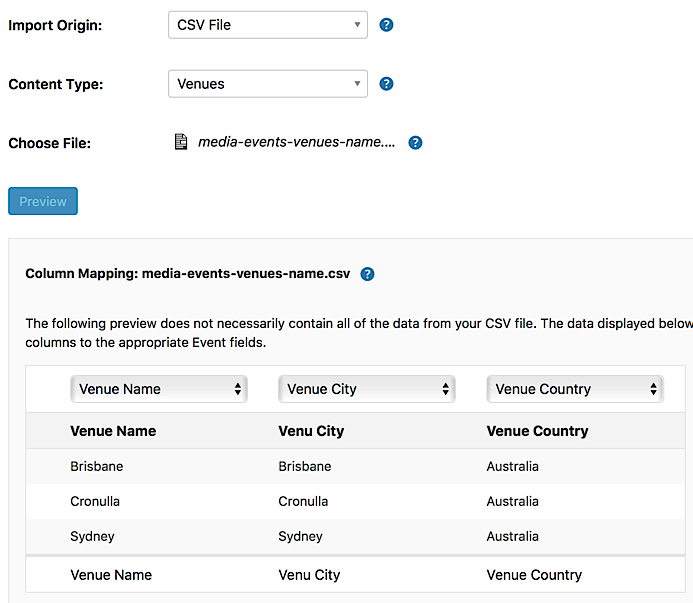
If you’re still having problems after confirming that your settings and column mappings match what’s seen here, let me know, and we’ll see where we can go from there!
May 18, 2017 at 9:17 am #1285589ParticipantHey Caroline – yes, that is exactly how everything was mapped. 🙁
I’d love to know the next step to try and get this working!
Thank you for your help with this. 🙂
May 18, 2017 at 10:35 am #1285762ParticipantHi Caroline
What do you suggest? We reinstall the plugin? Reset it up? Send you screenshots of our install?
We seem to be running out of ideas here …..
C
May 18, 2017 at 7:37 pm #1285975MemberHi Conrad,
Thanks for taking the time to confirm that for me! For our next steps, there are a couple of things that I’d like for you to try, if you don’t mind:
- It looks like you’re running versions of The Events Calendar and Events Calendar PRO with version numbers that don’t match. Since our plugins rely on shared code between them to ensure proper functionality, running different versions side-by-side can cause unexpected issues to crop up during regular usage. Please take a moment to update both of your calendar plugins to the most recent version so that both of these show the same version number when viewed in your plugins listing!
- Sometimes, conflicts with third-party themes or plugins can cause problems to crop up in unexpected places. Conflict testing can help us to identify themes or plugins that may be causing problems with our plugins. Would you mind taking a moment to run through our conflict testing steps as outlined in this link? https://theeventscalendar.com/knowledgebase/testing-for-conflicts/
Let me know what the result is after trying these two steps, and we’ll see where we can go from there! 🙂 Thanks so much for your patience as we continue to work on this issue together!
May 19, 2017 at 9:57 am #1286416ParticipantHi Caroline,
Excellent thing to note about the events calendar and the pro – our versions, even after updating – do not match. We downloaded them directly from the site – I wonder if there is a more recent version of Pro that we should have? Where might we get that?
Thank you!
Here are the versions we have, after updating: https://www.screencast.com/t/cLyIOYSIhYYF
(Inactive for conflict testing!)
May 19, 2017 at 5:34 pm #1286556MemberHi Conrad,
Thanks for following up to confirm that everything’s all up-to-date on your end! And you’re absolutely right–it looks like the latest versions of these two plugins do have mismatched version numbers! I’m so sorry for the confusion! ? Since everything is at the most recent available version, you should still be okay there, but thank you for double-checking! Feel free to move forward with conflict testing whenever you’re ready (you can leave all Modern Tribe plugins active for conflict testing), and let us know if you should have any questions as you’re working through the steps! 🙂
Thank you!
May 22, 2017 at 10:13 am #1287182ParticipantThis reply is private.
May 22, 2017 at 7:21 pm #1287427MemberThis reply is private.
June 13, 2017 at 9:36 am #1297314Support Droid
KeymasterHey there! This thread has been pretty quiet for the last three weeks, so we’re going to go ahead and close it to avoid confusion with other topics. If you’re still looking for help with this, please do open a new thread, reference this one and we’d be more than happy to continue the conversation over there.
Thanks so much!
The Events Calendar Support Team -
AuthorPosts
- The topic ‘Import via CSV Failure’ is closed to new replies.