
Home › Forums › Calendar Products › Event Aggregator › I am getting an error message when trying to import an iCal feed
- This topic has 12 replies, 4 voices, and was last updated 9 years, 3 months ago by
George.
-
AuthorPosts
-
December 1, 2016 at 4:43 pm #1200595
bodhitree
ParticipantI tried with two feeds that I know work. The error message is this: “{“success”:false,”data”:{“message”:”There was a problem processing your import. Please try again.”}}”
I have disabled The Events Calendar: iCal Importer, and all my Events plugins are up to date.
Also the admin styles for the plugin are not working well, it is almost impossible to understand any of the forms. I have attached a screen shot.
I am not the only developer on this project so at this time I am unable to deactivate plugins or change theme on this staging server. I am only seeing these errors on the staging server, in my local environment (in which I have all the identical files/plugins/theme as staging, DB might be slightly different) the admin is fine and the import works fine.
December 2, 2016 at 5:28 pm #1201094Geoff B.
MemberGood evening Ted and welcome to the Events Calendar Support forum!
Thank you for reaching out to us.
We are sorry to hear about that error message showing up as you are trying to import events.
I would love to help you with this topic.As a first troubleshooting step, could you please provide us with your complete system information in a private reply using the instructions found in the following link?
https://theeventscalendar.com/knowledgebase/sharing-sys-info/
Even better if you could do that both for the staging environment and your local install, so that I can compare.
Could you also send me the URLs of these feeds, so that I can run some tests on my own.
Have a good week-end,
Geoff B.
December 5, 2016 at 11:36 am #1201682ParticipantThis reply is private.
-
This reply was modified 9 years, 4 months ago by
December 5, 2016 at 11:51 am #1201691ParticipantHey Geoff, I am seeing one interesting thing. The plugin is working on my local environment (same plugins, theme etc.) but not on our WPEngine Staging environment. And I can see that a Tribe admin CSS file is not being loaded on Staging (tribe-common-admin.min.css) but is locally.
I’d like to fault WPEngine exclusively (as I’ve heard of other Staging issues) but all our other plugins are working fine in all environments. So it must be a Tribe/WPEngine Staging combo.
December 5, 2016 at 10:53 pm #1201887MemberHey Ted,
Thank you for the info and investigation.
I would like to run this by our Dev to see if their expert eyes can’t spot something that would shed some explanation on this behaviour.
Let me follow up on this for you.
Best regards,
Geoff B.
December 6, 2016 at 12:53 pm #1202276ParticipantThanks Geoff, that would be great. This is holding up our development of this feature and may cause us to abandon The Events Calendar altogether, so the sooner the better.
PS. You are speaking with Alison not Ted. Ted signed up for the account. I am the dev. Thanks!
December 6, 2016 at 8:39 pm #1202432MemberHey Alison,
I’m sorry I missed your correct name.
You are right, the account number name confused me and somehow I did not see it afterwards. My bad.I went ahead and asked Dev about this.
Although it is possible that the staging environment is to blame, there are other possible causes for this.
Here are the top recommendations:
- Can you check if possibly there is not a mixed content issue (some of the resources being loaded over http while others are loaded via https.
- Ensure that both URLs under Settings in wp-admin are matching (either http or https depending on your setup)
- Give the following plugin a shot: https://wordpress.org/plugins/ssl-insecure-content-fixer/
- Reinstalling our plugins in that environment (I know it sounds silly, but you would be surprised how effective that can be sometimes)
- Could you please provide us with that iCal link for testing purposes
- Would it be possible to log in to look (not to touch) ?
Thank you for sticking with us through this.
No matter what you decide (although we would hate to see you go), we would really like to be able to figure this one out for everybody’s benefit.Best regards,
Geoff B.
December 9, 2016 at 3:49 pm #1204245ParticipantGeoff, I’m inspecting the admin and yes a lot of the tribe resources are coming in as http instead of https! We are 100% https. When I correct the urls in the inspector the admin styles start showing up. So I think you are on to something.
Also the URLs in the main settings page for the plugin admin are both http. So there’s nothing I can fix in the plugin? I have to add another plugin “SSL-insecure-content-fixer” to resolve this?
December 9, 2016 at 11:43 pm #1204316MemberGood evening Alison,
Thank you for writing back.
The recommended fix would be to have both URLs under Settings > General set to https (https://bodhitreelive.staging.wpengine.com)
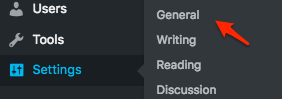
Let me know how that goes.
Best regards,
Geoff B.December 12, 2016 at 3:06 pm #1204949ParticipantThat was it! Thanks so much.
December 12, 2016 at 5:10 pm #1205001MemberGood evening Ted,
I am super stoked that this solved it for you.
You are welcome back in our support forums any time 🙂
For now, I am going to close this thread.
Have a great week!
Geoff B.
December 20, 2016 at 3:55 pm #1208593ParticipantHello!
I wanted to share that we’ve just published The Events Calendar 4.3.5, which includes some fixes to our plugin JavaScript and asset loading. These fixes should help address some of the problems reported here.
You can learn more about the release on this page → https://theeventscalendar.com/maintenance-release-the-events-calendar-4-3-5-event-tickets-4-3-5-and-premium-plugins/
Cheers!
George -
This reply was modified 9 years, 4 months ago by
-
AuthorPosts
- The topic ‘I am getting an error message when trying to import an iCal feed’ is closed to new replies.