
Home › Forums › Calendar Products › Events Calendar PRO › How to avoid overlapping events on week view
- This topic has 11 replies, 3 voices, and was last updated 9 years, 8 months ago by
Riza.
-
AuthorPosts
-
January 23, 2017 at 9:14 am #1222414
Riza
ParticipantCan you tell me how I can avoid overlapping events display better so that they are both readable? See saturday the 28th on the attached screen grab.
Page is at http://www.yourvalleynews.co.uk/valley-events/week/
January 24, 2017 at 1:11 pm #1223172Nico
MemberHi there Riza,
Thanks for getting in touch with us on this! I’ll help you here…
By default each event on week view has a ‘semi transparent’ background. This makes it easy to spot overlapping events. Seems that some custom CSS is overriding how this works by default (line 547 of the page code):
tribe-bar-form, .tribe-bar-views-inner, .tribe-grid-allday .tribe-events-week-allday-single, .tribe-grid-body .tribe-events-week-hourly-single {

    background-color: #E8FFEE;

    border: 0px solid #53B06F;

}
Commenting the background-color line makes it ‘semi-transparent’ again.
Please let me know if this helps,
Best,
NicoJanuary 25, 2017 at 3:31 am #1223491ParticipantI removed the custom CSS but I still see jumbled text. Please check.
January 30, 2017 at 8:36 am #1226205MemberThanks for following up Riza!
I’ve re-checked and that’s how week view displays events by default. Just to check we are on the same page this is how I’m seeing it:

I guess week view is not the best display for those events (all week empty except for weekends), but again it’s how week view displays events by default.
Please let me know if you are seeing differently from your side,
Best,
NicoFebruary 2, 2017 at 3:03 am #1228090ParticipantThis is the day I was finding the display of the overlapping events odd. Offsetting the bottom event’s title is making the title of the event very difficult to read. If there was no offset. It would be perfect.
February 6, 2017 at 2:09 pm #1230190MemberThanks for following up Riza!
If there was no offset. It would be perfect.
Can you clarify a bit what you mean here? Are you referring to events overlapping? If so I’m sorry to say, this is how it works and changing that would be certainly out of the scope of support we cna provide for our customer. But maybe I’m not getting this right!
Please let me know about it,
Best,
NicoFebruary 6, 2017 at 5:09 pm #1230263ParticipantWhat I meanst is the offset to the right of the title at the bottom makes reading the title difficult. On the attached image the red line and arrow shows the offset. I cannot see how that offset helps.
February 6, 2017 at 5:10 pm #1230266Participantmissing attachment
February 7, 2017 at 1:19 pm #1230862MemberHey Riza,
Thanks for following up! I think that happens because the words don’t fit in the current line. Inspecting the styles I don’t see any margin/padding limiting this.
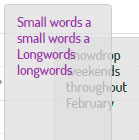
Take a look to the screenshot above (don’t panic, I changed the event title from the browser console to simulate this), the small words fit together in a line while the long words just fit one per line. Does this answers your question?
Please let me know about it,
Best,
NicoFebruary 7, 2017 at 1:59 pm #1230891ParticipantThank you for trying but I don’t think I can explain what I means and on the greater scheme of things your plugin does a great job, if that is the only think I found as a blemish I gave you five stars 🙂
February 8, 2017 at 4:58 am #1231228MemberYou are welcome Riza, glad to hear you are happy overall with the plugin 🙂
Sorry I couldn’t help you on this detail, seems to be the way it works by default.
I’ll go ahead and close out this thread, but if you need help with anything else please don’t hesitate to create a new one and we will be happy to assist you.
Best,
Nico -
AuthorPosts
- The topic ‘How to avoid overlapping events on week view’ is closed to new replies.